How to Sell Canva Templates and Make Massive Profits in 2026
How to Sell Canva Templates: Create, List, and Make Money
A Canva template shop on Etsy can run for years on a product someone designed in a single afternoon. One well-positioned Instagram content template bundle with 30 editable slides, listed at $27, generates sales every week with zero additional effort from the creator. That is the Canva template side hustle in its best-case form.
Learning how to sell Canva templates is one of the lowest-barrier ways to start a faceless digital product business. You need no graphic design degree, no startup capital, and no personal brand. Canva has 260 million monthly active users as of late 2025, according to DemandSage, and a significant share of those users are small business owners, coaches, and content creators who would rather buy a professionally designed template than build one themselves. That buyer demand is the market you are selling into.
This guide covers every step: what templates actually sell, how to design them, Canva’s licensing rules explained plainly, how to deliver them correctly, where to list them, how to price them, and how to drive traffic from Instagram, Threads, Pinterest, and Gumroad without showing your face or spending money on ads.
What Canva Templates Are (and Why They Sell)
A Canva template is an editable design file hosted on Canva’s platform that buyers can access through a shareable link. When a buyer clicks the template link, they get their own copy of the design in their Canva account. They edit the text, colors, photos, and fonts — but your master file stays untouched.
That delivery mechanism is what makes templates a digital product business rather than a design service. You design once, generate a template link, embed that link in a PDF, and sell the PDF as a digital download. Every sale of that same PDF sends the same template link to a new buyer. Your time is not involved in any individual transaction.
The reason templates sell is pure utility. Most of the 260 million Canva users cannot design from scratch at a professional level. A real estate agent who needs a polished listing presentation, a coach who wants a branded lead magnet, a small business owner who needs consistent Instagram posts — all of them need something that looks professional without hiring a designer or spending 6 hours figuring out layout. Your template solves that in 15 minutes for $12 to $47. That value exchange is why Canva templates generate real, consistent income for sellers who set up their shops correctly.
The highest-performing Etsy sellers in this category pull $10,000 to $19,000 per month from Canva templates, according to reported figures from top sellers in the space. Most sellers at 6 to 12 months in are making $500 to $3,000/month with a focused niche catalog. The spread between those numbers comes down to niche selection, template quality, and listing volume — not luck.
Canva Licensing: What You Can and Cannot Legally Sell
This is the section most Canva template guides handle carelessly. Getting it wrong can get your listings removed or your Etsy account flagged. The rules are not complicated once you understand them, but they do have specific requirements that matter.
The core rule from Canva’s Content License Agreement: You can sell products you create using Canva content, but you cannot sell Canva’s content itself on a standalone basis. The product being purchased must be your original design composition, not a Canva element in isolation.
Here is what that means in practice:
Free plan content: Elements, photos, and graphics available on Canva’s free plan can be used in templates you sell. The design must be your original composition — you are combining elements into a layout. You cannot take a free Canva illustration and sell it as a standalone download.
Pro plan content: If your template includes Canva Pro elements — premium photos, illustrations, fonts, or graphics — you can sell that template, but only as a Canva template link, not as a downloadable file containing the Pro elements. Selling a template with Pro content means you can only sell the template as a shareable link that directs buyers back to Canva, not as an off-platform downloadable file. This ensures the Pro content licensing remains with Canva.
What you cannot do: You cannot resell Canva’s stock elements as standalone graphics. You cannot take a Canva template that someone else made and resell it unchanged. You cannot use Disney elements or other branded licensed content in templates you sell commercially.
The practical implication for new sellers: If you use only free Canva elements in your designs, you have the most flexibility. You can sell your templates as a Canva template link inside a PDF, which is the standard delivery method. If you use Pro elements, stick to template link delivery only, never a downloaded file.
One rule that most guides completely skip: if you want to create a product you can sell, it needs to be an original design. You cannot sell any Canva content on a standalone basis. “Original design” means your layout, your composition, your design decisions — not a minimally edited version of an existing Canva template. Start from a blank canvas or significantly transform any starting point.
The Best Canva Templates to Sell in 2026
Not every template category performs equally. These are the formats with consistent buyer demand right now, based on actual Etsy search volume and seller-reported performance data.
Instagram and Social Media Templates
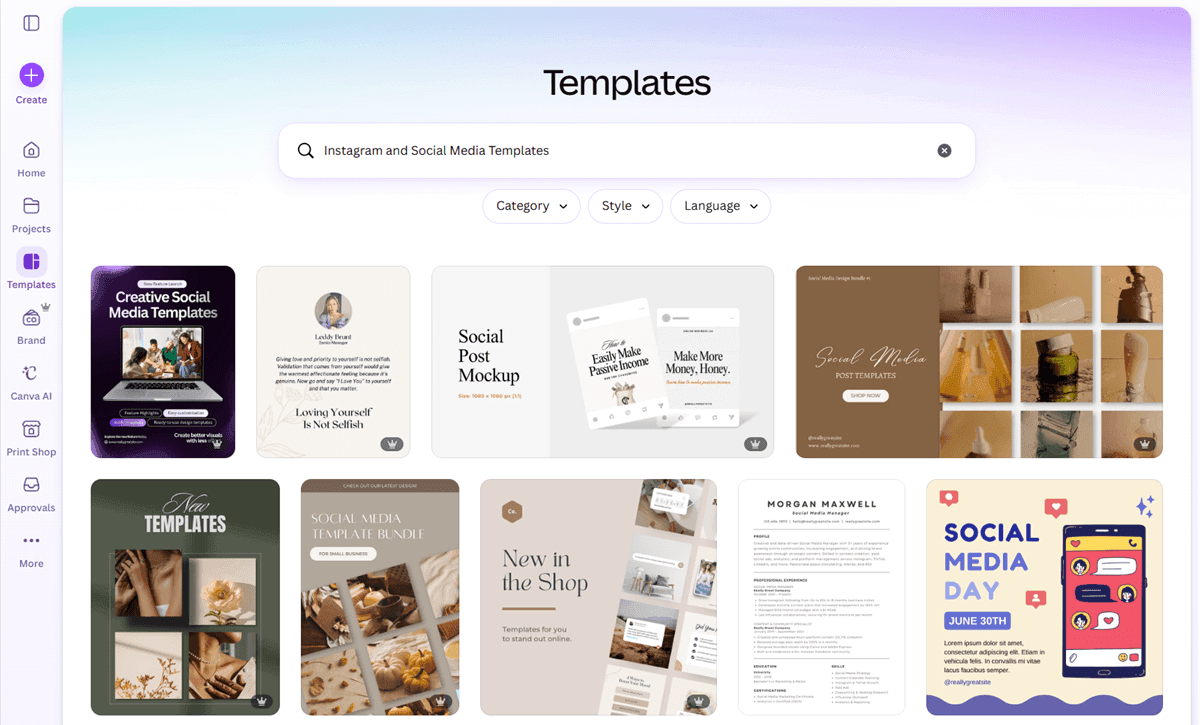
Instagram content templates for coaches, service providers, small business owners, and content creators are the highest-volume Canva template category on Etsy. Packs of 20 to 60 editable Instagram post templates, story templates, or carousel templates sell consistently in the $12 to $47 range.
The distinction that matters: “Instagram templates” is too broad. “Instagram templates for nutrition coaches” or “Instagram story templates for wedding photographers” are specific enough to rank in niche Etsy searches and convert far better. A faceless Instagram account posting before-and-after examples of the template in use, with a Gumroad or Etsy link in the bio, is the most direct traffic strategy for this category.
Lead Magnet and Ebook Templates
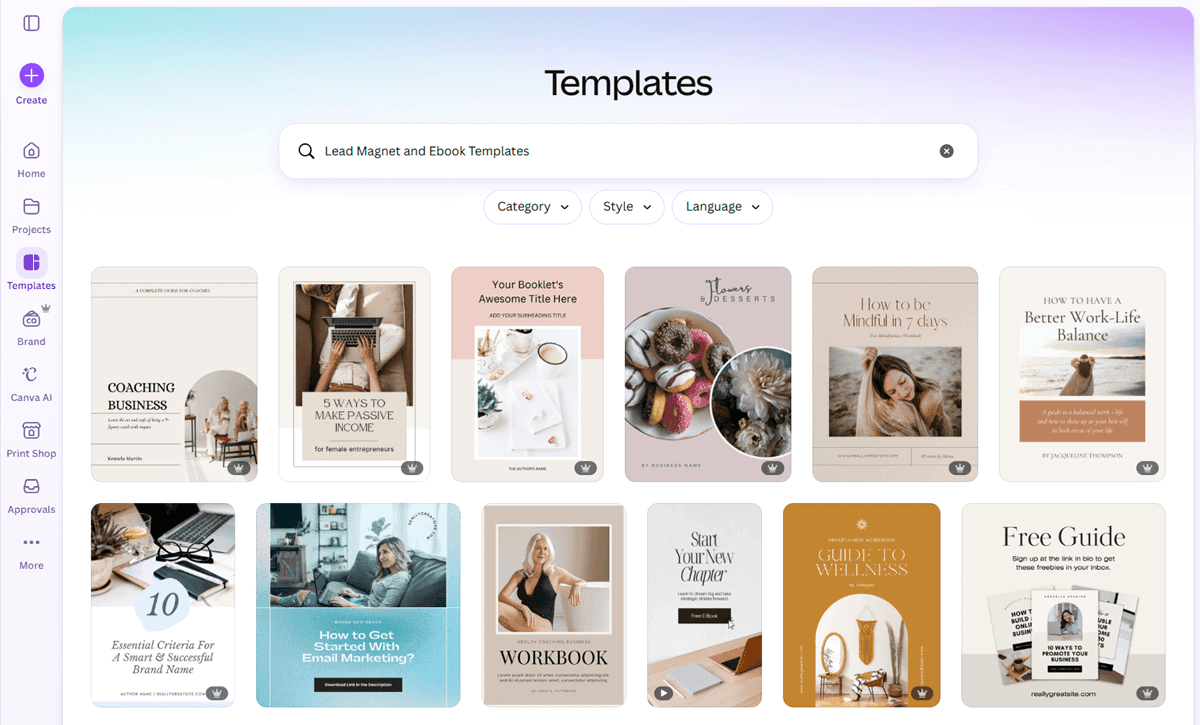
Coaches, course creators, and service businesses need lead magnets — free PDFs or guides they give away in exchange for email addresses. A polished, editable Canva ebook or lead magnet template saves them 4 to 8 hours of design work for $15 to $37. This category has strong buyer intent because the purchaser is trying to solve a business problem, not just get a nice design.
Templates specifically labeled for “coaches,” “therapists,” “real estate agents,” or “fitness professionals” consistently outperform generic “ebook template” listings in search and conversion.
Presentation Templates
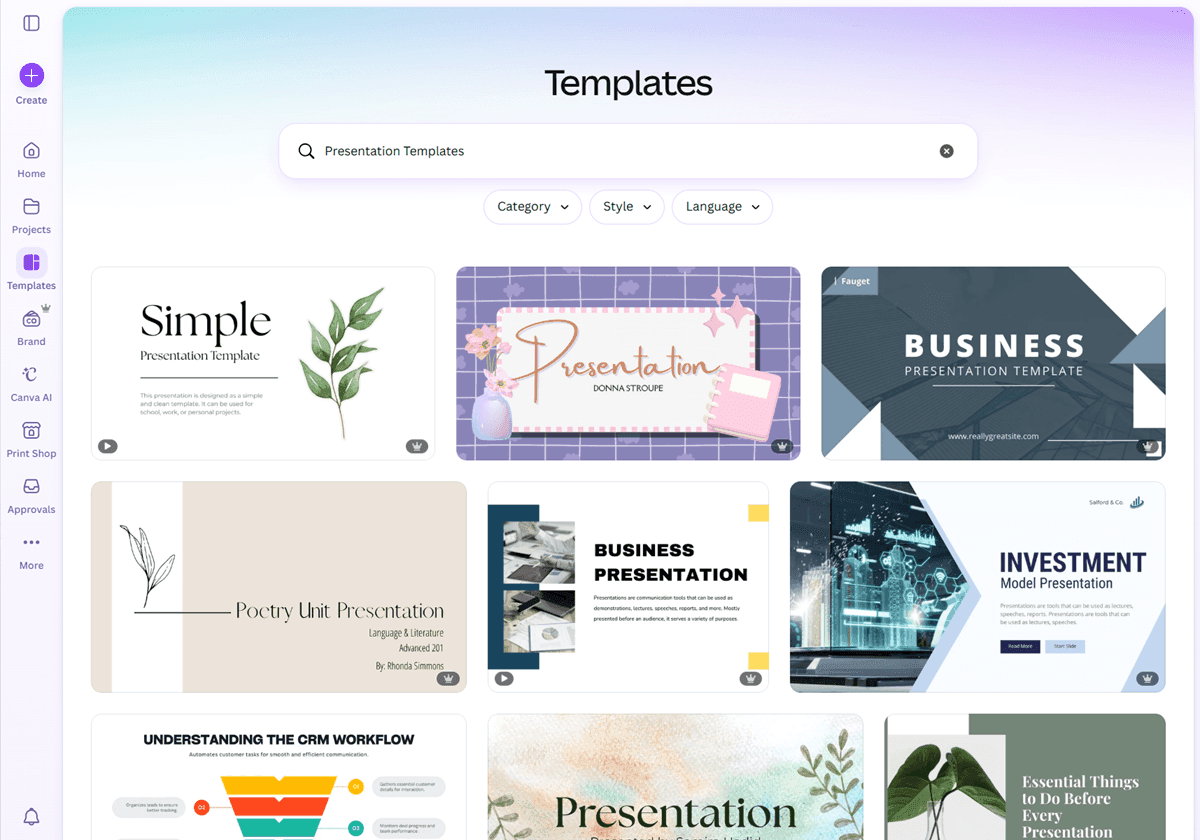
Business presentation templates in Canva sell at premium price points. Businesses and students pay premium prices for Canva presentation templates that save hours, with a well-designed 15-slide Canva template selling for $24 to $49. Specific angles that perform well: startup pitch deck templates, real estate listing presentation templates, freelance portfolio decks, and workshop slide templates for educators.
Planners and Productivity Templates
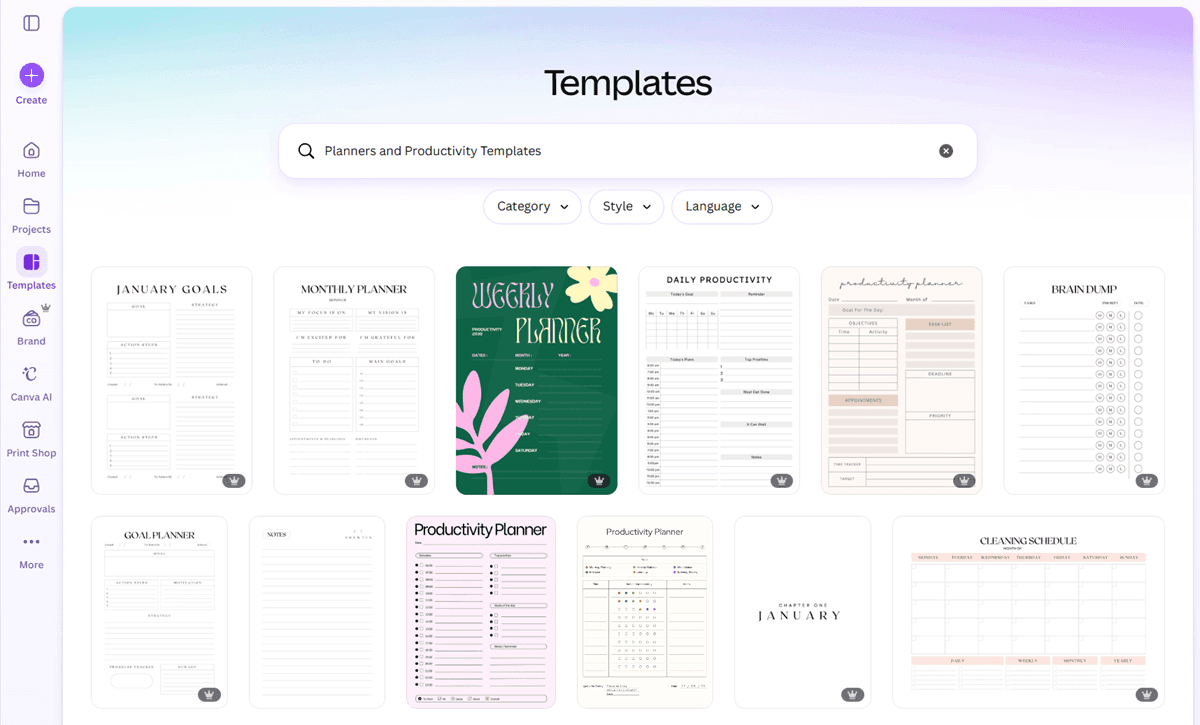
Canva-based digital planners, goal trackers, habit trackers, and content planning calendars sell across Etsy and Gumroad. Google Trends data from 2025 shows a consumer shift toward functional planners over purely decorative art — products like ADHD daily planners, wedding budget spreadsheets, and new homeowner checklists serve a clear purpose. Functional over decorative is the product direction that converts.
Branding Kit Templates
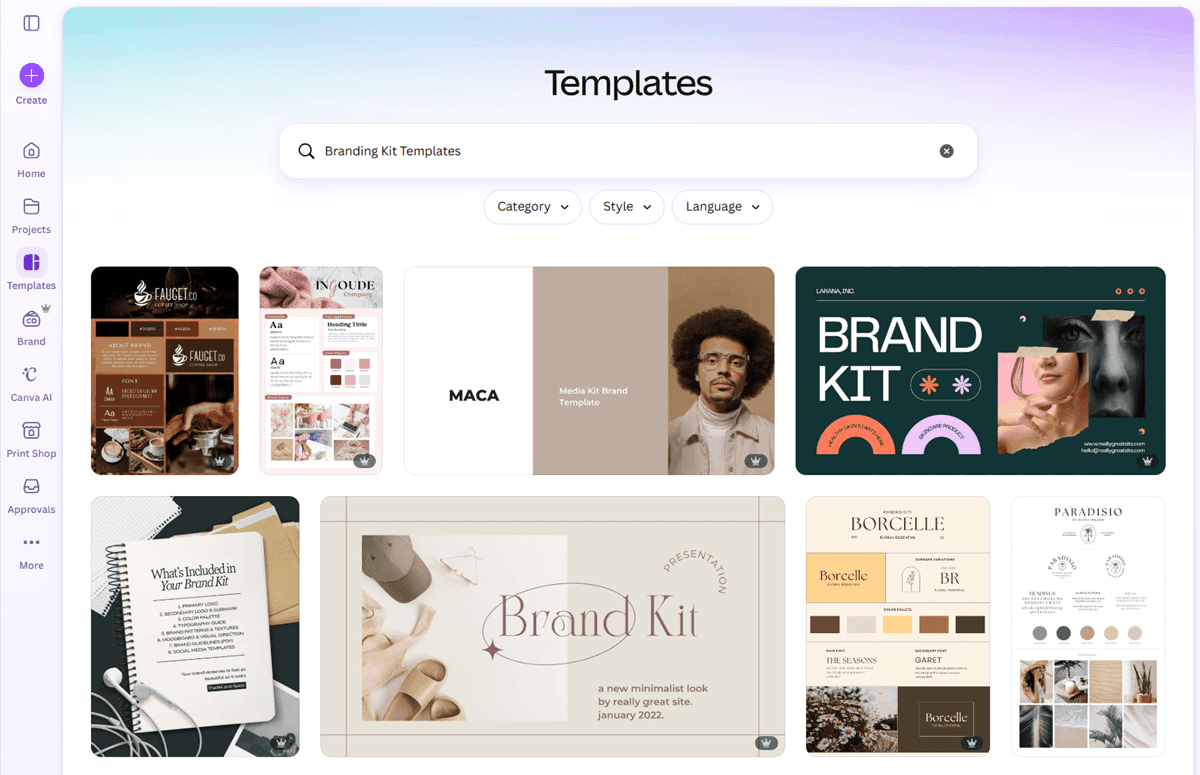
Small business owners and freelancers regularly purchase branding kit templates — a coordinated set of a logo placeholder, color palette guide, business card, letterhead, and social media profile designs. These bundles justify higher pricing ($37 to $97) because the buyer gets a complete visual identity framework in one purchase. Pinterest Business identified the surge in B2B demand as a major 2026 trend, with small business owners buying branding kits, client onboarding packets, and pricing guide templates to professionalize their operations quickly.
Media Kit Templates
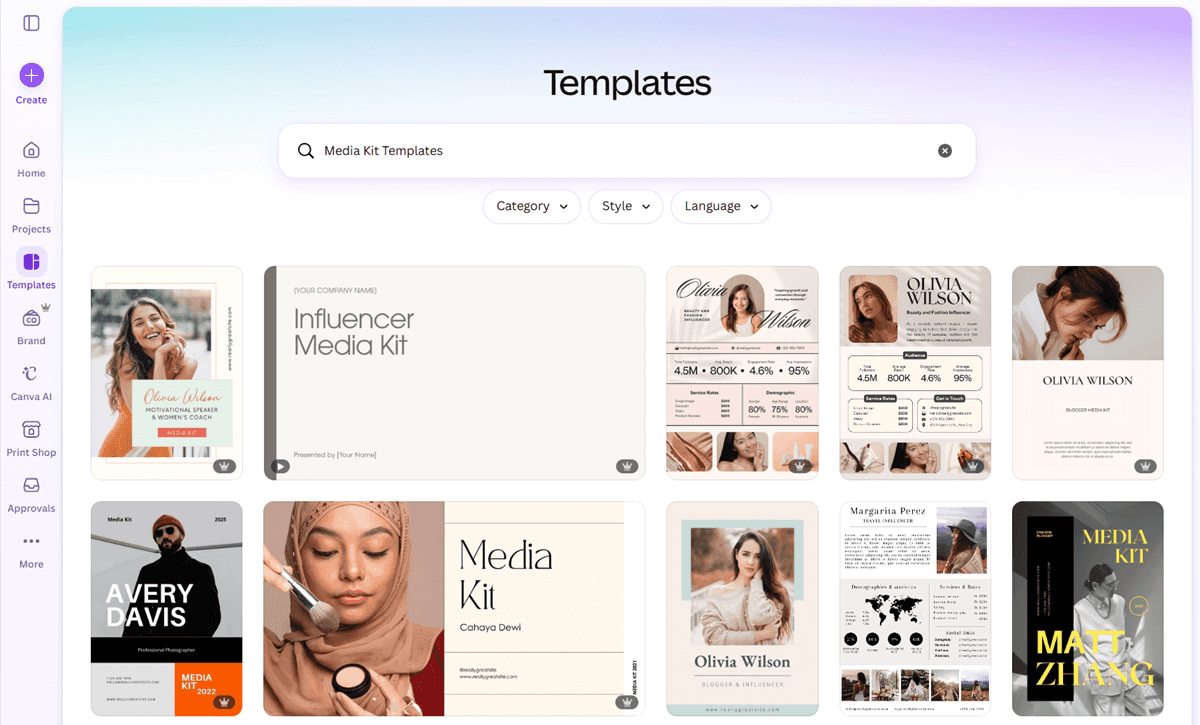
Influencer media kits, press kit templates, and speaker bio templates for content creators are a growing niche. As the creator economy expands, more individuals need professional-looking media kits but lack design skills. A 3 to 5-page Canva media kit template that looks polished and editable sells well at $12 to $27 and has comparatively low competition relative to general social media templates.
Canva Template Bundles
Bundles consistently outperform single templates on revenue per transaction. A bundle of 5 related templates priced at $37 generates more revenue than 5 separate $9 listings, attracts more serious buyers who plan to actually use the templates, and ranks better on Etsy because the higher price point signals quality to the algorithm.
Build bundles around a specific user: “Canva Templates for Wellness Coaches” (social posts + lead magnet + story templates + media kit) is a bundle that a health coach will pay $47 for without hesitation.
How to Create Canva Templates (Step by Step)
This process assumes you are creating templates to sell on Etsy or Gumroad. Follow these steps in order.
Step 1: Choose your niche and template type
Before opening Canva, decide exactly who your buyer is and what problem you are solving. “Health coach Instagram templates” is a niche. “Social media templates” is not. Write one sentence describing your exact buyer and what they need. This sentence becomes your product positioning.
Step 2: Research what is already selling
Open Etsy and search for your template idea. Look at listings with hundreds of reviews — they confirm the market exists. Look at listings with strong sales but weak listing images or vague titles — those are your gap opportunities. Note the price ranges and bundle structures of top performers.
Step 3: Open Canva and design from a blank canvas
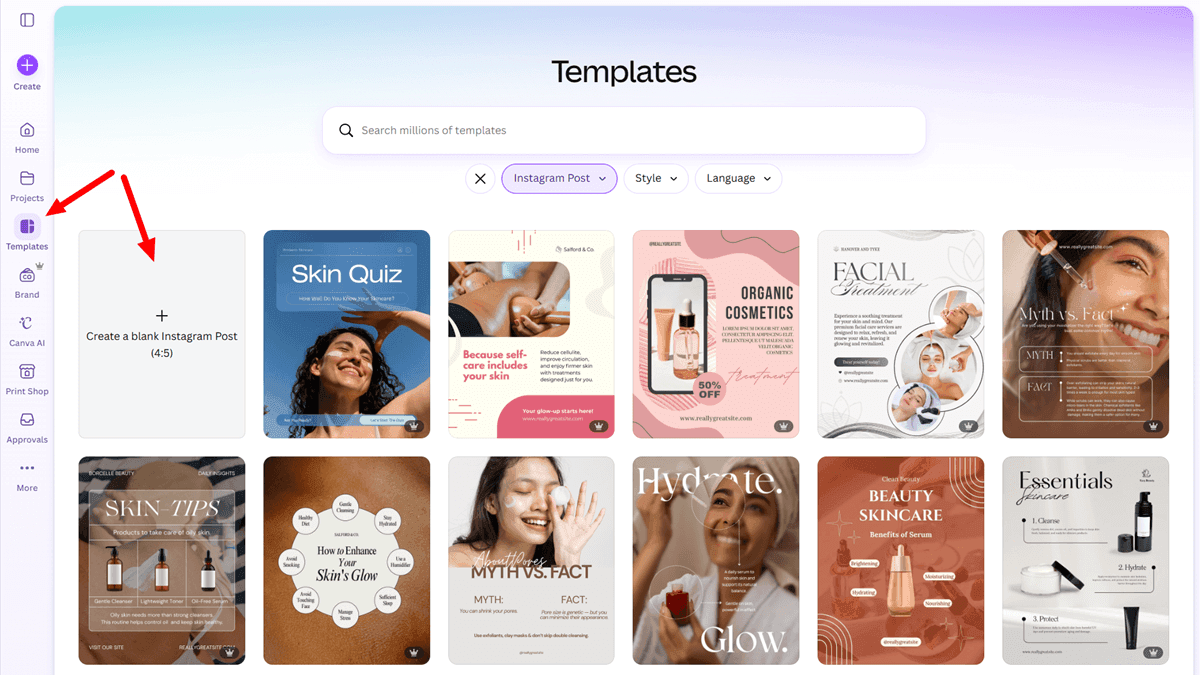
Do not start from an existing Canva template. Start from a blank canvas at the correct dimensions for your format (1080x1080px for Instagram posts, 1920x1080px for presentations, A4 for planners). Use free Canva elements if you want maximum flexibility on delivery. Use Pro elements only if you plan to deliver via template link only.
Step 4: Design for editability, not just beauty
Your buyer needs to be able to change colors, fonts, photos, and text quickly. Use Canva’s text placeholder style. Keep the font choices to 2 (a heading font and a body font). Avoid overly complex layering that confuses non-designers. The best templates look professional and are simple to edit.
Step 5: Use Canva’s Magic Studio features to scale
Once you create an Instagram post template, use Canva’s Magic Switch feature to instantly resize it into a Pinterest pin or Instagram story. This lets you build a bundle of 3 coordinated formats from a single design in minutes instead of hours. Magic Studio’s AI background removal and text generation also speed up the production process significantly.
Step 6: Generate your Canva template link
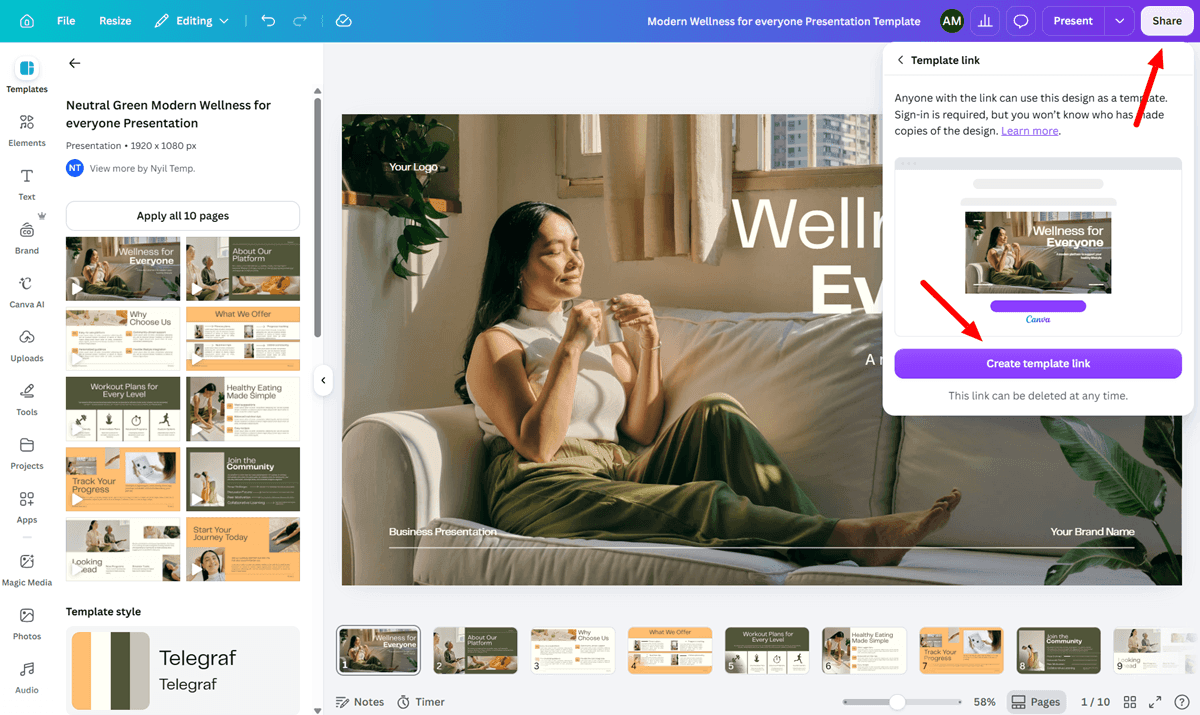
When your design is complete, go to Share, then select “Template link.” This creates a unique URL that gives each buyer their own editable copy without altering your master.
As of 2025, Canva has moved the ability to create template links to the Canva Pro plan. If you are on a free plan and do not see the template link option, you will need to upgrade to Pro or use free-only elements and export as a PDF for delivery.
Step 7: Build your delivery PDF
Create a simple 1 to 2-page PDF in Canva itself. This PDF contains: a thank-you message, clear instructions for accessing the template (click the link below, then click “Use template”), the template link as a clickable hyperlink, and your branding. This PDF is the actual file your buyer downloads. The template itself lives on Canva’s servers.
Step 8: Create mockup images for your listing
Your listing photos are the most important sales asset you have. Use Canva to create device mockups of your template, including your Instagram template displayed on a phone screen, your planner shown on a desk, and your presentation on a laptop. High-quality mockup images are the single biggest differentiator between listings that convert and listings that get ignored.
Where to Sell Canva Templates
Each platform serves a different strategic purpose. The best approach for most sellers is to use more than one.
Etsy
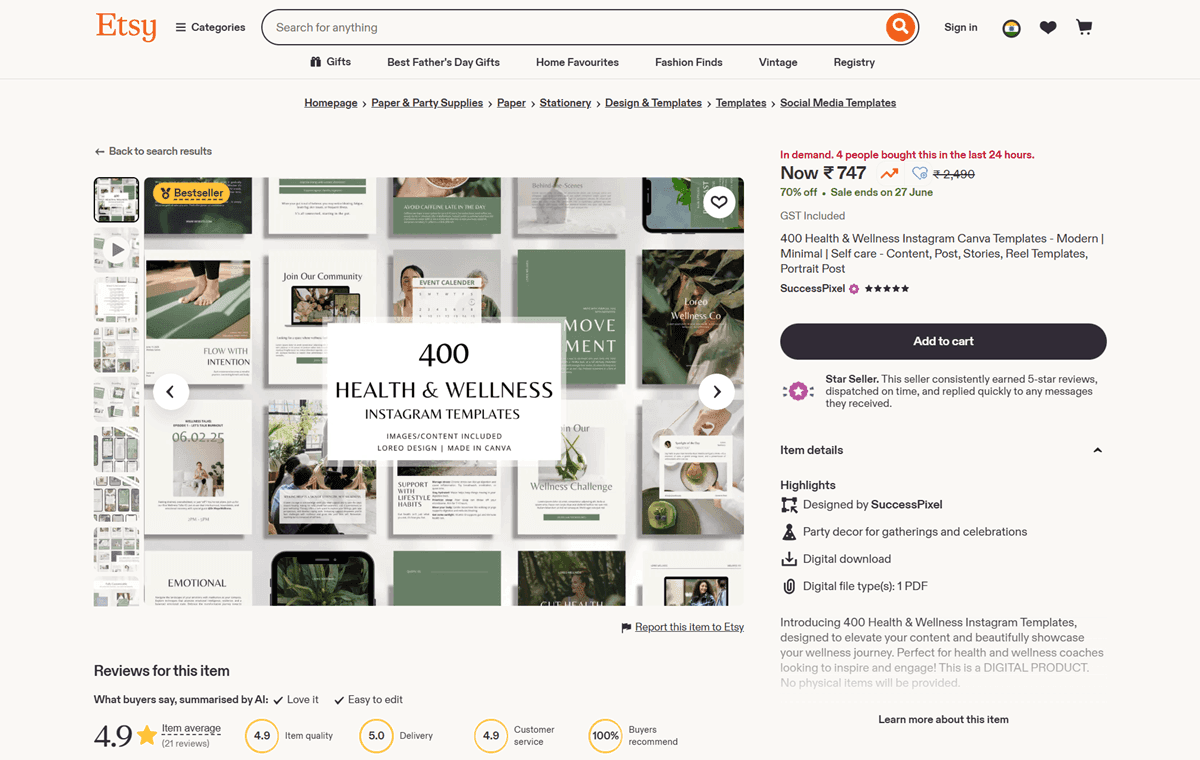
Etsy is the best starting point for Canva template sellers because of its built-in buyer search traffic. Millions of buyers actively search Etsy for downloadable templates every day. You do not need to build an audience to make your first sales — you need to show up in search results for the right keywords.
Etsy charges a $0.20 fee per listing and an additional 6.5% transaction fee per sale, plus regional payment processing fees. Those fees are worth paying for the traffic volume you receive in return, especially early on when you have no existing audience.
Etsy SEO matters more than most sellers realize. Your listing title, tags, and first sentence of the description all feed into Etsy’s search algorithm. Use the exact phrases buyers search for — “editable Instagram templates for coaches,” “Canva social media bundle,” “branding kit Canva template” — not the phrases you would use to describe the product to a designer.
The best Canva template shops win on search coverage, not just design taste. More focused listings usually beat one giant catch-all bundle. The practical implication: create individual listings for specific use cases (“Canva Instagram templates for nutritionists”) rather than one mega-bundle listing that covers every possible buyer. Having more listings means more search entry points.
Gumroad
Gumroad is the best direct-to-buyer platform for Canva templates when you want to build a customer relationship and email list alongside your storefront. Setup is minimal. Gumroad handles payment processing and file delivery automatically.
The strategic advantage of Gumroad alongside Etsy is that you own the customer data. Every buyer on Gumroad can be added to your email list, giving you a direct channel for announcing new templates and bundles. Etsy keeps customer data within the platform.
A common strategy is to list on Etsy for discovery, and include a coupon inside the PDF for 20% off your Gumroad shop to move repeat buyers to a higher-margin channel. This approach uses Etsy’s traffic to acquire customers and Gumroad to retain them at better margins.
Creative Market
Creative Market is the right platform for premium Canva template packs targeted at professional designers, marketers, and agencies. The buyer audience pays higher prices and is more design-sophisticated than Etsy buyers. Entry standards are higher — Creative Market reviews submissions — but average order values are significantly higher, and the platform draws buyers who purchase repeatedly.
Focus Creative Market listings on branding kits, presentation templates, and high-production social media bundles rather than basic planners or printables. Those products fit the platform’s buyer profile better.
Payhip
Payhip is worth setting up as a second direct storefront alongside Gumroad. It has a built-in affiliate program that lets you recruit other creators, including faceless Instagram or Threads accounts in your niche, to promote your templates for a set commission. This is one of the most scalable free traffic strategies available. You only pay the affiliate when they generate a sale.
Stan Store and Beacons
For sellers whose primary traffic comes from Instagram or Threads, Stan Store and Beacons function as link-in-bio storefronts. Followers can browse and purchase your templates without leaving the mobile flow. Stan Store is the more polished option for digital product-first sellers. Beacons is more flexible for creators who want to display a mix of products, a newsletter signup, and external links on one page.
Shopify
Shopify makes sense once you have 20 or more templates and want to build long-term brand equity under your own domain. The setup cost and monthly subscription ($29/month minimum) are higher than the other options, but you own the customer relationship completely, pay no marketplace fees on your own store, and have full control over upsells, email capture, and design.
How to Price Canva Templates
Pricing is where most beginner sellers leave significant money on the table. The instinct is to price low to compete. That instinct is almost always wrong.
Single templates:
$9 to $19 for a single well-designed template in a specific niche. Lower than this signals low quality to buyers, not affordability. Higher than this for a single template requires exceptional design or a highly specialized niche (medical professional templates, legal document templates, etc.).
Template bundles (5 to 15 templates):
$24 to $47. This is the sweet spot for volume Canva template sellers. A bundle of 10 coordinated Instagram post templates for coaches at $37 generates nearly 4 times the revenue of selling each template at $9, with no additional creation effort.
Comprehensive niche kits (20+ templates across formats):
$47 to $97. A complete “Canva Brand Kit for Wellness Coaches” that includes social media templates, a lead magnet template, a pricing guide template, and story templates at $67 is a single purchase that saves the buyer a day of work. At that price point, buyers are serious, and refund rates are low.
The mechanism behind pricing psychology is that buyers calibrate perceived quality from price before they look at anything else. A $3 template raises more suspicion than a $17 template, even if the design is identical. Price for the value you deliver, not for the cost of your time.
The honest caveat: if your templates are genuinely low quality — rushed designs, elements that do not align, confusing layout — no price point will save your conversion rate. Quality and price should rise together.
How to Drive Traffic to Your Canva Template Shop
Creating and listing templates is the part that most people do. Driving consistent traffic to those listings is the part most people underestimate. Here is a practical traffic stack that works for Canva template sellers without requiring a personal brand.
Instagram for Canva Template Sellers
Faceless Instagram accounts in the “small business tools,” “content creator resources,” and “digital products” niches are the most active buyers and the most active promotional channels for Canva templates. The accounts that sell templates most effectively from Instagram use 3 formats consistently.
Text-based carousel posts showing “before and after” — a generic, ugly Instagram post versus a polished version using a template — demonstrate value without needing to explain it. Product mockup posts showing the template on a phone or laptop screen make the abstract product concrete and shoppable. Short screen-recording Reels showing how the template works in Canva — clicking, editing, customizing — answer the buyer’s main question (“will this actually be easy to use?”) and drive significant saves and link-in-bio clicks.
The account never needs to show a face. The content is the template itself. A consistent posting rhythm of 3 to 5 times per week, with a Stan Store or Gumroad link in the bio, builds a buyer audience in a focused niche over 3 to 6 months.
Threads for Template Promotion
Threads rewards short, useful text posts that reach new readers through algorithmic distribution rather than follower count. For Canva template sellers, this means posting practical tips your target buyer cares about — “3 things every coach should have on their Instagram profile” or “the Canva fonts that make templates look expensive” — with a bio link pointing to your store.
Threads is particularly effective for reaching solopreneurs and small business owners who are actively looking for productivity and marketing tools. A daily posting habit of 2 to 3 short posts compounds quickly, and the reach of individual posts on Threads can match or exceed accounts with 10x the followers on Instagram.
Pinterest for Evergreen Template Traffic
Pinterest is the highest-leverage long-term traffic channel for Canva template sellers because it functions as a visual search engine. A pin you create today linking to your Etsy listing or Gumroad page can drive consistent traffic for 12 to 24 months with no additional effort.
The pin strategy that works best: create pins that show your template in use, not just the raw design. A pin showing “Instagram content ideas for coaches — done-for-you templates” with a mockup image performs better than a plain product photo. Use vertical pins (1000x1500px), keyword-rich pin titles and descriptions, and link directly to the specific Etsy listing, not just your shop homepage.
Ten to 20 well-made pins per template, distributed across relevant Pinterest boards over several weeks, build a search-indexed library that sends steady traffic to your listings indefinitely.
Email Marketing From Your Gumroad Store
Every buyer who purchases from your Gumroad store is a potential email subscriber. Set up a simple welcome sequence using a free email tool like Beehiiv or Kit (formerly ConvertKit): a thank-you email with download instructions, a follow-up 3 days later with tips for using the template, and a third email introducing your other templates.
The value of this list compounds over time. When you launch a new template bundle, an email to 400 people who already bought from you and had a good experience will generate more sales in 24 hours than a week of cold Instagram posts. The email list is the asset that makes the business durable regardless of platform algorithm changes.
Common Mistakes That Kill Canva Template Sales
Experienced sellers see these patterns repeatedly. Avoiding them early saves months of frustration.
1. Designing for designers instead of buyers
Your templates should be easy for a non-designer to edit and customize in 10 to 15 minutes. Complex layering, non-standard fonts that buyers must download separately, and cryptic placeholder text (“Lorem ipsum” instead of “Your Headline Here”) create bad buyer experiences and generate refund requests.
2. Using the wrong delivery method
Sending buyers a downloaded Canva file instead of a template link means they receive a file they cannot open without Canva’s app, and they cannot edit it as a template. Always deliver via the Canva template link embedded in a PDF. Always include clear instructions for how to use the link.
3. Listing photos that look like screenshots
The listing photos on Etsy are the most important sales asset in your entire shop. Flat, uninspiring screenshots of your templates do not sell. Professional-looking device mockups, styled lifestyle contexts, and clear before-and-after comparisons sell. Spend as much time on your listing photos as on the template itself.
4. Choosing a niche that is too broad
“Social media templates” has 40,000 competing Etsy listings. “Instagram story templates for virtual assistants” has a few dozen. Specific niches have less competition, higher conversion rates, and buyers who are willing to pay more because the product feels made for them.
5. Building a single hero listing instead of a catalog
One perfect listing will not generate a reliable income. A catalog of 15 to 30 focused listings in a related niche builds multiple search entry points, creates opportunities for bundle cross-selling, and distributes risk so that one underperforming listing does not define your entire revenue.
Building a Canva Template Business That Compounds
The sellers who generate consistent, growing income from Canva templates are running a business, not a side project. The structure that works is simple, but it requires a 6 to 12-month commitment before income becomes reliable.
Months 1 and 2:
Create your first 5 to 10 templates in a single specific niche. List them on Etsy with strong mockup images and keyword-optimized titles. Set up a Gumroad storefront with the same products for direct sales. Create a faceless Instagram account or Threads profile in your niche and start posting 3 times per week.
Months 3 and 4:
Build your catalog to 15 to 25 templates. Add your first bundle listing, combining your best performers. Start creating Pinterest pins for each listing. Set up a simple free lead magnet — one free template — on Gumroad to start building your email list.
Months 5 and 6:
With early Etsy reviews accumulating and Pinterest traffic building, you have a data picture of which templates perform best. Double down on those subcategories. Create higher-priced bundle variants. Announce new launches to your email list, however small.
By months 6 to 9, sellers who have followed this structure consistently report $500 to $2,000/month from their Canva template catalog. The income grows from there as the catalog expands, the email list grows, and Pinterest drives compounding traffic.
The Canva template business is one of the most sustainable faceless digital product models available because the product has an infinite shelf life. A well-designed Instagram template pack for coaches you create today is still relevant and sellable in 3 years. That durability is worth building toward.
FAQ related to How to Sell Canva Templates
Q: Do I need Canva Pro to sell Canva templates?
A: You do not need Canva Pro to create and sell templates. The free plan includes all basic elements you need for professional designs, and template links are accessible on both plans. Canva Pro provides access to premium elements, more storage, and the Magic Studio AI tools — all of which speed up production significantly. If you plan to use Pro elements in templates you sell, you must deliver via template link only, not as a downloadable file.
Q: How much can you realistically make selling Canva templates?
A: Income varies widely based on niche specificity, catalog size, listing quality, and traffic strategy. Most sellers at 3 to 6 months in with 10 to 20 listings report $100 to $600/month. Sellers at 12 months with a catalog of 30 or more focused listings and a consistent Instagram or Pinterest traffic strategy commonly report $800 to $3,000/month. The highest-performing Etsy template shops earn significantly more, but those results reflect 2 or more years of catalog and audience building.
Q: Can I legally sell Canva templates on Etsy?
A: Yes, provided your templates are original design compositions, and you follow Canva’s Content License Agreement. Your designs must be your own original layouts — not minimally edited versions of existing Canva templates. If your templates include Pro elements, you must deliver them as Canva template links, not as downloadable files containing those elements. Etsy also requires that the products you sell represent your own creative work.
Q: What is the best niche for Canva templates in 2026?
A: The most consistently profitable niches are Instagram templates for specific professional audiences (coaches, real estate agents, therapists, photographers), branding kit templates for small businesses and freelancers, presentation templates for startups and educators, and lead magnet or ebook templates for course creators. The shift in 2026 is away from generic designs toward hyper-specific audience targeting. “Health coach Instagram templates” outperforms “Instagram templates” in every metric.
Q: How do I deliver Canva templates to buyers correctly?
A: Create a simple 1 to 2-page PDF in Canva that contains your template link as a clickable hyperlink, clear instructions for using it (click the link, then click “Use template” to get your own editable copy), and your branding. Upload this PDF as the digital download file on Etsy or Gumroad. Never send buyers a downloaded Canva file — only the template link inside a PDF. This ensures every buyer gets a clean, independent, editable copy without altering your master design.
Q: How many Canva templates do I need to make a consistent income?
A: Most sellers report a more stable monthly income starting around 15 to 25 listings in a focused niche. A single listing rarely generates consistent revenue because Etsy search ranking and Pinterest traffic take time to build. A catalog of 20 to 30 listings gives you multiple search entry points, opportunities to create cross-selling bundles, and enough data to identify which subcategories perform best in your niche.
Q: Is it better to sell Canva templates on Etsy or Gumroad?
A: Both serve different strategic purposes, and the best approach is to use both. Etsy provides built-in search traffic from buyers who are actively looking to purchase. It is a better starting point for new sellers with no existing audience. Gumroad gives you direct customer relationships, email list building, and higher margins per sale. List on Etsy for discovery, and use Gumroad or Payhip as your direct storefront for repeat buyers. Include a discount code for your Gumroad shop inside your Etsy delivery PDF to move customers to the higher-margin channel over time.
Q: How do I drive traffic to Canva templates without showing my face?
A: Three channels work consistently without on-camera presence. Pinterest pins linking to your Etsy listings generate evergreen search traffic for 12 to 24 months per pin. Faceless Instagram accounts posting template mockups, before-and-after posts, and screen-recording Reels build a niche buyer audience over 3 to 6 months. Threads posts with short, practical tips in your niche reach new readers algorithmically without requiring a large follower base. All three can be managed without revealing your identity.
If you want to go deeper, explore how to set up your Gumroad storefront and how Canva templates fit into a full faceless digital product business built for passive income.