
Skool Black Friday 2026: Get 2 Months Free on Yearly Plans

Skool Black Friday Deal
- 2 months free with yearly billing: Hobby is $90/year ($7.50/month), and Pro is $990/year ($82.50/month), saving $18 and $198 a year.
- 14-day free trial on both plans: Hobby and Pro both include unlimited members, courses, videos, and live calls.
- No coupon code needed: Switch the plan toggle to Yearly at sign-up, and the 2 free months apply automatically. It’s Skool’s standing yearly price, so there’s no countdown to beat.
| Plan | Monthly Billing | Yearly Billing | You Save a Year | Fee on Member Payments |
|---|---|---|---|---|
| Hobby | $9/mo | $90/yr ($7.50/mo) | $18 | 10% + 30 cents |
| Pro | $99/mo | $990/yr ($82.50/mo) | $198 | 2.9% + 30 cents |
- Points, leaderboards, and unlockable course levels keep members engaged without social media algorithms.
- All-in-one setup with community, unlimited videos, live calls, and an event calendar, no plugins needed.
- Low barrier to entry, since the $9 Hobby plan lets you test a paid community before upgrading to Pro.
- Basic course builder, with no built-in quizzes, completion certificates, or graded assignments.
- No built-in email marketing or funnel builder, and all-member email broadcasts are limited to one every 72 hours.
- Zapier integrations, webhooks, webinars, and lower transaction fees are locked behind Pro.
Quick Deal Summary
- Skool’s best Black Friday deal is live now: 2 months free on yearly billing. Hobby is $90 a year ($7.50 a month), and Pro is $990 a year ($82.50 a month). Grab the yearly Skool deal.
- You don’t need a coupon code. The savings apply when you switch the plan toggle to Yearly.
- Both plans come with a 14-day free trial, so you can build your community before you pay. Start your free trial.
- Hobby takes 10% + 30 cents of each member payment. Pro takes 2.9% + 30 cents and adds a custom URL and affiliates.
We recommend Hobby for most new communities. If your members pay you more than about $1,268 a month, Pro is a better fit.
Skool Black Friday Deal 2026 Details
| Deal Component | What You Get |
| Skool Black Friday deal | 2 months free when you pay yearly |
| Discount | 16.7% off the monthly price (12 months for the price of 10) |
| Yearly prices | Hobby $90 a year ($7.50 a month) and Pro $990 a year ($82.50 a month) |
| What you save | $18 a year on Hobby and $198 a year on Pro |
| Coupon code | None needed |
| Validity | Live now, with no end date, because this is Skool’s standing yearly pricing |
| Free trial | 14 days on both plans |
| Fees on member payments | Hobby 10% + 30 cents; Pro 2.9% + 30 cents (3.9% + 30 cents on charges above $900) |
| After the first year | Your plan renews automatically at the same yearly price until you cancel |
| Refunds | None on plan payments, so cancel before the trial ends if Skool isn’t for you |
| Purchase link | Get the Skool yearly deal |
How to Get the Skool Yearly Deal Step by Step
Here’s how we signed up for Skool, step by step.
Step 1: Estimate how much your members will pay you each month. Under about $1,268, Hobby costs less. Above that, Pro is cheaper. You can switch plans later.
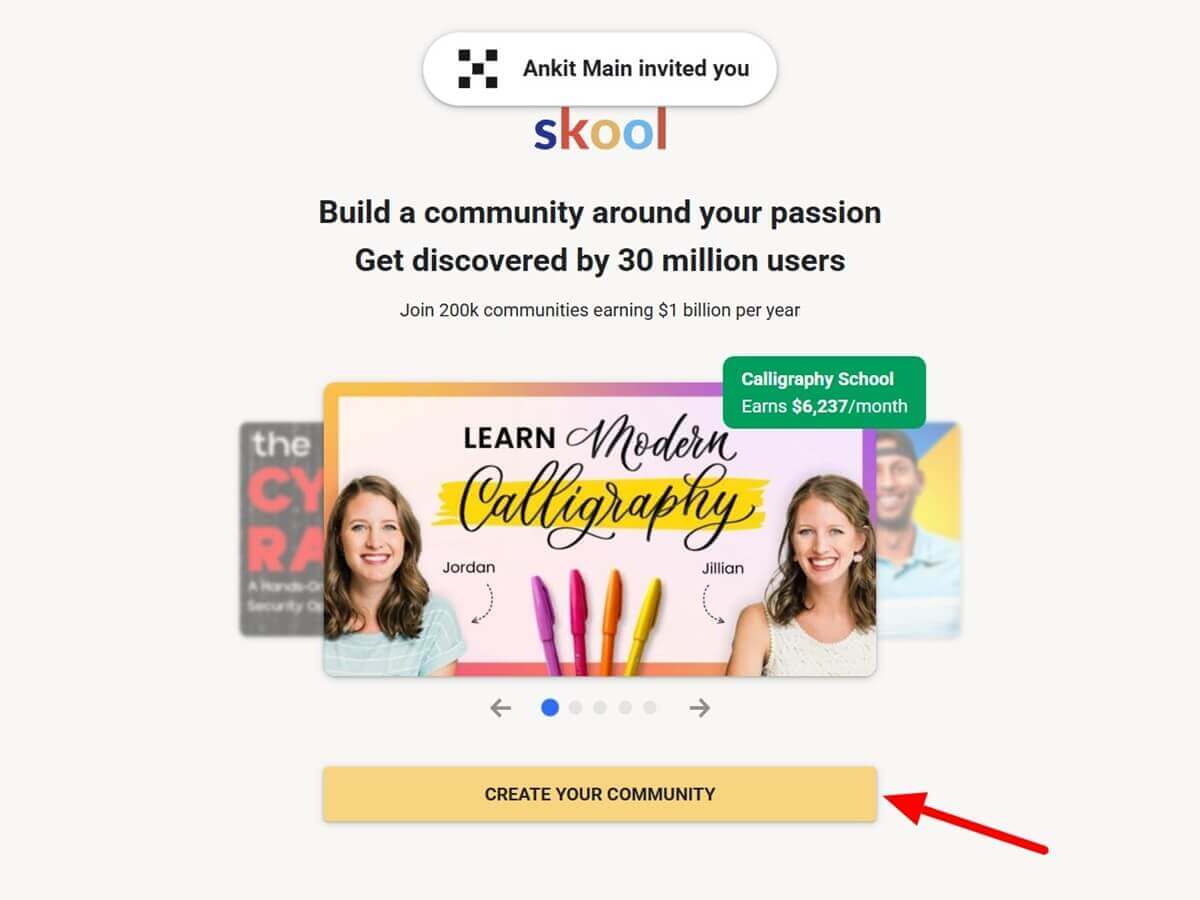
Step 2: Open Skool through our partner link and click the “Create Your Community” button.
Step 3: On the plan screen, switch the toggle from Monthly to Yearly. The Yearly option shows a 2-month-free badge, and the prices change to $90 for Hobby and $990 for Pro.
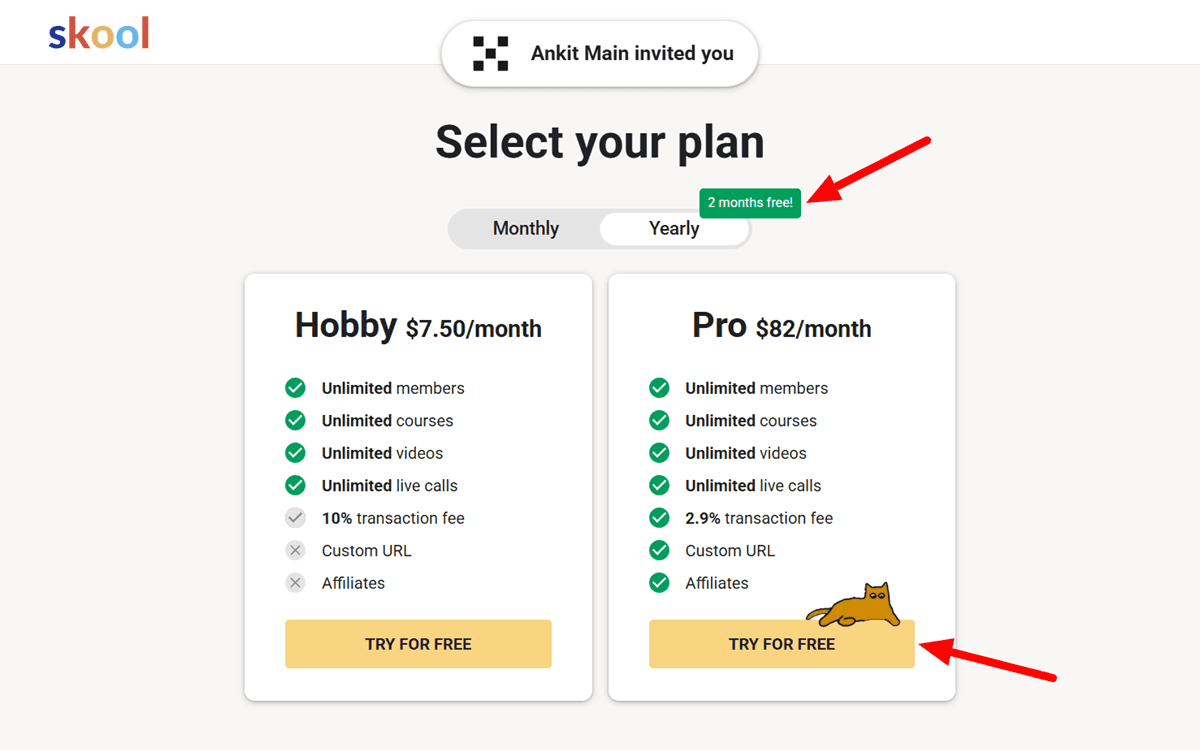
Step 4: Pick Hobby or Pro and click “TRY FOR FREE.” Both plans start with a 14-day trial.
Step 5: Create your account and name your community. Check the plan, the billing cycle, and the date of your first charge before you confirm.
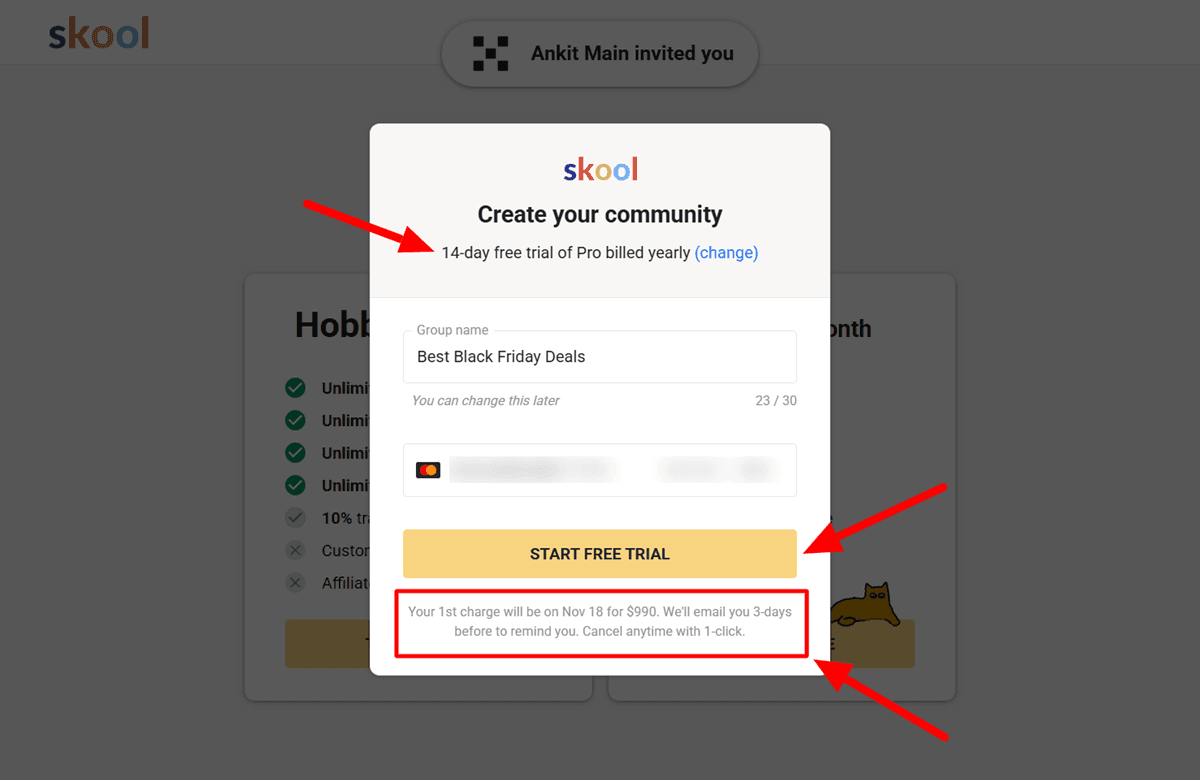
Step 6: Use the trial to add a welcome course, set up your categories, and choose your membership price. Connect payments before you invite anyone.
Step 7: Decide before day 14 whether you’re keeping Skool. Your plan renews automatically, and Skool doesn’t refund plan payments, so set a reminder.
Is There an Official Skool Black Friday Discount?
No. Skool isn’t running a separate Black Friday sale in 2026, and there’s no promo code field at checkout. Coupon sites that list Skool codes are showing codes that don’t apply anywhere.
The yearly plan is the real saving, and it’s live right now. You get 2 months free, which is 16.7% off, on either plan. Because it’s Skool’s standing price, you won’t lose it after Cyber Monday.
Skool Pricing: Hobby vs Pro
| Plan | Monthly | Yearly | Yearly per Month | Fee on Member Payments | Custom URL | Affiliates |
| Hobby | $9 | $90 | $7.50 | 10% + 30 cents | No | No |
| Pro | $99 | $990 | $82.50 | 2.9% + 30 cents (3.9% above $900) | Yes | Yes |
Both plans include unlimited members, courses, videos, and live calls. The differences are the fee on member payments and Pro’s extras: a custom URL, affiliates, Zapier, and webinars.
The break-even point is easy to work out. Hobby costs $9 plus 10% of payments, and Pro costs $99 plus 2.9%. That 7.1-point fee gap covers the $90 price difference once members pay you about $1,268 a month. On yearly billing, the price gap shrinks to $75 a month, so Pro wins by about $1,056 a month. The 30-cent fee is the same on both plans, so it doesn’t change the math.
If you sell high-ticket memberships, Pro’s fee rises to 3.9% + 30 cents on any single charge above $900. The gap with Hobby drops to 6.1 points on those charges, so Pro still costs less in fees.
How Much Could You Keep? The Simple Math
Your income on Skool is your membership price times your paying members, minus Skool’s fees. The table below is plain arithmetic, not an earnings forecast. Your results depend on your audience size and the strength of your offer.
| Goal | Example Membership | Gross per Month | You Keep on Hobby | You Keep on Pro | Cheaper Plan |
| About $1K a month | 40 members at $25 a month | $1,000 | $879 | $860 | Hobby |
| About $5K a month | 100 members at $50 a month | $5,000 | $4,461 | $4,726 | Pro |
| About $10K a month | 100 members at $100 a month | $10,000 | $8,961 | $9,581 | Pro |
The table uses monthly plan prices. On yearly billing, Hobby drops to $7.50 and Pro to $82.50 a month. “You keep” means what’s left after the plan price and fees, before taxes and other costs.
One more fee to know about: if Skool’s own discovery brings you a paying member, Skool takes a 30% commission on that member. Members you bring yourself pay only the normal fee.
Here are three takeaways:
- Your first $1,000 depends on members, not fees. At $25 a month, you need 40 paying members.
- Hobby saves you a little at low revenue, but Pro saves about $265 at $5,000 and $620 at $10,000.
- Raising your price moves the needle faster than adding members. Going from $50 to $100 takes 100 members from $5,000 to $10,000.
A Quick Way to Start Earning With Skool
Step 1: Pick one clear promise for one audience, such as “learn X in 8 weeks.”
Step 2: Set a simple monthly price, somewhere between $25 and $100.
Step 3: Add a short welcome course and a weekly live call. Live calls are unlimited on both plans.
Step 4: Invite the people you already reach: your email list, social followers, clients, or past students.
Step 5: Keep members active with weekly prompts. Points and levels help, but they won’t do the work for you.
Skool Features and Benefits
Here’s what your $7.50 or $82.50/month buys. Both plans include unlimited members, courses, videos, and live calls. Pro adds a custom URL, affiliates, Zapier, webinars, and lower fees.
Community Feed
The feed keeps conversations going between lessons, which is what turns one-time buyers into recurring members. It suits coaches and creators who sell access to themselves and a group. The trade-off is design: every Skool community looks much the same, and you can’t change much.
Classroom
Your courses sit one tab away from your community, so members don’t need a second login or tool. Videos are unlimited on both plans. The course builder is basic, with no quizzes, certificates, or graded assignments, so check whether you need those first.
Gamification
Members earn points for posting and commenting, climb levels, and appear on a leaderboard. You can lock course modules until members reach a certain level, which gives people a reason to participate. It boosts activity, but it won’t replace a good weekly rhythm.
Live Calls and Calendar
Both plans include unlimited live calls and an event calendar that shows times in each member’s time zone. That makes group coaching easy to run without a separate meeting tool. Webinars, as a separate feature, are Pro only.
Affiliates (Pro)
Pro lets your members earn a commission for referring new members, so your community can grow by word of mouth. It suits paid communities with happy members who already talk about you. You set the commission, and it’s not available on Hobby.
Payments and Email
Skool handles member billing in USD and pays out to your bank in your local currency every Wednesday. Its fees include card processing, so there’s no separate Stripe bill. There’s no built-in email marketing, and all-member email broadcasts are limited to one every 72 hours, so most owners add an email tool.
Skool Pros and Cons
Pros
- Low fixed cost, starting at $7.50 a month on the yearly Hobby plan.
- Unlimited members, courses, videos, and live calls on both plans.
- Your community and courses share one login for members.
- Points and unlockable modules give members a reason to show up.
- Card processing is included in the fee, and payouts arrive weekly.
Cons
- Hobby takes 10% + 30 cents of every member payment.
- No refunds on plan payments, even if you cancel mid-year.
- Little customization, so most communities look alike.
- No email marketing, and all-member emails are capped at one every 72 hours.
- Custom URL, affiliates, Zapier, and webinars are Pro only.
Is Skool Right for You?
- Coaches and creators who want recurring membership income: Skool fits well.
- Course sellers who also want a community: it works, but check the course tools first.
- Anyone who needs deep branding or built-in email: look at the alternatives below.
- Anyone without an audience yet: Skool won’t bring you members on its own. Build or borrow an audience first.
Skool Alternatives
If Skool isn’t the right fit, these three are the closest options. Heartbeat is the only one of them with a Black Friday sale live right now.
| Platform | Entry Price | Fee on Member Payments | Black Friday 2026 | Best For |
| Skool | $9/mo (Hobby), $99/mo (Pro) | 10% or 2.9%, processing included | 2 months free on yearly | Simple, gamified communities with courses |
| Circle | $89/mo (Professional, billed annually) | 2% plus card processing | No sale listed | Branded, customizable communities |
| Mighty Networks | $79/mo (Starter, billed annually) | 2% plus card processing | No sale listed | Communities with their own app |
| Heartbeat | $24.50/mo first year (Build, yearly) | 5% (1.25% on Scale) plus Stripe | Up to 40% off | Memberships, courses, and events in one place |
Circle
Circle gives you far more control over branding and layout than Skool. Professional costs $89 a month billed annually, with a 2% fee on member payments, a 14-day trial, and a 30-day money-back guarantee. Choose it if your community needs to look like your brand and you can pay more.
➡️ Also read: Circle.so Black Friday Deal 2026: Save Up to 30% on Annual Plans
Mighty Networks
Mighty Networks puts courses and events right next to your community, and its higher plans can put your community in its own branded app. Starter costs $79 a month billed annually, with a 2% revenue share. Choose it if a mobile app experience matters to your members.
➡️ Also read: Mighty Networks Black Friday 2026: 2 Months Free on Annual Plans
Heartbeat
Heartbeat combines community, courses, events, and payments, and its Black Friday sale is live with up to 40% off. Build drops to $24.50 a month for the first year ($294), then returns to $490 a year. Its fee is 5% on Build, on top of Stripe’s processing fee, and falls to 1.25% on Scale.
➡️ Also read: Heartbeat Black Friday 2026: 40% Off Annual Plans
Stay on Skool if you want the lowest fixed cost and strong engagement features.
Frequently Asked Questions
Q: Does Skool have a Black Friday deal in 2026?
A: Skool isn’t running a separate Black Friday sale in 2026. Its best deal is live now: 2 months free on yearly billing, so Hobby is $90 a year, and Pro is $990 a year.
Q: Is there a Skool promo code?
A: No. There’s no code field at checkout, and the yearly savings apply automatically. Codes on coupon sites don’t work.
Q: Is the yearly plan worth it?
A: Yes, if you’ll stay at least 10 months. You pay for 10 months and get 12, so Hobby costs $90 instead of $108, and Pro costs $990 instead of $1,188. Skool doesn’t refund plan payments, so use the free trial first.
Q: When should I upgrade from Hobby to Pro?
A: When members pay you more than about $1,268 a month on monthly billing, or about $1,056 on yearly billing. Below that, Hobby’s lower plan price beats Pro’s lower fee. Pro also adds a custom URL and affiliates.
Q: How much of each member payment does Skool take?
A: Hobby takes 10% plus 30 cents, and Pro takes 2.9% plus 30 cents. On Pro, charges above $900 cost 3.9% plus 30 cents. A $9 membership leaves you $7.80 on Hobby and $8.44 on Pro.
Q: Can I really make $1,000 or more with Skool?
A: Skool doesn’t guarantee income, and results depend on your audience and your offer. The math is simple: 40 members at $25 a month is $1,000 before fees. The real question is whether you can get 40 paying members.
Q: Does Skool offer refunds?
A: No refunds for on-plan payments. If you cancel, you keep access until the end of your billing period. After that, your group becomes read-only. Cancel before the 14-day trial ends if Skool isn’t right for you.
Q: Is there a member limit?
A: No. Both plans include unlimited members, courses, videos, and live calls.
Q: Do I get a custom URL on Hobby?
A: No. A custom URL and affiliates are Pro features.
How We Verified This Deal
On November 22, 2026, we checked Skool’s payments FAQ (updated November 4, 2026) for the fees and its payment terms for the trial, auto-renewal, and refund rules. The yearly prices and the 2-months-free badge come from our own walkthrough of Skool’s sign-up flow, shown in the screenshots above. We checked the Circle, Mighty Networks, and Heartbeat pricing pages the same day.
Final Take
Skool is a good buy if you want a simple, low-cost way to run a paid community with courses. It isn’t running a separate Black Friday sale, so the smart move is the yearly plan: 2 months free, saving $18 a year on Hobby and $198 on Pro. We recommend starting on Hobby, using the 14-day trial to build and price your community, and moving to Pro once members pay you more than about $1,268 a month.
Be realistic about income. Skool gives you the tools, not the members. If you need deep branding or built-in email, compare Circle and Heartbeat first.
Want more choices? Check out all our Black Friday software deals, or read our Skool monetization guide.
Skool Black Friday Deals 2026

Name: Skool
Description: Skool combines your online community, courses, and discussions in one easy-to-use platform. It's designed for creators, coaches, educators, and entrepreneurs who want to build paid communities, host online courses, and engage members without switching between different tools. Skool includes community features, course hosting, gamification, and member management to support your growth and revenue goals. Sign up for an annual plan to receive 2 months free and maximize the value of your online community.
Offer price: 7.50
Currency: USD
Operating System: Web-based
Application Category: Online Community & Course Platform
Author: Ankit Main
Overall
4.7-
Community Management
-
Course Creation
-
Ease of Use
-
Pricing
User Review
( votes)