Pictory Black Friday Deal 2025: Save Up to 50% Plus Get 2400 Bonus AI Credits [Live]

Pictory Black Friday Deal 2025: Save Up to 50% Plus Get 2400 Bonus AI Credits
Right now, you can grab Pictory AI’s biggest discount of the year.
Get up to 50% off Annual Plans, 2400 bonus AI Credits, Getty Images & ElevenLabs, and a consultation with Pictory’s video-creation expert (a $210 value) as part of the Pictory Black Friday sale, running from November 12 through December 3, 2025.
This isn’t just another software sale. It’s a chance to transform how you create videos without spending hours in complex editing software.
Pictory turns text into polished videos in minutes. Whether you’re a content creator tired of staring at editing timelines, a marketer scrambling to keep up with video demands, or a coach who needs professional content without the learning curve, this deal removes the biggest barrier: cost.
The clock’s ticking. Three weeks. That’s all you have to lock in this pricing before it disappears for another year.
Pictory Black Friday Deal Details
| Offer Component | Details |
|---|---|
| Discount | Up to 50% off Annual Plans |
| Exclusive Bonuses | 2400 AI Credits + Getty Images & ElevenLabs + A Consultation with Pictory’s Video-creation Expert (a $210 Value) |
| Promo Code | BLACKFRIDAY2025 (Auto-applied) |
| Valid Period | November 12 – December 3, 2025 |
| Official Link | Get Deal Now |
📌Affiliate Disclosure: This article contains affiliate links to Pictory. If you sign up through our links, we may earn a commission at no extra cost to you. We only recommend tools we’ve personally tested and believe will benefit your marketing efforts.
How to Claim the Pictory Black Friday and Cyber Monday Deals
Getting your hands on this offer takes less than five minutes:
Step 1: Click the official deal link to visit Pictory’s Black Friday page.
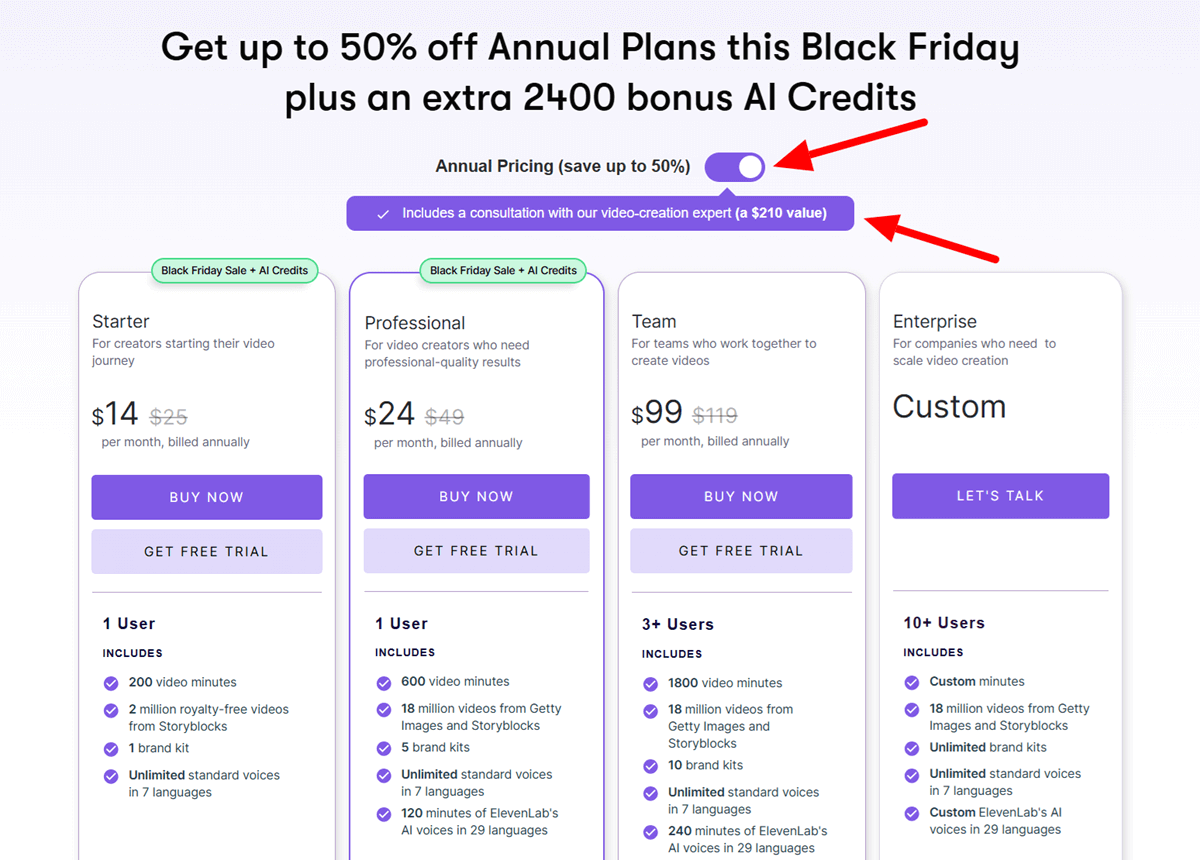
Step 2: Browse the annual plan options. You’ll see Starter, Professional, and Team tiers. Each shows the discounted price automatically.
Step 3: Select your preferred plan. The 50% discount applies instantly—no code needed. The 2400 bonus AI credits get added to your account right after purchase.
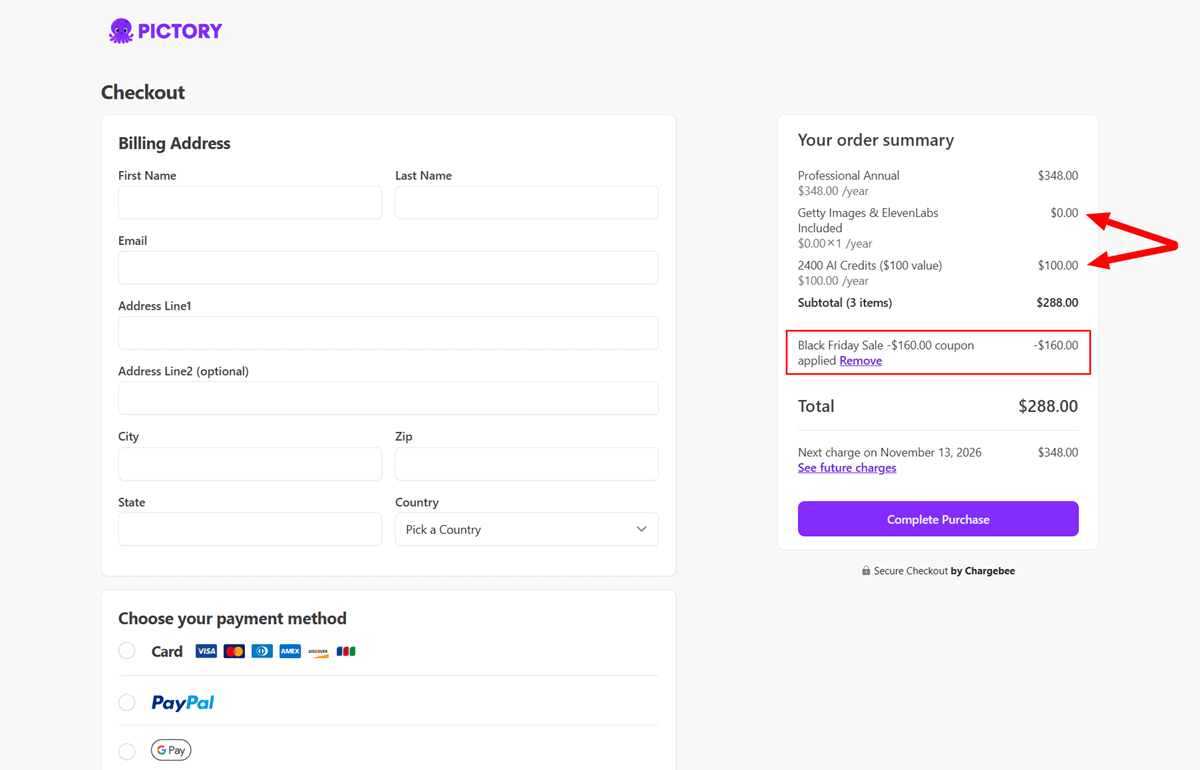
Step 4: Enter your payment details. Pictory accepts all major credit cards and PayPal.
Step 5: Complete checkout. You’ll receive immediate access to your account, plus an email confirmation with your bonus credits.
Step 6: Start creating videos. The platform walks you through your first project with templates and suggestions.
If you run into issues during checkout, refresh the page or try a different browser. The discount should appear automatically when you select an annual plan during the promotion window.
What is Pictory AI?
Pictory AI converts written content into video content. Drop in a blog post, article, or script, and the platform generates a video complete with visuals, captions, and voiceover options. It pulls relevant stock footage, matches scenes to your text, and assembles everything into a cohesive video.
The software targets a specific problem: video creation takes too long. Most people abandon video marketing because editing demands technical skills and hours of work. Pictory removes both obstacles. You type or paste text. The AI handles the rest.
The platform runs entirely in your browser. No downloads, no installations, no system requirements beyond a stable internet connection. You can create videos from any device, anywhere.
Who’ll Benefit From Pictory Black Friday Sale 2025
This tool serves several groups particularly well:
➤ Content creators who need to repurpose written content into video formats for YouTube, TikTok, or Instagram. You’ve already written the blog post. Now you need a video version without learning Premiere Pro.
➤ Social media managers juggling multiple platforms and constant content demands. You need five videos this week, but you have two hours. Pictory helps you meet those deadlines.
➤ Online coaches and course creators who want professional-looking lesson videos without the production hassle. Your expertise is in teaching, not video editing.
➤ Marketing teams at small businesses that need video content but lack a dedicated video staff or budget for production agencies.
➤ YouTubers who want to create compilation videos, highlight reels, or turn existing long-form content into digestible shorts for maximum reach.
If you’re producing written content but struggling to create video versions, or if you’re avoiding video entirely because editing feels overwhelming, this platform bridges that gap.
Why the Pictory AI Black Friday Deal Matters

Annual subscriptions to video software typically represent a significant investment. Pictory’s regular pricing reflects its capabilities, but this 50% discount changes the math dramatically.
Here’s what makes this promotion particularly valuable:
The bonus 2400 AI credits extend your creative capacity. These credits power AI voiceovers, premium visuals, and advanced features. At full price, purchasing these credits separately would add hundreds to your annual cost.
You’re locking in pricing for 12 months. When you renew next year, rates might increase. Annual subscribers who purchased during previous Black Friday sales still pay their original discounted rate at renewal.
Compared to hiring video editors or subscribing to multiple tools for editing, stock footage, and voiceovers, Pictory consolidates these expenses into one platform at half the regular cost during this window.
The timing matters too. Q4 and Q1 represent peak content creation periods. You’re either wrapping up this year’s campaigns or planning next year’s content calendar. Having video capabilities ready now means you can execute those plans immediately.
Pictory Features
1. Text-to-Video Conversion
Paste your article, blog post, or script. Pictory scans the content, identifies key points, and creates scene divisions automatically. The AI selects relevant stock footage from its library of millions of clips and images. Each scene matches the tone and subject matter of your text.
2. Automatic Video Captions
The platform generates accurate captions synchronized to your voiceover or text timing. You can customize caption styles, fonts, colors, and positioning. Captions make your videos accessible and perform better on social platforms where users watch without sound.
3. Script-to-Video Creation
Write your video script directly in Pictory or import one. The AI suggests scenes, transitions, and pacing based on your script structure. You maintain full control over the narrative while the platform handles visual production.
4. Video Editing from Text
Edit your video by editing the text transcript. Delete a sentence, and the corresponding video segment disappears. Rearrange paragraphs, and the video scenes reorder automatically. This approach makes editing intuitive for people who think in words, not timelines.
5. AI Voiceover Options
Choose from multiple AI voices in different accents and languages. The voices sound natural, not robotic. You can adjust speed, pitch, and emphasis. Or record your own voiceover and sync it with your video.
6. Video Summarization
Upload long-form video content—webinars, podcasts, interviews—and Pictory extracts the highlights. The AI identifies key moments and creates shorter compilation videos perfect for social media teasers or recap content.
7. Blog-to-Video Converter
Feed Pictory your blog URL. The platform scrapes the content and generates a video. This feature works particularly well for evergreen content you want to repurpose across channels.
8. Branded Templates
Create custom templates with your brand colors, fonts, logos, and outros. Save these templates and apply them to future projects for consistent branding across all your videos.
9. Collaboration Tools
Team plans include shared workspaces where multiple users can create, edit, and review videos. Comments and feedback tools streamline the approval process.
10. Stock Library Access
The platform includes millions of royalty-free video clips, images, and music tracks. You don’t need separate subscriptions to stock footage sites. Everything’s searchable within Pictory.
Pictory Black Friday Pricing Breakdown

Pictory operates on a tiered subscription model with three main plans:
1. Starter Plan
It targets individual creators and small projects. You get 200 video minutes per month, up to 30 minutes each. This tier includes basic AI voiceovers, caption generation, and access to the stock library. The Starter plan fits bloggers, solopreneurs, and content creators just starting with video.
2. Professional Plan
This plan removes most limits. You can create 600 video minutes monthly, each up to 30 minutes long. Pro unlocks all AI voices, priority rendering, and commercial usage rights. This tier suits professional content creators, marketing consultants, and agencies serving multiple clients.
3. Teams Plan
The plan adds collaboration features. Multiple users share one account with separate logins. You get 1800 video minutes per month (enough for 60+ videos with custom arrangements), 30-minute video length, API access, and dedicated support. Businesses with in-house marketing teams typically choose this tier.
During the Black Friday sale, all annual plans receive 50% off their regular rates. The 2400 bonus AI credits apply across all tiers. These credits unlock premium features like advanced AI voices, priority processing, and extended rendering capabilities.
Monthly subscriptions remain available year-round, but don’t receive the Black Friday discount. Annual subscriptions already cost less per month than paying monthly, so the additional 50% off makes the value proposition even stronger.
Pictory offers a free trial so you can test the platform before committing. The trial includes limited features and watermarked videos, but you’ll get a feel for the workflow and output quality.
Payment processing happens securely through standard channels. Refund policies apply according to the terms you’ll see during checkout. Most users find the free trial sufficient to determine if the platform meets their needs before purchasing.
Pros & Cons
Pros:
✓ Speed stands out immediately:
What might take you three hours in traditional editing software takes 15 minutes in Pictory. You paste text, make some adjustments, and export a finished video.
✓ The learning curve barely exists:
If you can type and click, you can create videos. New users produce their first video within minutes of signing up.
✓ Quality remains consistently high:
The AI selects relevant footage and assembles scenes that make sense. You’re not getting random stock clips that don’t match your content.
✓ The text-based editing feels natural:
Editing video by editing text removes the intimidation factor for people who write but don’t edit video.
✓ Repurposing content becomes effortless:
That blog post you wrote? Now it’s a YouTube video, an Instagram reel, and a LinkedIn post—all created from one source.
✓ No software installation or updates:
Everything runs in the browser. You can create videos from your laptop today and pick up where you left off on a tablet tomorrow.
Cons:
✗ Customization has limits
While you can adjust many elements, you can’t control every frame like you would in professional editing software. The AI makes decisions you might want to override.
✗ Missing elements in the stock library:
The stock library, while extensive, won’t always have exactly what you envision. Sometimes you’ll need to compromise on footage or import your own clips.
✗ AI voiceovers sound good but not perfect:
Listeners who pay attention might notice slight robotic qualities in pronunciation or emphasis. Recording your own voice produces better results but requires additional time.
✗ Video length limits:
Pictory caps videos at certain durations depending on your plan. Long-form content creators might bump against these limits and need to split projects or upgrade tiers.
✗ The platform works best for certain video types:
Educational content, marketing videos, and social media clips excel here. Complex storytelling with specific visual requirements might need more traditional editing tools.
✗ Slow rendering times:
It varies based on video length and complexity. While faster than manual editing, you’ll still wait several minutes for longer videos to process.
Pictory Black Friday Deal 2025: FAQs
Q: How long does the Black Friday deal last?
A: The promotion runs from November 12 through December 3, 2025. After that date, pricing returns to regular rates.
Q: Do I need technical skills or video editing experience?
A: Absolutely No. The platform was built for people without editing experience. You work with text, and the AI handles the technical aspects.
Q: Can I cancel my subscription if it doesn’t work for my needs?
A: Yes. Check the specific cancellation terms during checkout, but Pictory typically does not offer refunds under its standard policy.
Q: What happens to the bonus 2400 AI credits?
A: They’re added to your account immediately after purchase. You can use them throughout your subscription year for premium features like advanced AI voices and priority rendering.
Q: Can I create videos in languages other than English?
A: Yes. Pictory supports multiple languages for both captions and AI voiceovers. The exact language options depend on your plan tier.
Q: Will my videos have watermarks?
A: Paid plans produce videos without watermarks. The free trial includes watermarks, which disappear once you subscribe.
Q: Can I use these videos commercially?
A: Commercial rights depend on your plan. Premium and Teams plans include commercial usage. Standard plans may have restrictions, so verify during signup.
Q: How does Pictory compare to hiring a video editor?
A: A freelance editor might charge $50-200 per video. Pictory lets you create unlimited videos (within your plan limits) for a flat annual fee. The tradeoff is less customization than working with a human editor.
Q: Can I import my own footage and images?
A: Yes. All plans allow you to upload custom media assets to use in your videos.
Q: Is there a limit to how many videos I can create?
A: Your plan determines monthly video limits. The Standard plan allows 200 video minutes, Premium allows 600, and Teams allows 1800, so depending on your arrangement, you can create a certain number of videos or upgrade to the next tier to get more video minutes.
Q: Do I need to download any software?
A: No. Pictory runs entirely in your web browser. You just need internet access.
Q: What if I run out of AI credits before my subscription ends?
A: You can purchase additional credits separately or upgrade to a higher tier with more credits included.
Pictory Black Friday Deal 2025: Conclusion
This Black Friday window offers something rare in software sales: a tool that genuinely saves time paired with genuine savings. Pictory removes the technical barriers that keep most people from creating video content. The 50% discount removes the financial barrier, too.
Three weeks. That’s your window to lock in this pricing for the entire year. Whether you’re creating content for your business, building a YouTube channel, or managing social media for clients, having video capabilities changes what you can accomplish.
The 2400 bonus credits sweeten the deal, but the real value lies in what you’ll create once you start using the platform. Every blog post becomes a video. Every script becomes shareable content. Every idea gets visual form without the usual friction.
Still Waiting?
Stop letting video creation slow you down.
Grab Pictory.ai Black Friday deal now and start turning your content into videos today. The 50% discount, plus 2400 bonus credits and other perks, will disappear on December 3.
Click the link and secure your annual plan before this opportunity closes.