
Novashare Black Friday Deals 2025: 30% Instant Discount

Novashare is one of the best WordPress social sharing plugins on the market.
While you may find many other social sharing plugins and online tools, Novashare’s extensive feature set and customization flexibility are just unbeatable.
The best thing is that you’ll get a massive discount during the Novashare Black Friday sale.
I have used various social media sharing plugins, including Social Warfare, Social Snap, Easy Social Share Buttons, and many more. However, Novashare ranks ahead of most of its competitors on multiple parameters. It’s super lightweight and never compromises on speed performance.
To buy a social media sharing plugin focusing on site performance, you should explore Novashare Black Friday deals. I have shared an overview and sales page links if you’re interested in purchasing the Novashare WordPress plugin.
| Plan | Regular Pricing | Black Friday Pricing | Link |
| 1 Site – Personal | $19.95 | $13.97 | Buy Now |
| 3 Sites – Business | $49.95 | $34.96 | Buy Now |
| Unlimited Sites | $119.95 | $83.96 | Buy Now |
Please note that you need to apply the coupon code “BLACKFRIDAY” on the checkout page to get a 30% instant discount.
📌Affiliate Disclosure: This article contains affiliate links to Novashare. If you sign up through our links, we may earn a commission at no extra cost to you. We only recommend tools we’ve personally tested and believe will benefit your marketing efforts.
How to Activate Novashare Black Friday Discount?
Follow the simple step-by-step guide below to activate Novashare Black Friday and Cyber Monday discount offers.
Step 1: First, visit the Novashare Black Friday offer page by clicking this link.
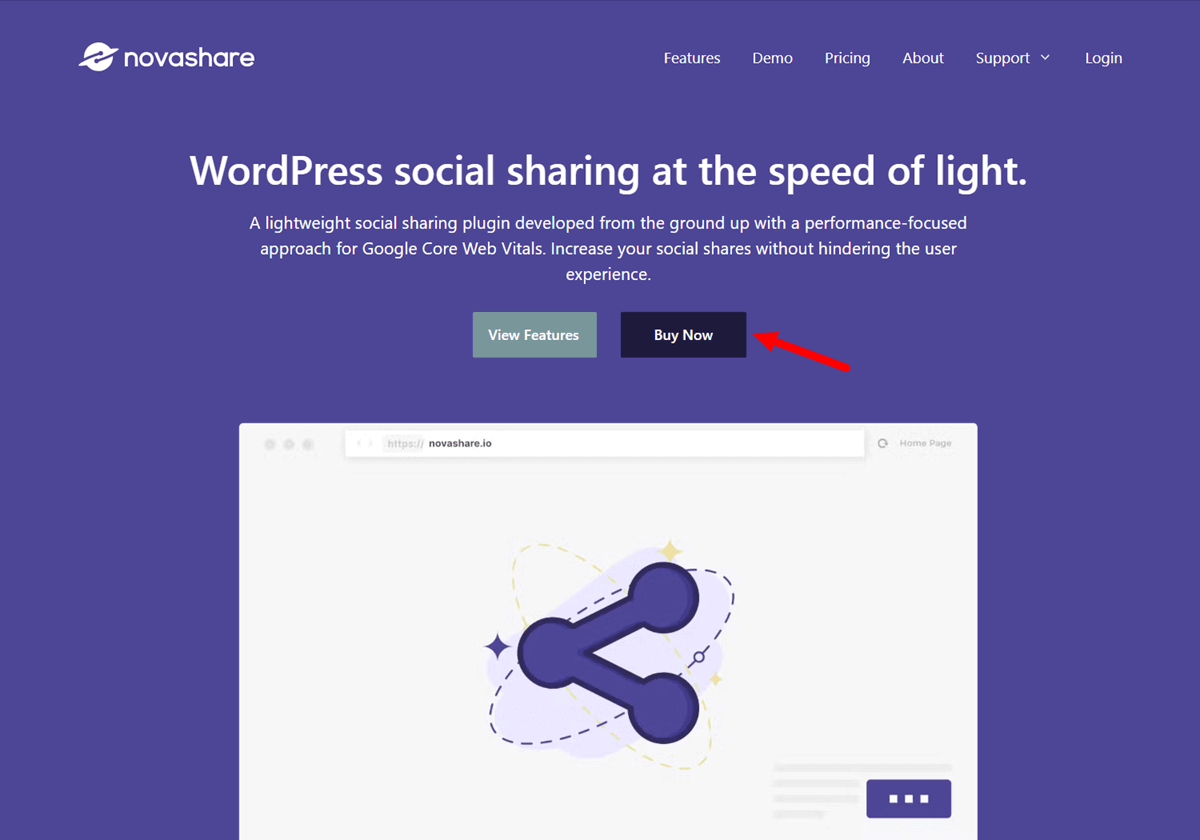
Step 2: Hit the “Buy Now” button.
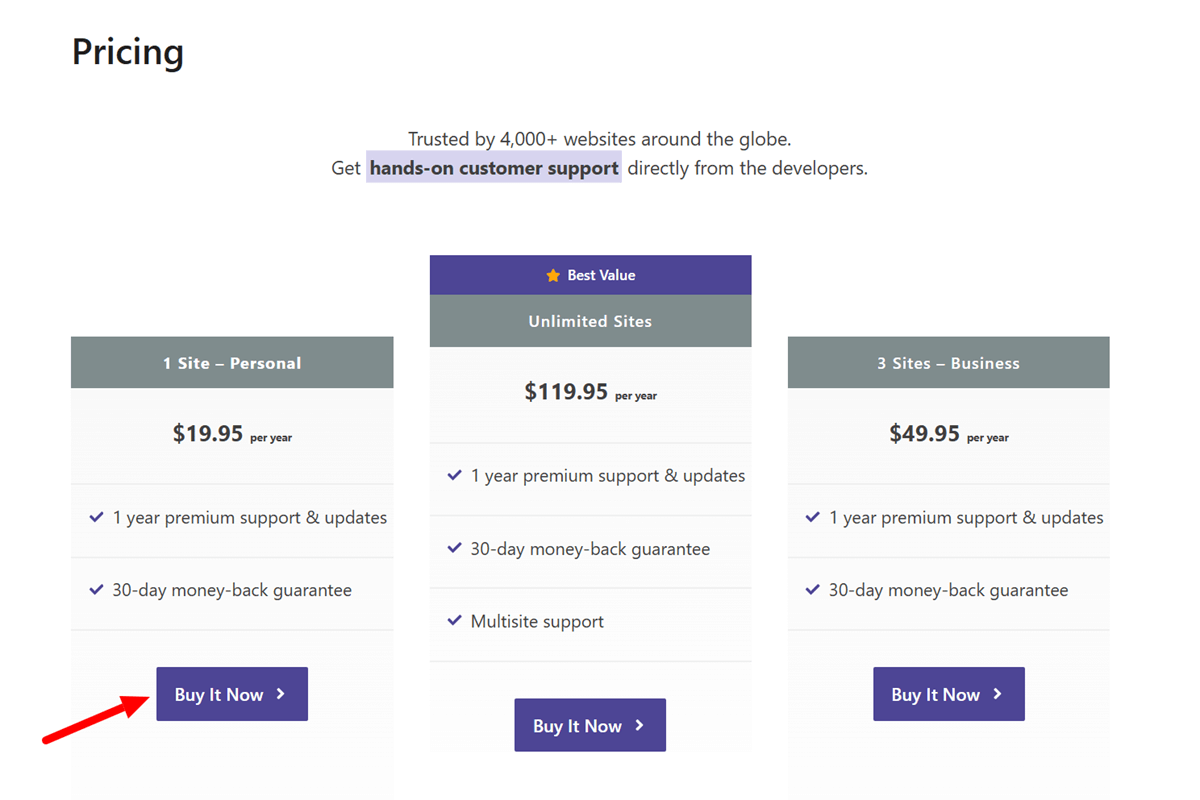
Step 3: Choose an appropriate Novashare plan and click the “Buy It Now” button.
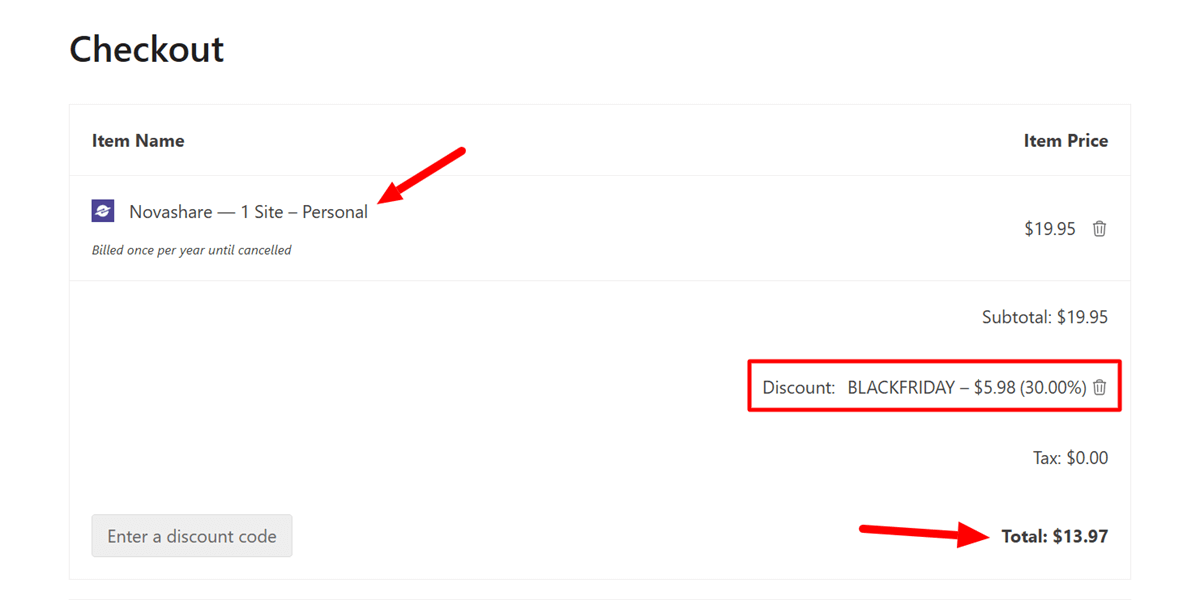
Step 4: You’ll be redirected to the Checkout page. See the order details, enter the discount code BLACKFRIDAY, and click the “Apply” button. You’ll receive a 30% instant discount on your cart price.
Step 5: Select the payment method. Enter your personal info and billing info. Please note that Novashare supports credit cards and PayPal payments only.
Step 6: Review your order, agree to the Novashare terms and privacy policy, and hit the Purchase button to complete your purchase.
Congratulations! You’ve successfully grabbed the Novashare Black Friday discount.
Novashare will send the purchase details to your registered email address. Now, you can log in to your account and download a copy of the Novashare WordPress plugin.
And you’re all done! You’ve grabbed the best social sharing plugin on the planet with a 30% discount.
Novashare Black Friday Sale: Pricing Plans
Currently, Novashare does not offer any free plans. However, the pricing for premium seems affordable for most users.
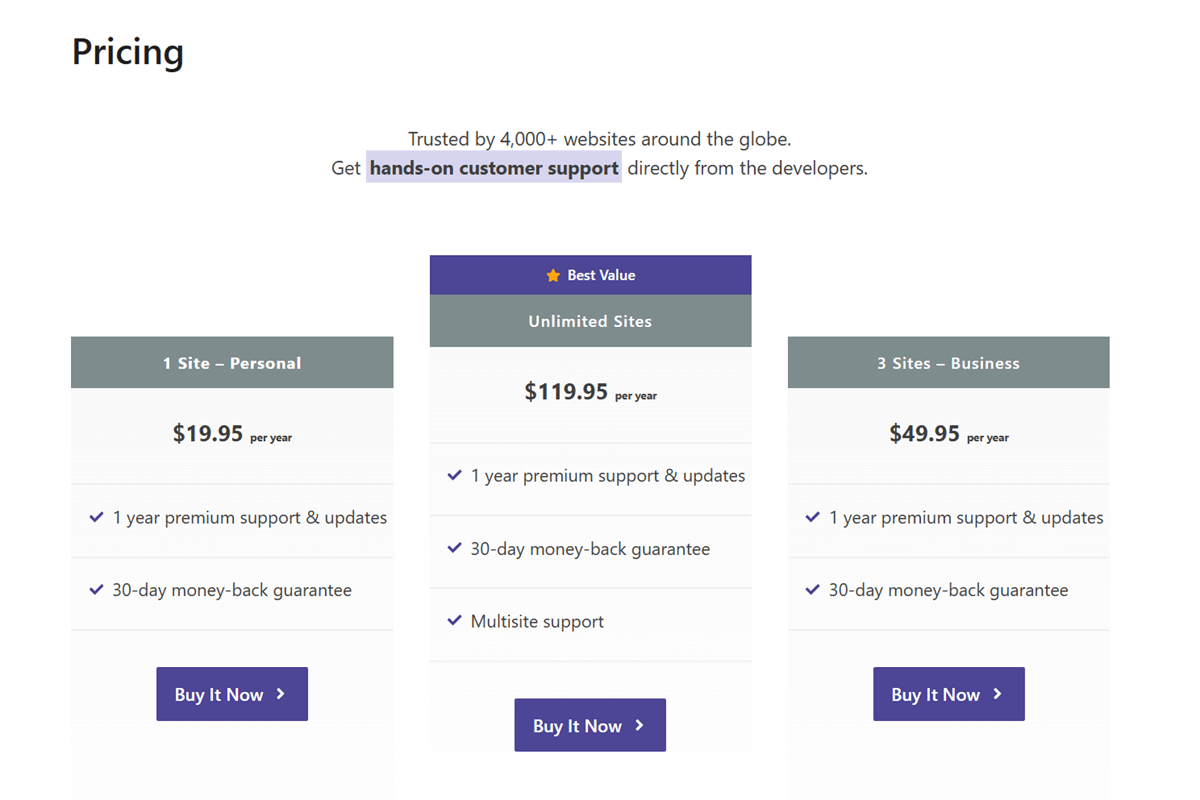
It offers three pricing plans.
1 Site – Personal
- Suitable for: Individual Bloggers
- Updates & Support: 1 Year
- Price: $19.95
- Discounted Price: $13.97
3 Site – Business
- Suitable for: Business Owners who run up to 3 sites
- Updates & Support: 1 Year
- Price: $49.95
- Discounted Price: $34.96
Unlimited Sites
- Suitable for: Website designers, agencies, and people with more than three sites
- Updates & Support: 1 Year (This version comes with multisite support)
- Price: $119.95
- Discounted Price: $83.96
Please note that Novashare offers a 30-day money-back guarantee on new purchases. Plus, you’ll get a 15% renewal discount on all pricing plans.
Top Reasons to Buy Novashare Black Friday Deals
In this section, I’ll discuss some of the popular Novashare features.
Some social sharing plugins offer more features than Novashare, but Novashare seems the best social sharing plugin for WordPress sites, considering the front-end performance.
Let’s have a look.
1. Lightweight Social Sharing Buttons
Bloated social sharing plugins can affect your website’s loading time and user experience.
I have tested dozens of WordPress social sharing plugins. Among all of them, Novashare is the most lightweight plugin.
Novashare uses inline SVG icons instead of third-party icons. That means there are no external DNS lookups or requirements for additional icon libraries.
Novashare’s minimal code ensures that the plugin remains super lightweight and loads as quickly as possible.
2. Multiple Social Sharing Options
Novashare enables you to add social sharing buttons at multiple places with various styles.

Here are the social sharing options that Novashare supports:
- Inline Buttons Above and Below the Content
- Floating Bar
- Click to Tweet
- Image Pins
Currently, Novashare has included social sharing buttons for 19 popular networks, including:
- Buffer
- Hacker News
- SMS
- Tumblr
- VK
- Telegram
- Mix
- Yummly
However, only Twitter, Facebook, Pinterest, Buffer, Reddit, Tumblr, VK, and Yummly support the share count out of the above-mentioned social networks.
3. Click to Tweet Block
The block editor is my personal favorite because of its simplicity and accessibility.
So I recommend using the “Click to Tweet” block instead of shortcodes for custom tweets.

It increases your editing speed and saves a lot of time.
Novashare Click to Tweet block enables you to create custom tweets to share important content with a single click.
You can choose a color scheme, change CTA & its position, remove username or URL, or hide hashtags.
Are you still using the traditional WP classic editor?
Novashare offers a customizable shortcode to enable the Click to Tweet feature.
4. Image Pins
Pinterest is an excellent source for driving high-quality social traffic with less effort.
Usually, you need to upload a pin and share it on different group boards because most social share plugins pin the featured image by default.

However, Novashare offers a dedicated Pin option when a user hovers over website images to share a particular image or infographic specially designed for Pinterest marketing.
You can “Enable Image Pins” under the Novashare options and select preferred post types between Posts, Pages, and Quizzes, if any.
5. Easy-to-Use UI
Unlike other WordPress social share plugins, Novashare offers a simple user interface.
You can find and enable the required options and start using the plugin within a few minutes.
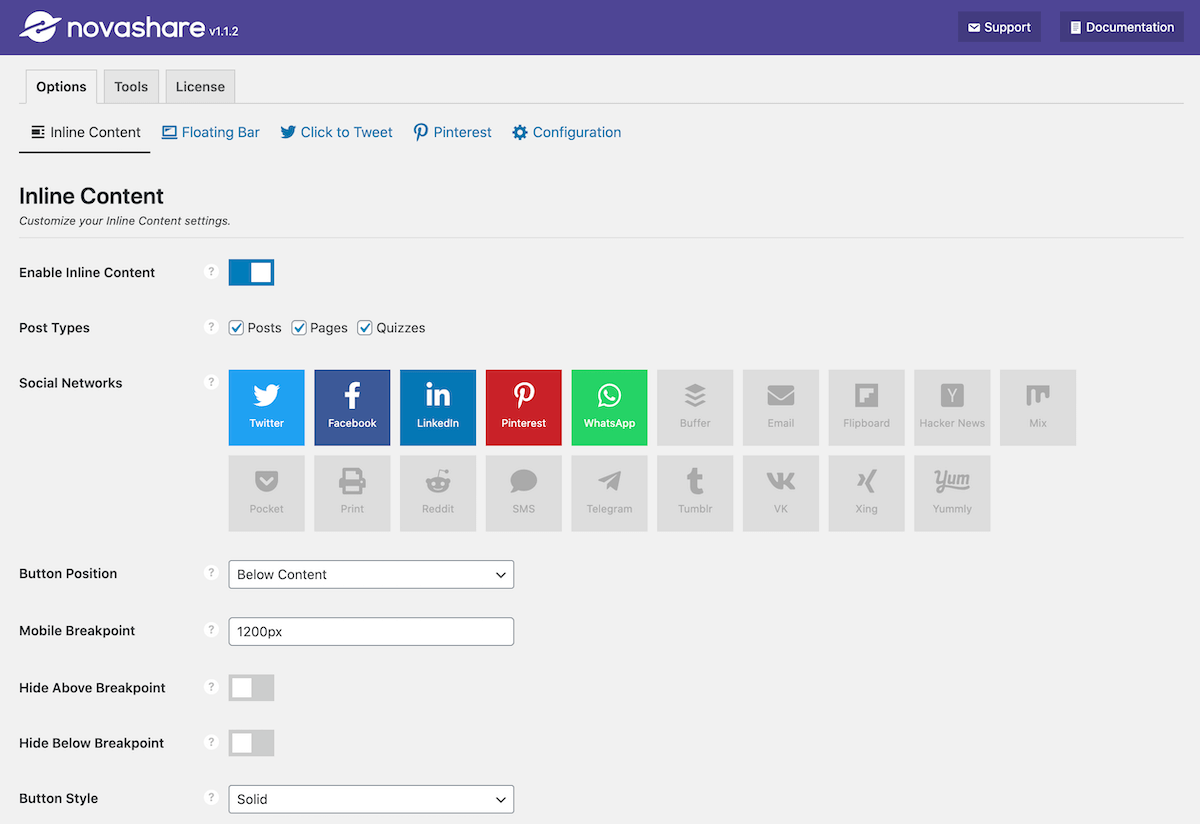
Novashare allows you to configure the following settings via its UI in WordPress.
- Enable inline social sharing buttons and a floating bar.
- Choose preferred social networks and display locations on your site.
- Change the styling (size, shape, and color of social sharing buttons) to match your site’s branding.
- Set mobile breakpoints.
- Enable Click to Tweet functionality.
- Enable image pins.
- Import and export the plugin settings.
- Configure advanced options such as minimum share counts, link shortening, UTM tracking & analytics, and network share count recovery.
- Add and manage your license keys.
Most importantly, Novashare UI is very fast to navigate compared to other plugins that use fancy UI.
6. Social Share Counts
Social proof adds a positive impression on visitors’ minds.
That’s why Novashare offers a social share count feature to display the total number of share counts and individual share counts for each social network.
Individual social share count is available for limited networks, including Twitter, Facebook, Pinterest, Buffer, Reddit, Tumblr, VK, and Yummly.
Additionally, Novashare offers different options for social share count recovery.
7. Access to Detailed Analytics Data
As a blogger, a marketer, or an online entrepreneur, analytics is one of the most important parts of any business website.
Novashare allows you to configure UTM parameters for Google Analytics. It’ll help you get an idea of how your content is performing on social media.
Alternatively, you can use bit.ly for link shortening and additional reporting.
Pros and Cons of Novashare
Pros
✅ Very lightweight: Novashare is built for speed, which makes it ideal for sites that want social sharing features without added load.
✅ Simple and clean interface: All settings are well organized, so you can configure sharing buttons quickly.
✅ Designed for performance: The plugin uses inline SVG icons, smart caching, and minimal scripts to protect site speed.
✅ Works across all themes and builders: It integrates smoothly with popular page builders and standard WordPress themes.
✅ Built by experienced developers: Novashare is created and supported by the same team behind Perfmatters, offering reliable updates and fast support.
✅ Scales well on high-traffic sites: It is optimized to handle large volumes of visitors without causing slowdowns.
Cons
❌ No free version: Users must purchase a license since there is no free option available in the WordPress directory.
❌ Limited advanced styling: Design customization is simple, but users wanting highly detailed styling may find it basic.
❌ Social network selection is curated: While most major platforms are supported, the plugin avoids clutter, so not every network is included.
Novashare Black Friday Sale: FAQs
Q: What is Novashare?
A: Novashare is the lightweight and fastest social sharing WordPress plugin. It enables you to display social sharing buttons and Click to Tweet blocks on your website. You’ll also get access to many advanced features that keep you ahead of your competition.
Q: Does Novashare affect website loading speed?
A: No, the Novashare plugin is super lightweight and takes only ~5KB on the front end. Plus, our tests found that Novshare has minimal impact on site loading speed.
Q: Is Novashare secure?
A: Yes, Novashare is designed for business websites and developers and has paid special attention to plugin security. As a result, Novashare has not been hacked until now.
Q: Does Novashare have a free version?
A: Unfortunately, Novashare does not offer a free version. However, you can get a single-site license for as low as $20.96.
Q: Do I need to renew my license?
A: Yes. Renewals get you regular plugin updates and support. Novashare renewals happen automatically for convenience and can be canceled at any time.
Q: Is there a discount on renewals?
A: Yes. All renewals include a 15% discount automatically.
Q: Can I upgrade my license later?
A: You can upgrade your Novashare license at any time from your account dashboard. The system will prorate the remaining value of your current plan.
Q: Will I get refunds?
A: Yes. Novashare includes a 30-day money-back guarantee for all new purchases.
Novashare Black Friday Sale: Final Words
Novashare is undoubtedly the best social sharing plugin for WordPress sites.
Its super-fast speed, ease of use, and advanced features make it the first choice for professional bloggers.
Although you won’t find massive discounts or coupon codes, the Novashare Black Friday sale is a great opportunity to get 30% off regular pricing.
The offer will last for a few days only. So buy your Novashare copy before the discount offer expires.
I hope you find this deal post useful. Would you please share it with your friends?
Because sharing is ❤️
Novashare Black Friday Discount

Name: Novashare
Description: Novashare is a fast and lightweight WordPress social share plugin. It's designed with a performance-focused approach to boost shares. You'll get also get access to advanced features such as click to tweet black, one-click image pins, share count display, UTM tracking, bit.ly link shortening, and share count recovery.
Offer price: 13.97
Currency: USD
Operating System: Linux
Application Category: WordPress Social Sharing Plugin
Author: Ankit Main
Overall
4.8-
Features
-
Performance
-
Pricing
-
Support
User Review
( votes)


