
Make.com Black Friday 2026: Save Up to 72% With Annual Billing

Make.com Black Friday Deal
- 15% off with annual billing: The Make Plan costs 15% less with annual billing at every credit level, starting at $9/month for 5,000 credits.
- Up to 72% lower per-credit price: High-volume plans drop to $0.60 per 1,000 credits, against Make’s entry rate of about $2.12.
- No coupon code needed: Annual pricing applies when you choose Annual billing. Unused plan credits expire at the end of each term.
| Credits Per Month | Annual Billing | Per-Credit Price |
|---|---|---|
| 150,000 | $153.45/mo | $1.02 per 1,000 (save 52%) |
| 7,000,000 | $4,274.13/mo | $0.61 per 1,000 (save 71%) |
| 8,000,000 | $4,811.40/mo | $0.60 per 1,000 (save 72%) |
- Visual scenario builder with routers, filters, iterators, and aggregators.
- 3,500+ apps, plus webhooks and custom API calls.
- AI Agents and AI Toolkit, with your own AI provider on paid plans.
- Steeper learning curve than beginner-first tools.
- Credits don’t roll over, and extra credits cost 25% more.
- 24/7 support is Enterprise-only.
Quick Deal Summary
The biggest Make.com saving this Black Friday is annual billing on the Make Plan. It takes 15% off the monthly price at every credit level, and because Make’s per-credit price falls as you buy more, high-volume plans can save up to 72%. The Make Plan starts at $9/month on annual billing for 5,000 credits.
Make doesn’t run a separate Black Friday coupon or sale, so the price you see on the pricing page is the lowest one available. The smart way to save is to choose the right credit level, opt for annual billing, and avoid paying extra for credits you don’t need.
Make.com Black Friday Deal Details
| Deal Component | What You Get |
| Deal | Make Plan on annual billing, the lowest price Make offers |
| Discount | 15% off monthly billing at every credit level, and up to 72% off Make’s entry per-credit price on high-volume plans |
| Coupon Code | None needed. There’s no Make promo code; annual pricing applies when you choose Annual billing |
| Starting Price | $9/month, billed annually, for 5,000 credits ($1.80 per 1,000 credits) |
| Example Prices | 150,000 credits: $153.45/month (billed annually) vs $180.53 monthly. 8,000,000 credits: $4,811.40 a month annual vs $5,660.47 monthly |
| Free Plan | 1,000 credits a month, the visual builder, 3,500+ apps, and a 15-minute minimum interval between runs |
| Billing | Annual billing is charged upfront for the year. Monthly billing costs 15% more |
| Unused Credits | Plan credits expire at the end of each term, so they don’t roll over |
| Extra Credits | Cost 25% more than plan credits |
| Cancellation | Your paid plan runs to the end of the term, then your organization moves to the Free plan |
| Purchase Link | Get the Make.com annual plan |
How to Get the Best Make.com Price This Black Friday
Step 1: Open Make’s pricing page through our Make.com link.
Step 2: Move the credits slider to the number of credits you expect to use each month. If you’re unsure, start lower, because extra credits are easy to add later.
Step 3: Switch the toggle to Annual billing. Watch the Make Plan price drop by 15% and the “Save” label rise.
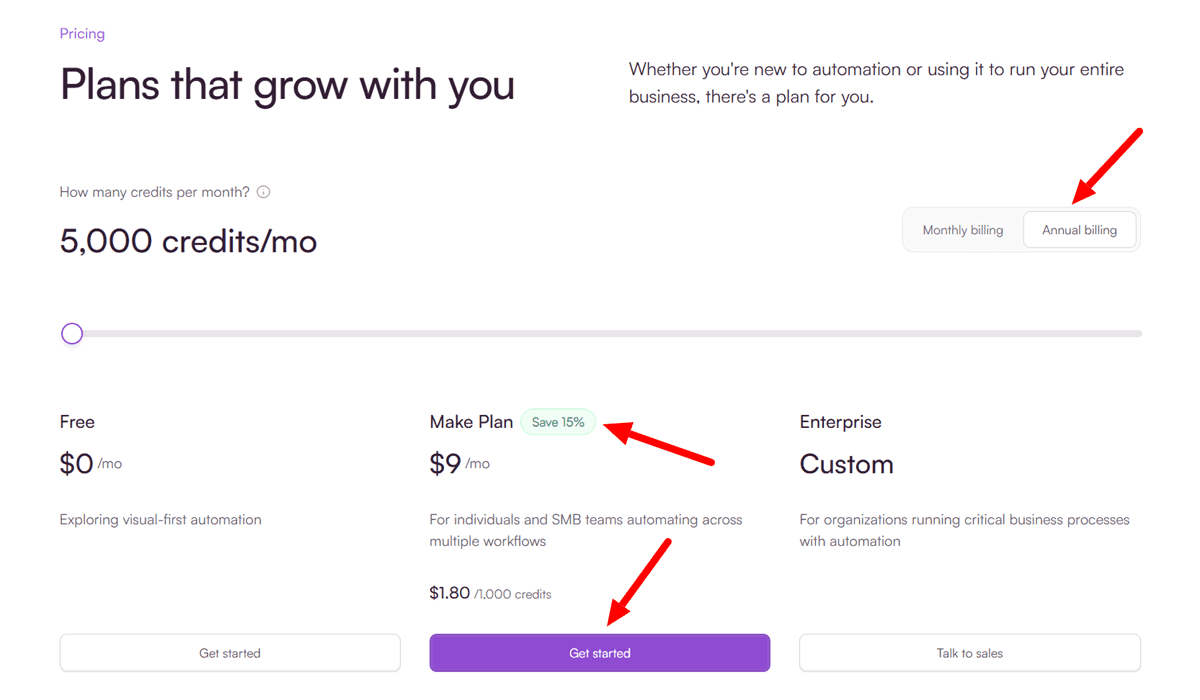
Step 4: Click Get started on your preferred Make Plan, then create your account or log in.
Step 5: Check the checkout total. Annual billing charges the full year upfront; for example, $108 for 5,000 credits a month.
Step 6: Not sure how many credits you need? Start on the Free plan, build your scenarios, and watch your credit usage for a few days before you upgrade.
Make.com Pricing: Monthly vs Annual Billing
Make now sells one paid plan, the Make Plan, and you choose how many credits you need each month. Annual billing costs 15% less than monthly billing at every credit level we checked.
| Credits Per Month | Monthly Billing | Annual Billing (Per Month) | Per 1,000 Credits (Annual Billing) | How Much You Save (Annual Billing) |
| 5,000 | $10.59 | $9.00 | $1.80 | 15% |
| 150,000 | $180.53 | $153.45 | $1.02 | 52% |
| 7,000,000 | $5,028.39 | $4,274.13 | $0.61 | 71% |
| 8,000,000 | $5,660.47 | $4,811.40 | $0.60 | 72% |
Here’s what annual billing saves you over a full year:
| Credits Per Month | Monthly Billing for 12 Months | Annual Billing for 12 Months | You Save |
| 5,000 | About $127 | $108 | About $19 |
| 150,000 | $2,166.36 | $1,841.40 | $324.96 |
| 7,000,000 | $60,340.68 | $51,289.56 | $9,051.12 |
| 8,000,000 | $67,925.64 | $57,736.80 | $10,188.84 |
What “Save Up to 72%” Really Means
Make’s “Save” label doesn’t compare annual with monthly billing. It compares each plan’s price per 1,000 credits with the monthly entry rate, which works out to about $2.12 per 1,000 credits.
So 5,000 credits on annual billing at $1.80 per 1,000 shows “Save 15%”.
At 8,000,000 credits on annual billing, the price falls to $0.60 per 1,000, and you save 72%. You only get the full 72% if you buy millions of credits a month.
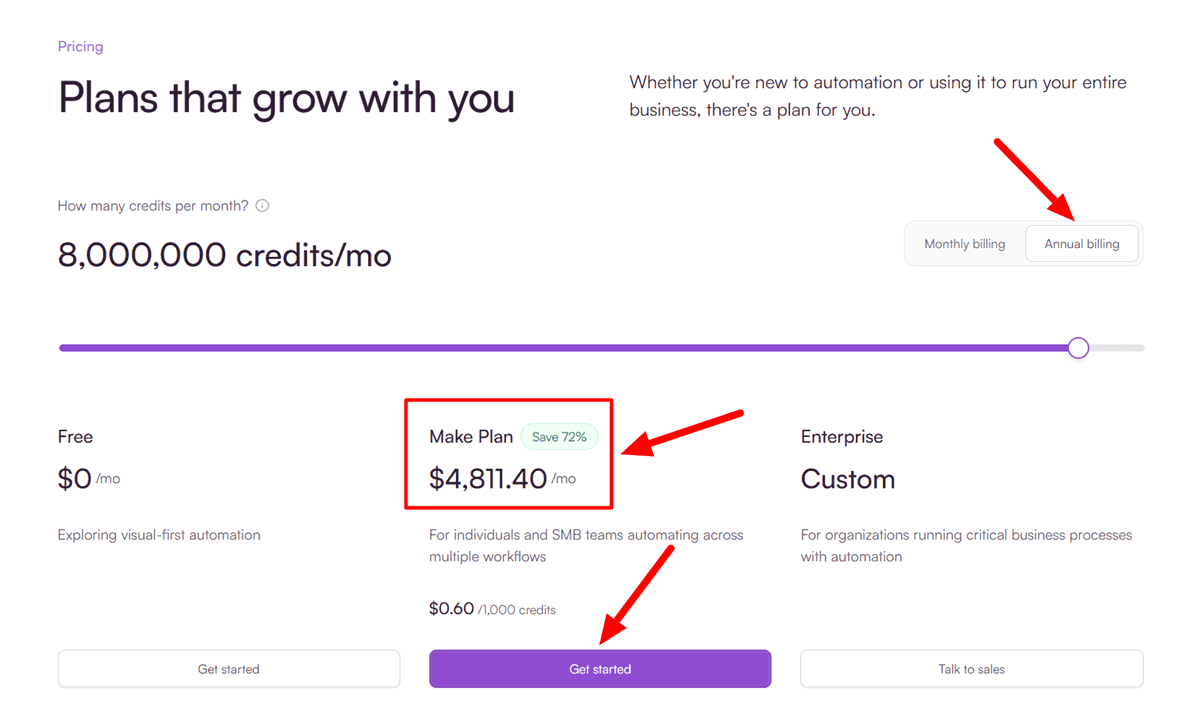
For most freelancers and small teams, the real savings come from the 15% annual discount, plus the lower per-credit rate you get by choosing the right credit level instead of buying extra credits later.
How Many Make Credits Do You Need?
Most Make actions use 1 credit each time a module runs. Routers and error handlers such as Rollback, Break, Resume, Commit, and Ignore use none, and some AI features that run through Make’s AI provider use more.
A quick way to estimate: multiply the modules in a scenario by how many times it processes an item each month.
A 5-module scenario that handles 100 new leads a day uses about 5 × 100 × 30 = 15,000 credits a month. Two of those scenarios need about 30,000 credits.
Plan credits expire at the end of each term, and extra credits cost 25% more than plan credits. So size your plan to your usual month, not your quietest one.
Make.com Features and Benefits
Visual Scenario Builder
Make shows every automation as a visual scenario on a canvas, so you can see how data moves from one module to the next. That makes multi-step logic and debugging much easier to follow than a list of steps. It’s included on the Free plan, so you can learn it before you pay.
Routers, Filters, Iterators, and Aggregators
Routers split one scenario into several paths, filters decide which items continue, and iterators and aggregators split and combine bundles of data. These tools let you build detailed workflows, such as routing leads by country or merging order lines into one invoice. Routers don’t use credits.
3,500+ Apps, Webhooks, and Custom API Calls
Make connects with 3,500+ apps, and you can use webhooks and custom HTTP or API calls for any tool without a ready-made module. The Make Plan also gives you access to 300+ Make API endpoints and enterprise apps.
AI Agents and AI Toolkit
Make includes AI modules, Make AI Agents, and the Make AI Toolkit for tasks like classifying, translating, and summarizing text. Every paid plan can connect your own AI provider, such as OpenAI or Anthropic, so you pay the provider directly for tokens.
Unlimited Scenarios and High-Priority Execution
The Make Plan includes unlimited active scenarios, high-priority scenario execution, custom variables, and full-text execution log search. You aren’t capped on how many automations run at once, only on the credits they use.
Teams and Team Roles
The Make Plan includes teams and team roles, so you can share scenarios with colleagues and control who can edit them. Enterprise adds custom functions, 24/7 enterprise support, overage protection, and advanced security features.
Make.com Pros and Cons
Pros:
- The visual scenario canvas clearly shows data flow, making complex logic and debugging easier.
- Routers, filters, iterators, and aggregators handle detailed multi-step workflows.
- 3,500+ apps, plus webhooks, custom API calls, and custom apps.
- Built-in AI modules, AI Agents, and the AI Toolkit, with your own AI provider on any paid plan.
- Often more cost-effective than simpler tools for multi-step automations, especially on annual billing.
Cons:
- It takes longer to learn than beginner-first tools, especially data mapping and error handling.
- Every action uses credits, so loops and frequent polling can burn through your quota fast.
- Monthly billing costs 15% more than annual, and plan credits don’t roll over.
- Extra credits cost 25% more than plan credits.
- 24/7 support is Enterprise-only, and advanced multi-agent setups can be easier with more technical tools.
Who Should Buy Make.com, and Who Should Skip It
Buy the Make Plan on annual billing if you run several multi-step automations, such as lead routing, CRM updates, or AI content workflows, and want a visual builder that shows exactly what happens at each step. It’s a strong fit for marketers, agencies, and operations teams that need more logic than a simple two-step tool.
Skip it if you only need one or two simple automations, because the Free plan or a simpler tool will do. Skip it too if you’re a developer who wants to self-host and pay nothing per step, where n8n is a better fit.
Make.com Alternatives
| Tool | Best For | Pick It Over Make When |
| Pabbly Connect | Budget automation with lifetime plans | You want to pay once instead of a yearly subscription |
| OttoKit | WordPress-centered automation | Your workflows start in WordPress plugins and forms |
| n8n | Technical teams and self-hosting | You want open-source automation you can host yourself |
Pabbly Connect
Pabbly Connect is a budget-friendly automation tool known for its lifetime plans. It suits small businesses with steady, predictable workflows that don’t want a growing monthly bill. Pick it over Make if paying once matters more than Make’s visual canvas and deeper data tools.
➡️ Also read: Pabbly Connect Black Friday Deals 2026
OttoKit
OttoKit, formerly SureTriggers, comes from Brainstorm Force, the team behind Astra. It’s built around WordPress, with deep integrations for WordPress plugins, forms, and WooCommerce. Pick it over Make if most of your automations start inside WordPress and you want a simpler setup.
➡️ Also read: OttoKit Black Friday Deals 2026
n8n
n8n is an open-source workflow automation tool that you can self-host or use in the cloud. It counts usage by workflow execution rather than by each step, which can cost much less for long workflows. Pick it over Make if you’re technical, want full control of your data, or plan to build complex AI agent workflows.
➡️ Also read: n8n Black Friday Deals 2026
How We Verified This Deal
We checked every price in this article on Make’s pricing page on November 21, 2026, using the credits slider on both monthly and annual billing. We use Make ourselves. Credit rules, extra-credit pricing, and cancellation terms come from Make’s pricing FAQ and help center.
Yearly totals, savings, and the per-credit math behind Make’s “Save” labels are based on Make’s listed prices. Taxes may apply. Check the checkout total before you pay.
Frequently Asked Questions
Q: Is there a Make.com Black Friday deal in 2026?
A: Make.com doesn’t run a separate Black Friday sale or coupon. The best Make.com price is annual billing on the Make Plan, which is 15% cheaper than monthly billing and saves up to 72% on high-volume plans.
Q: Is there a Make.com promo code for Black Friday?
A: No. Make.com has no Black Friday promo code. The annual price applies automatically when you choose Annual billing on the pricing page.
Q: How much does Make.com cost?
A: Make.com’s Make Plan starts at $9 a month on annual billing for 5,000 credits. At 150,000 credits, it costs $153.45 a month on annual billing or $180.53 on monthly billing.
Q: What does Make.com’s “Save 72%” label mean?
A: Make.com’s “Save” label compares a plan’s price per 1,000 credits with the entry monthly rate of about $2.12. At 8,000,000 credits on annual billing, the price is $0.60 per 1,000 credits, which is 72% lower.
Q: Is Make.com annual billing worth it?
A: Yes, if you’ll use Make.com all year. Annual billing costs 15% less than monthly billing, which saves $324.96 a year at 150,000 credits a month.
Q: Is there a Make.com Cyber Monday deal?
A: Make.com doesn’t run a separate Cyber Monday sale. Annual billing on the Make Plan is the lowest price on Cyber Monday too.
Q: Do unused Make.com credits roll over?
A: No. Make.com plan credits expire at the end of each term. Extra credits expire after one month on monthly billing, or at the end of the year on annual billing.
Q: How much do extra Make.com credits cost?
A: Extra Make.com credits cost 25% more than the credits included in your plan, whether you buy them manually or turn on auto-purchase.
Q: Does Make.com have a free plan?
A: Yes. Make.com’s Free plan includes 1,000 credits a month, the no-code visual builder, 3,500+ apps, routers and filters, and a 15-minute minimum interval between runs.
Q: Is Make.com cheaper than Zapier?
A: Make.com is often cheaper for multi-step automations because you pay per credit, and routers and error handlers use no credits. Compare both with your real workflows before you commit to a year.
Final Take
We recommend the Make Plan on annual billing for most marketers, freelancers, and small teams. Start at the credit level that covers your usual month, and you’ll pay 15% less than monthly billing, from $9 a month for 5,000 credits.
If you run millions of actions a month, the high-volume tiers bring the price down to $0.60 per 1,000 credits, which is where the 72% saving applies. If you’re a developer who wants to self-host, n8n is a better fit.
For more software deals, see our best SaaS Black Friday deals.
