
Streamlabs Black Friday 2026: 42% Off Ultra Annual

Streamlabs Black Friday Deal
- 42% off with annual billing: Ultra costs $189/year instead of $324 on monthly billing, a $135 saving with no code to enter.
- Same price at renewal: The annual plan renews at $189/year plus applicable taxes, so there’s no first-year teaser rate.
- Every Streamlabs Pro tool in one plan: Desktop, Mobile, Console, Talk Studio, Cross Clip, Video Editor, and Podcast Editor Pro are all included.
| Deal Detail | What You Get |
|---|---|
| Discount | 42% off Ultra with annual billing ($189/year vs $324) |
| Coupon Code | None needed; the price applies when you pick Annual |
| Ultra+ | $645/year instead of $948, a 32% saving |
| Renewal | Auto-renews at $189/year plus applicable taxes |
| Cancel | Anytime from your Memberships page; you keep the free Starter plan |
- 1,000+ premium overlays, every widget theme, and Reactive Overlays that respond to your gameplay.
- Sidekick AI and 10 automations switch scenes and capture clips while you play.
- Multistreaming plus Network Boost and Disconnect Protection for mobile streams.
- Network Boost is capped at 10 hours/month on Ultra; 80 hours needs Ultra+.
- Sidekick tops out at 1,000 interactions/month on Ultra.
- One-on-one support and a dedicated contact are Ultra+ only, at $645/year.
Quick Deal Summary
- The Streamlabs Black Friday deal is live: 42% off Streamlabs Ultra with annual billing. Claim the Streamlabs Black Friday deal.
- Ultra drops to $189/year ($15.75/month), down from $27/month ($324/year).
- You save $135 in the first year, no code needed, and the plan renews at the same $189/year.
- Ultra+ is also cheaper on annual billing: $645/year ($53.75/month) instead of $79/month, a 32% saving.
We recommend Ultra on annual billing for most streamers, because it covers multistreaming and the full overlay library, with Sidekick included, for $189/year. If you stream full time and want one-on-one help plus 80 hours of Network Boost, Ultra+ is a better fit.
Streamlabs Black Friday Deal 2026 Details
| Deal Component | What You Get |
| Streamlabs Black Friday deal | 42% off Streamlabs Ultra with annual billing |
| Deal price | $189/year, which works out to $15.75/month |
| Regular price | $27/month on monthly billing ($324/year) |
| Discount | 42%, or $135 saved in the first year |
| Coupon code | None needed |
| Validity | Live now for Black Friday and Cyber Monday 2026 |
| Ultra+ price | $645/year ($53.75/month) instead of $79/month, 32% off |
| Student discount | 50% off up to 2 years of Ultra with code STUDENT and a valid .edu email (new subscriptions only) |
| Payment options | PayPal, card, Amazon Pay, and Cash App |
| After the first year | Auto-renews at $189/year plus applicable taxes; cancel anytime from your Memberships page |
| Purchase link | Get the Streamlabs Black Friday deal |
How to Claim the Streamlabs Black Friday Deal
Here’s how we upgraded to Ultra at the annual price. It takes about two minutes, and you don’t need a code.
Step 1: Open the Ultra page through our Streamlabs link and click to join Ultra. Log in with your Streamlabs ID or the Twitch, YouTube, or other account you stream with.
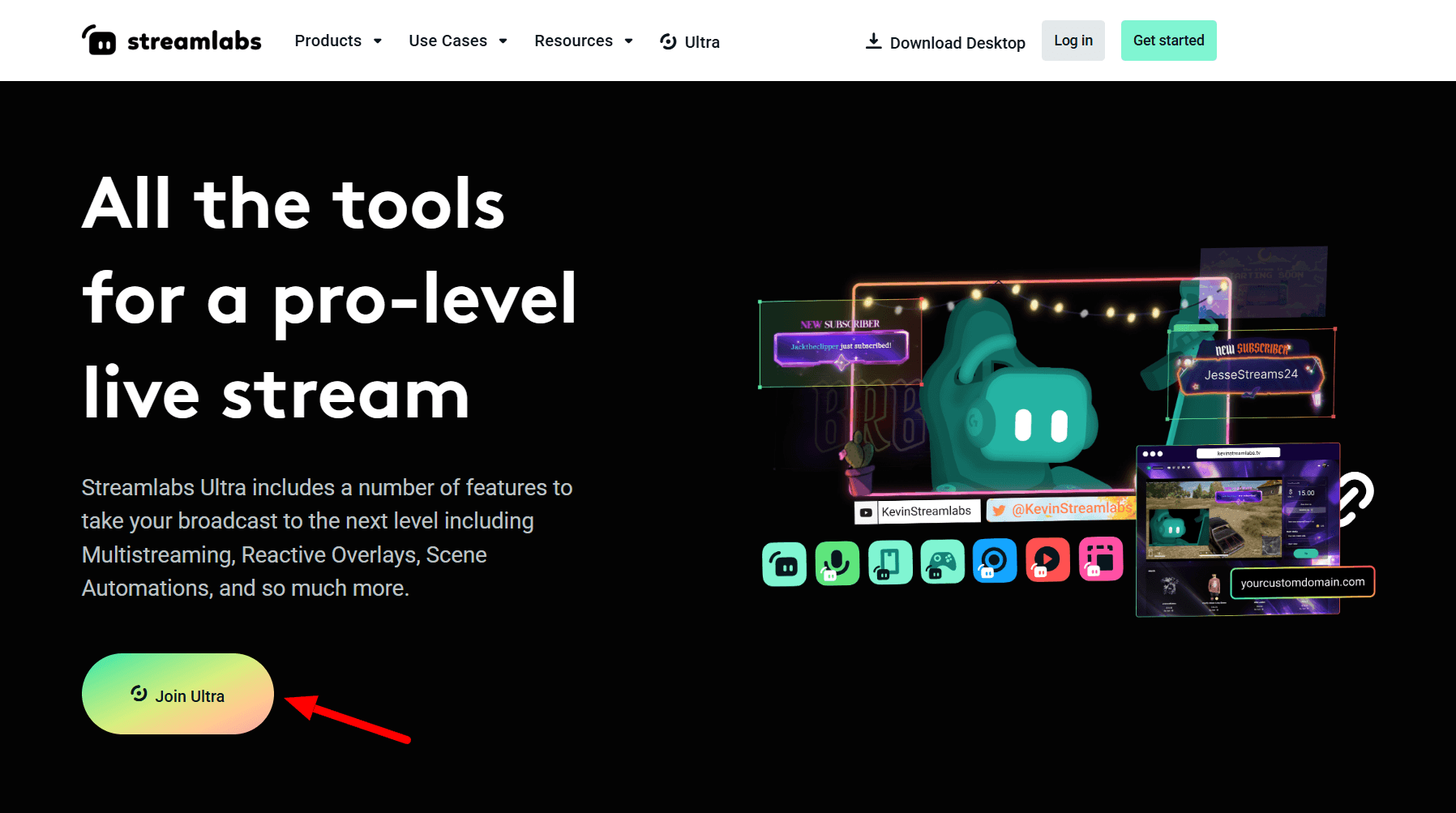
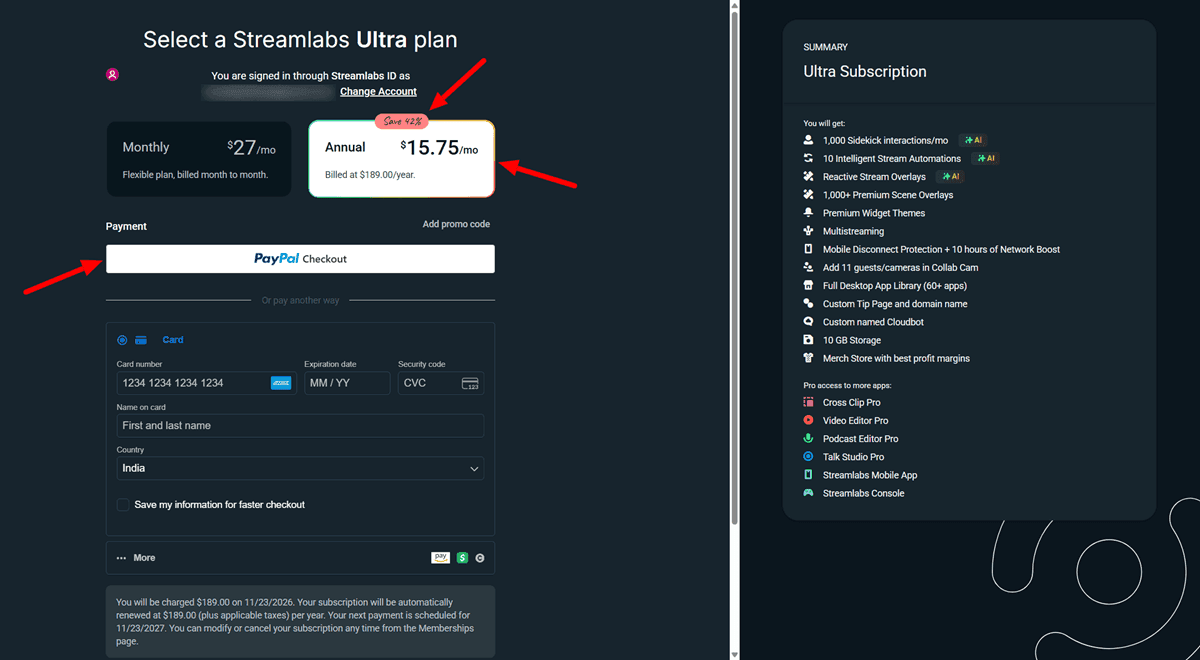
Step 2: On the plan screen, switch from Monthly to Annual. The Ultra price changes from $27/mo to $15.75/mo, “Billed at $189.00/year,” with a “Save 42%” badge.
Step 3: Choose Ultra, or Ultra+ if you need dedicated support. Ultra+ shows $53.75/mo on Annual, billed at $645/year.
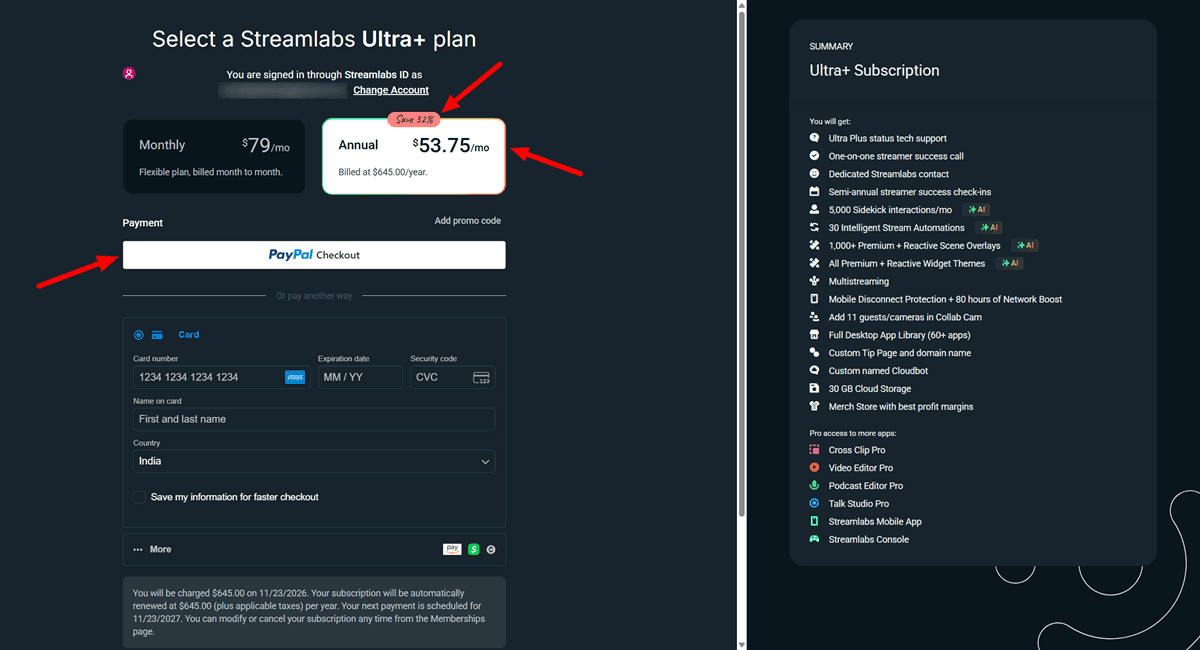
Step 4: Pick a payment method: PayPal, card, Amazon Pay, or Cash App. If you’re a student with a .edu email, click “Add promo code” and enter STUDENT.
Step 5: Check the order summary. It notes that your plan auto-renews at $189/year plus applicable taxes and that you can cancel anytime from the Memberships page.
Step 6: Confirm your payment, then open Streamlabs Desktop or the mobile app. Ultra features turn on for the same account right away.
How Much Does Streamlabs Ultra Cost?
Streamlabs has a free Starter plan and two paid plans: Ultra and Ultra+. Here’s what each costs on monthly and annual billing, from our checkout on 23 November 2026.
| Plan | Monthly | Annual | Per Month on Annual | You Save vs Monthly |
| Starter | $0 | $0 | $0 | None |
| Ultra | $27/month | $189/year | $15.75 | $135 (42%) |
| Ultra+ | $79/month | $645/year | $53.75 | $303 (32%) |
Taxes are added at checkout where they apply. Ultra gets the bigger cut on annual billing, which is why this deal is built around it. Students who verify a .edu email can take 50% off up to 2 years of Ultra with code STUDENT on either monthly or annual billing.
Which Streamlabs Plan Should You Buy?
Starter: For Testing Streamlabs
Starter is free and lets you stream from your PC, laptop, or phone, with Dual Output for one horizontal and one vertical stream at once. You get hundreds of free overlays and widget themes, Merch Store, Collab Cam for one guest or camera, 1GB of cloud storage, up to 5 automations, and 100 Sidekick interactions that don’t reset. It’s enough to learn the software, but not to multistream or use premium themes.
Ultra: Best Value for Most Streamers
Ultra adds multistreaming, 1,000+ premium scene overlays, every premium widget theme, and Reactive Overlays. Sidekick gets 1,000 interactions/month with 10 active automations, Collab Cam takes 11 guests or cameras, and you get 10GB of storage and 10 hours/month of Network Boost. At $189/year, it’s the plan we recommend for most creators.
Ultra+: For Full-Time Streamers
Ultra+ includes everything in Ultra, plus Ultra Plus status tech support, a one-on-one streamer success call, a dedicated Streamlabs contact, and semi-annual check-ins. Limits rise to 5,000 Sidekick interactions/month, 30 automations, 30GB of storage, and 80 hours of Network Boost. It costs $645/year, so it pays off mainly if streaming is your job.
Streamlabs Ultra Features and Benefits
Ultra is one subscription for every Streamlabs product. Here’s what you get for $189/year and where the limits sit.
Sidekick AI Co-Host and Stream Automations
Sidekick is an AI agent inside Streamlabs Desktop that works as a co-host, live producer, and tech support. It can answer questions about your game or chat, switch scenes, clip your best moments, and help troubleshoot during a stream. Ultra includes 1,000 interactions/month and 10 active automations, and automations like scene switching or clipping don’t count toward the interaction limit unless Sidekick responds.
Reactive Overlays and Premium Themes
Ultra opens 1,000+ premium scene overlays and every premium widget theme, so your alerts and scenes match without design work. Reactive Overlays use Streamlabs AI to read what’s happening in your game and trigger overlay animations from those events. Starter users only get the limited free themes.
Multistreaming and Dual Output
Multistreaming sends one stream from Streamlabs Desktop to several platforms, such as Twitch and YouTube, at the same time. Dual Output, also available on Starter, sends one horizontal and one vertical stream at once, so you can feed vertical platforms without a second setup. With Ultra, you can also multistream from your phone.
Network Boost and Mobile Disconnect Protection
Network Boost keeps an IRL stream alive by pairing your phone with extra relay devices and switching between Wi-Fi, cellular data, and hotspots when one connection weakens. Disconnect Protection holds your stream open and shows viewers a Be Right Back screen until your signal returns. Ultra includes 10 hours/month of Network Boost, which suits occasional IRL streams; Ultra+ raises that to 80 hours.
Collab Cam for 11 Guests or Cameras
Collab Cam brings guests or extra cameras into your stream. Ultra raises the limit from one on Starter to 11, which covers group streams and multi-angle podcast setups.
Pro Apps: Cross Clip, Video Editor, Podcast Editor, and Talk Studio
Ultra includes the Pro tiers of Cross Clip, Video Editor, Podcast Editor, and Talk Studio, plus the Streamlabs Mobile App and Streamlabs Console. Talk Studio lets you stream from your browser, and Console lets you design your broadcast and multistream from Xbox with no capture card or PC. You also get the full Desktop App Library of 60+ apps.
Custom Tip Page, Cloudbot, and Merch Store
Ultra gives you a custom tip page with your own domain name and a custom-named Cloudbot for chat moderation and commands. Merch Store lets you design and sell your own merchandise, and Ultra gives you the best profit margins. You also get 10GB of cloud storage.
How We Use Streamlabs
We stream with Streamlabs Desktop on Ultra, using premium overlay themes and alerts so our scenes stay consistent from one stream to the next. We went through the Ultra checkout on 23 November 2026, both monthly and annual, to confirm the $189/year price, the 42% saving, and the renewal terms.
Streamlabs Pros and Cons
Pros
- Annual billing cuts Ultra to $189/year, and the renewal price stays the same.
- The premium overlay and widget theme library saves hours of design work.
- Reactive Overlays and Sidekick automations react to your gameplay without manual switching.
- Multistreaming works from desktop and mobile, with Dual Output for vertical platforms.
- One plan covers Desktop, Mobile, Console, Talk Studio, Cross Clip, Video Editor, and Podcast Editor.
- The free Starter plan stays available if you cancel.
Cons
- Network Boost is capped at 10 hours/month on Ultra.
- Sidekick is limited to 1,000 interactions/month on Ultra.
- Dedicated support and a named Streamlabs contact require Ultra+ at $645/year.
- Monthly billing costs $135/year more than annual.
- Taxes are added on top of the listed price where they apply.
- If you stream to one platform with simple scenes, Starter or OBS Studio already covers you.
Streamlabs Alternatives
If Streamlabs Ultra isn’t the right fit, these three tools cover similar ground in different ways.
| Tool | Starting Price | Multistreaming | Best For |
| Streamlabs Ultra | $15.75/month ($189/year) | Yes, from desktop and mobile | Gamers who want overlays and AI tools in one app |
| Restream | $12.67/month (Standard, annual with RESTREAM20) | 3 to 8 channels, depending on plan | Browser-based multistreaming with unified chat |
| StreamYard | $35.99/month (Core, billed annually) | 3 destinations on Core, 8 on Advanced | Interview shows and webinars |
| OBS Studio | Free | 1 destination without plugins | Full control over your stream on your own computer |
Restream
Restream is a browser studio built for multistreaming, with one chat that pulls messages from every platform. Its Black Friday code RESTREAM20 stacks with annual billing, so Standard costs $152/year and Professional, which adds 1080p and 5 channels, costs $376/year. Choose Restream if you stream talk shows or webinars from a browser to many channels; choose Streamlabs if you stream games and want overlays and alerts built into your encoder.
➡️ Also read: Restream Black Friday 2026: Save 20% with Promo Code
StreamYard
StreamYard is a browser studio known for easy guest joining. Core costs $35.99/month billed annually ($44.99 monthly) and streams to 3 destinations in 1080p, while Advanced at $68.99/month billed annually reaches 8. Choose StreamYard if your show is mostly interviews; choose Streamlabs for gaming overlays at a lower price.
OBS Studio
OBS Studio is free, open-source software that gives you full control over scenes, sources, and output quality. It has no premium theme library, AI co-host, or built-in multistreaming, so you build those pieces yourself with plugins. Choose OBS if you want maximum control and don’t mind the setup work.
Frequently Asked Questions
Q: Does Streamlabs have a Black Friday deal in 2026?
A: Yes. The Streamlabs Black Friday deal is live: 42% off Streamlabs Ultra with annual billing, which brings it to $189/year ($15.75/month) instead of $27/month.
Q: How much does Streamlabs Ultra cost?
A: Streamlabs Ultra costs $27/month on monthly billing or $189/year on annual billing. Ultra+ costs $79/month or $645/year.
Q: Do I need a Streamlabs promo code for the deal?
A: No. The 42% discount applies when you choose annual billing at checkout. Students can add code STUDENT with a valid .edu email for 50% off up to 2 years of Ultra.
Q: Is there a Streamlabs Cyber Monday deal?
A: Yes. The same 42% off Ultra on annual billing is live for Cyber Monday.
Q: Is Streamlabs free?
A: Yes. Streamlabs Starter is free and includes streaming from PC or phone, Dual Output, free themes, 5 automations, and 100 Sidekick interactions. Multistreaming and premium themes need Ultra.
Q: What’s the difference between Streamlabs Ultra and Ultra+?
A: Ultra+ adds dedicated support, a one-on-one success call, and semi-annual check-ins, plus 5,000 Sidekick interactions, 30 automations, 30GB of storage, and 80 hours of Network Boost.
Q: Does the Streamlabs Ultra price go up at renewal?
A: No. The annual plan auto-renews at $189/year plus applicable taxes.
Q: How do I cancel Streamlabs Ultra?
A: Go to your Memberships page and click Cancel Membership, then confirm. You keep the free Starter plan. If you subscribed in the iOS or Android app, cancel through that app store.
How We Verified This Deal
On 23 November 2026, we went through the Streamlabs Ultra checkout on monthly and annual billing and recorded the Ultra and Ultra+ prices, the 42% and 32% savings, the payment options, and the renewal terms. We calculated the yearly savings from those prices.
Feature limits come from Streamlabs’ Ultra, Sidekick, and Network Boost pages; the student code comes from Streamlabs’ student discount page; and Restream and StreamYard prices come from their pricing screens.
Final Take
The Streamlabs Black Friday deal is worth it if you stream regularly from Streamlabs Desktop or your phone. Annual billing takes 42% off Ultra, so you pay $189/year instead of $324, and the price stays the same at renewal. We recommend Ultra for most streamers for multistreaming, premium overlays, and Sidekick. If streaming is your full-time job and you want dedicated support with 80 hours of Network Boost, Ultra+ at $645/year is a better fit.
Want more choices? Check out all our Black Friday software deals.
Streamlabs Black Friday Deal 2026

Name: Streamlabs Ultra
Description: Get 42% off Streamlabs Ultra with annual billing: $189/year ($15.75/month) instead of $27/month, saving $135/year with no code needed. The plan renews at $189/year. Ultra adds multi-streaming, 1,000+ premium overlays with Reactive Overlays, the Sidekick AI co-host with 1,000 interactions/month, 10 hours of Network Boost, Collab Cam for 11 guests, and pro versions of every Streamlabs app.
Offer price: 189
Currency: USD
Operating System: Windows, macOS, iOS, Android, Web
Application Category: Live Streaming
Author: Ankit Main
Overall
4.7-
Multistreaming
-
Overlays and Themes
-
Stream Stability
-
AI and Automation
-
Ease of Use
-
Pricing
User Review
( votes)