
Klap Black Friday 2026: 50% Off Yearly + 30% Off Promo Code

Klap Black Friday Deal
- Two discounts stacked: Yearly billing is 50% off, and SUCCESSPIXEL takes another 30% off your first payment.
- Your whole year of clips at once: Yearly plans load 1,200, 3,600, or 12,000 clips upfront, and source videos can run up to 3 hours.
- Built for stream clipping: Paste a Twitch or Kick VOD link, and Klap stacks your facecam over the gameplay.
| Deal Detail | What You Get |
|---|---|
| Discount | 50% off yearly billing, plus 30% off your first payment |
| Coupon Code | SUCCESSPIXEL |
| First-Year Prices | Basic $121.80, Pro $247.80, Pro+ $793.80 |
| Year Two | Standard yearly price (Basic $174) |
| Refund | Full refund in your first month |
- Virality scores, active-speaker reframing, and animated captions on every clip.
- Unlimited social accounts with scheduling and post analytics.
- Source video length doesn’t use up your clips.
- Clip picks rely mainly on speech, so silent gameplay clips poorly.
- The free trial covers 1 video, and downloads need a paid plan.
- Source videos are capped at 3 hours.
Quick Deal Summary

GTA 6 just dropped, and every launch stream is hours of footage nobody has clipped yet. If you’ve been waiting for a reason to start clipping, this is it, and Klap is the tool we’d start with.
- The Klap Black Friday deal is live: 50% off with yearly billing, plus an extra 30% off your first payment with code SUCCESSPIXEL. Claim the Klap Black Friday deal.
- With both discounts, Basic costs $121.80 for the first year ($10.15/month), Pro $247.80, and Pro+ $793.80.
- Yearly plans load the whole year’s clips at once: 1,200 on Basic, 3,600 on Pro, and 12,000 on Pro+.
- The code field only shows on monthly checkout, so add SUCCESSPIXEL first and then switch to yearly. The steps below show how.
We recommend Basic for most new clippers, because 1,200 clips a year for $121.80 is enough to test GTA 6 clipping across several streamers. If you run multiple channels or clip daily, Pro is a better fit.
Klap Black Friday Deal 2026 Details
| Deal Component | What You Get |
| Klap Black Friday deal | 50% off yearly billing, plus 30% off your first payment with SUCCESSPIXEL |
| Coupon code | SUCCESSPIXEL |
| Basic | $121.80 for year one ($10.15/month), then $174/year |
| Pro | $247.80 for year one ($20.65/month), then $354/year |
| Pro+ | $793.80 for year one ($66.15/month), then $1,134/year |
| Monthly option | 30% off your first month: Basic $20.30, then $29/month; Pro+ $132.30, then $189/month |
| Validity | Live now for Black Friday and Cyber Monday 2026 |
| Free trial | 1 video, no credit card; downloading and posting need a paid plan |
| Refund | Full refund in your first month; after that, refunds for up to your last 3 unused months in a row |
| Payment | Card, PayPal, Apple Pay, or Link |
| Purchase link | Get the Klap Black Friday deal |
How to Claim the Klap Black Friday Deal (Stack Both Discounts)
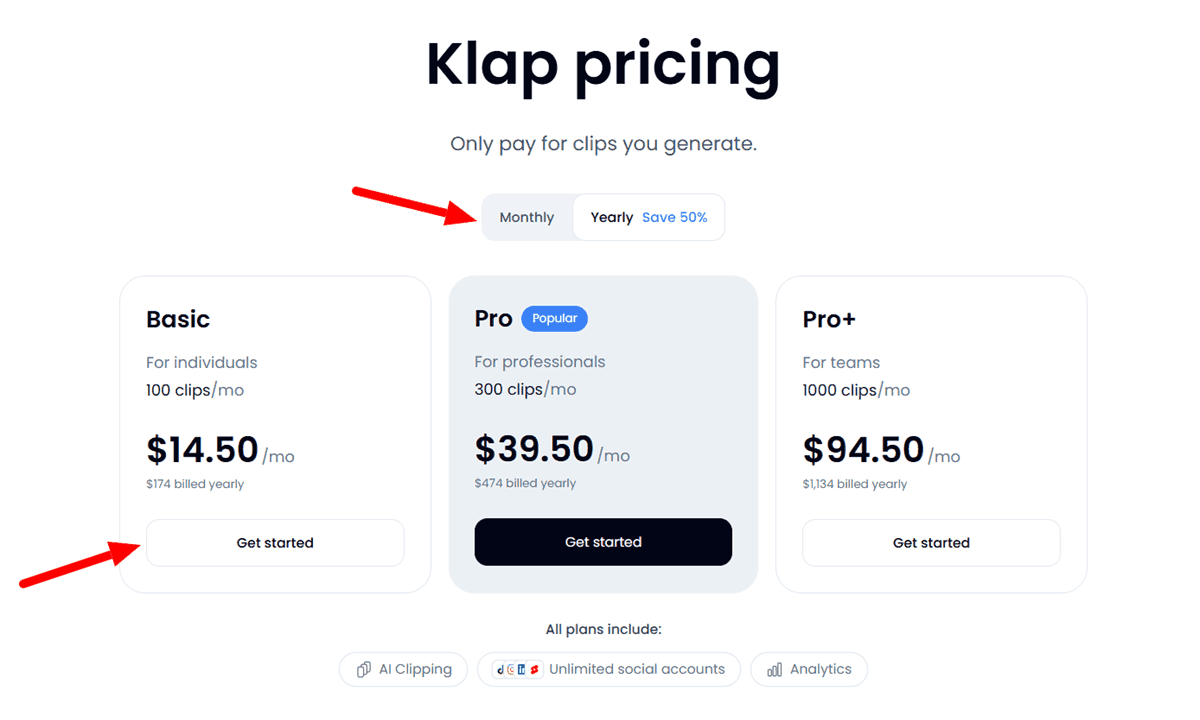
Here’s the trick we used. If you pick yearly billing on the pricing page, the promo code field doesn’t show at checkout. Start on monthly and switch at checkout to get both discounts.
Step 1: Open Klap’s pricing page through our Klap link.
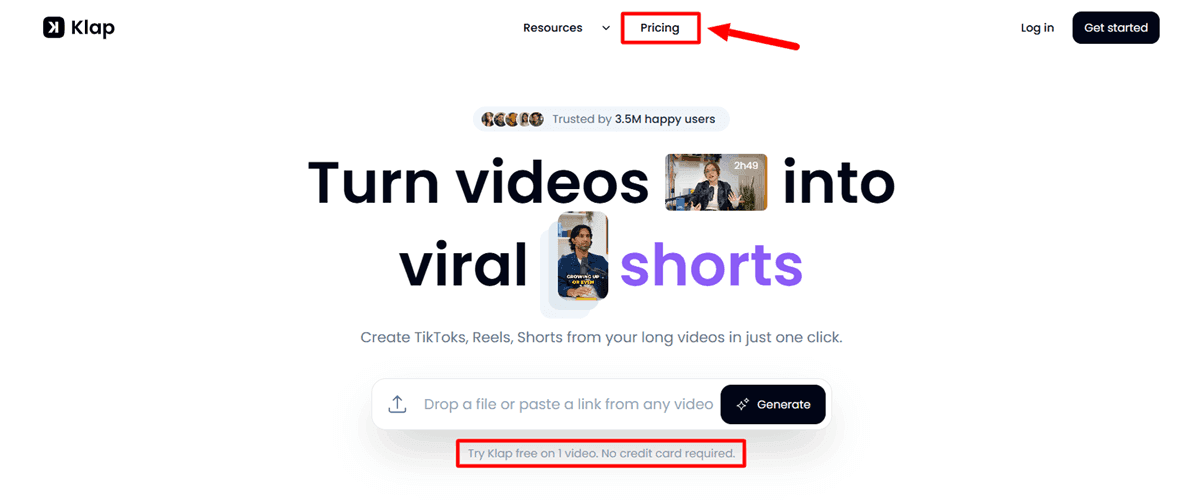
Step 2: Select the Monthly tab (not Yearly), then click “Get started” on your plan and create your account.
Step 3: On the checkout page, click the promo code field and enter SUCCESSPIXEL. You’ll see “30% off” under the code.
Step 4: Turn on the “Save with annual billing” toggle. The code stays applied. For Pro+, the order shows a $1,134.00 subtotal, a $340.20 discount, and $793.80 due today, then $1,134.00 per year starting next year.
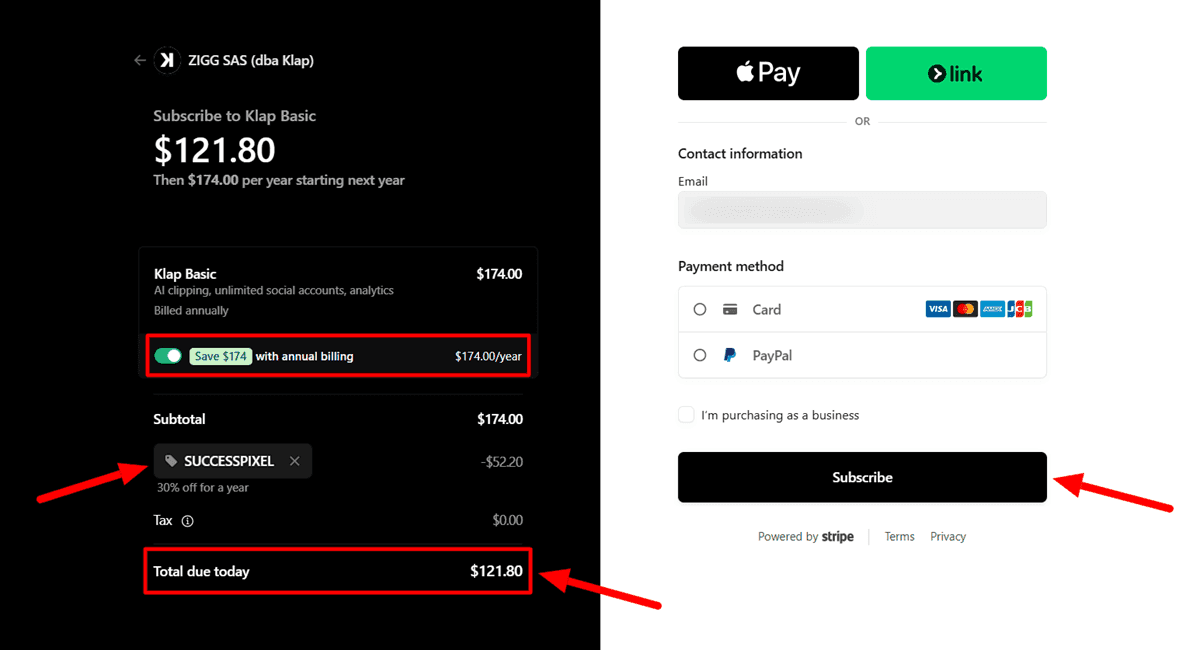
Step 5: Pay with card, PayPal, Apple Pay, or Link, and click Subscribe.
Step 6: Paste your first Twitch, Kick, or YouTube link, or upload a video, and let Klap generate your clips.
Klap Black Friday Pricing vs Regular Pricing
| Plan | Clips | Standard Yearly | Yearly With SUCCESSPIXEL (Year One) | You Save | Cost per Clip (Year One) |
| Basic | 100/month (1,200/year) | $174 ($14.50/month) | $121.80 ($10.15/month) | $52.20 | About $0.10 |
| Pro | 300/month (3,600/year) | $354 ($29.50/month) | $247.80 ($20.65/month) | $106.20 | About $0.07 |
| Pro+ | 1,000/month (12,000/year) | $1,134 ($94.50/month) | $793.80 ($66.15/month) | $340.20 | About $0.07 |
Monthly billing costs $29/month for Basic and $189/month for Pro+, so yearly billing already halves the price. The 30% code applies to your first payment only, which on a yearly plan means the whole first year. From year two, you pay the standard yearly price, $174 on Basic.
Klap counts each short as one clip, and the length of your source video doesn’t use up your plan. A 3-hour GTA 6 stream costs the same as a 10-minute video; only the clips you generate count.
Klap for GTA 6 Clipping
GTA 6 launched on 19 November 2026 on PS5 and Xbox Series X|S, and launch streams regularly run for hours. That’s the biggest clipping opportunity of the year, whether you clip your own streams or other streamers’ VODs.
Klap takes Twitch and Kick VOD links directly, so you don’t need to download a stream first. It finds the webcam and stacks it above the gameplay in a vertical frame, which works best for GTA 6 reactions on TikTok, Shorts, and Reels. Source videos can run up to 3 hours, so long streams need to be split into parts.
Klap picks moments mainly from speech. That makes it accurate for commentary, reactions, and roleplay streams, where the best moments come with someone talking. Long silent driving or cutscenes won’t surface as clips, so clip those by hand in the editor.
How Klap Gets AI Clipping Right
Accurate AI clipping comes down to finding moments that work without context and framing them well. Here’s what Klap does on every clip, and how to get better picks.
Virality Score
Every clip gets a virality score, so you can post the strongest moments first instead of watching each one. Use it as a shortlist, not a final verdict, and skim the top-scored clips before you post.
Active-Speaker Reframing
Klap tracks who’s talking and keeps them in frame when it crops to vertical. For podcasts and duo streams, the frame follows the speaker without manual keyframes.
Animated Captions and Hook Titles
Each clip gets animated captions in 99+ languages, and the editor adds hook titles and B-roll. Captions matter for gaming clips, because many viewers watch muted.
Tips for More Accurate Clips
Talk through your gameplay, keep your facecam large enough to crop cleanly, and clip within a day or two while a stream’s moments are still trending. Review the top-scored clips, trim weak openings, and rewrite hook titles in your own voice.
Which Klap Plan Should You Buy?
Basic: For New Clippers
Basic gives you 100 clips a month, or 1,200 a year upfront with yearly billing, and includes every core feature. At $121.80 for the first year with the code, it’s the cheapest way to test whether clipping works for you.
Pro: For Daily Clippers
Pro raises you to 300 clips a month, or 3,600 a year. It suits creators who clip several streams a week or run more than one channel, and it costs $247.80 for the first year with the code.
Pro+: For Teams and Clipping Agencies
Pro+ includes 1,000 clips a month (12,000 a year) and is built for teams. At $793.80 for the first year, it fits clipping agencies and streamers with editors working across several channels.
Klap Features and Benefits
Every Klap plan includes the same features; only the number of clips changes.
AI Clipping From Links or Uploads
Paste a YouTube, Twitch, or Kick link, or upload a file, and Klap turns it into a batch of shorts. Source videos can run up to 3 hours. It’s the main time-saver for anyone repurposing long content.
Scheduling, Publishing, and Unlimited Social Accounts
Klap schedules and publishes to TikTok, YouTube, Instagram, LinkedIn, and Facebook, with unlimited social accounts on every plan. That matters for clippers running separate channels for different streamers or niches.
Post Analytics
Post analytics show how each clip performs after publishing, so you can see which streamers and formats get views. Use it to decide what to clip next.
No Watermark on Paid Plans
Clips you download or post on a paid plan carry no Klap branding. The free trial lets you preview and edit clips from 1 video, but downloading or posting needs a paid plan.
Klap API
The Klap API is self-serve and priced separately from the plans: $0.44 per input video, $0.32 per short, and $0.48 per export. It’s useful for developers building clipping into their own apps.
How We Use Klap
We use Klap to turn long videos and stream VODs into vertical shorts: we paste the link, sort the results by virality score, fix captions and hook titles in the editor, and schedule the best clips.
We checked out on 24 November 2026 with code SUCCESSPIXEL and confirmed that switching to yearly billing keeps the 30% discount. The screenshots below show our Klap workspace and the checkout.
Klap Pros and Cons
Pros
- Stack 50% yearly billing with 30% off from SUCCESSPIXEL.
- Takes Twitch and Kick VOD links and stacks the facecam over gameplay.
- Virality scores, active-speaker reframing, and captions in 99+ languages on every clip.
- Source video length doesn’t use up your clips.
- Unlimited social accounts with scheduling and post analytics.
- Clear refund policy, with a full refund in your first month.
Cons
- Clip picks rely mainly on speech, so silent gameplay and cutscenes need manual clipping.
- Source videos are capped at 3 hours, so long streams need splitting.
- The promo code field doesn’t show when you start on yearly billing.
- The free trial covers only 1 video and doesn’t allow downloads.
- The 30% code applies to the first payment only.
- The API is billed separately from the plans.
Klap Alternatives
Klap is our pick for clipping Twitch and Kick streams. Vizard, Submagic, and VEED fit better in specific situations.
| Tool | Price | What You Get | Best For |
| Klap | $121.80 for year one (Basic, with code) | 1,200 clips/year from videos up to 3 hours | Clipping Twitch and Kick streams with facecam layouts |
| Vizard | $174/year (Creator) | 600 minutes/month, 4K, uploads up to 10 hours | Very long recordings and 4K exports |
| Submagic | $12/month billed yearly (Starter) | 15 captioned videos/month; clipping via the Magic Clips add-on | Caption styling for short videos you already have |
| VEED | $147/year (Creator) | Full browser video editor with subtitles and AI tools | Editing, subtitles, and branding beyond clipping |
Vizard
Vizard Creator costs $174/year for 600 minutes of video a month, with 4K exports and uploads up to 10 hours; yearly plans are 50% off. It charges by minutes of source video rather than by clips, and Vizard Agent can build new videos from a text idea. Choose Vizard if you clip very long recordings in one go; choose Klap if you want Twitch and Kick links and pay per clip.
Submagic
Submagic is built around animated captions, with keyword highlights, emojis, B-roll, and trending caption styles. Starter costs $19/month or $12/month billed yearly for 15 videos of up to 2 minutes, and AI clipping from long videos comes through the Magic Clips add-on. Choose Submagic if you mostly polish short clips you’ve already cut; choose Klap if you’re starting with a 3-hour stream.
VEED
VEED is a full browser video editor with auto subtitles, translations, stock media, brand kits, and AI tools, and its Pro plan adds AI Clips, Magic Cut, and Eye Contact. Creator costs $25/month or $147/year, and Pro costs $45/month or $265/year, per editor seat. Choose VEED if you need a complete editor for longer videos and branded content; choose Klap if fast, high-volume stream clipping is the job.
Frequently Asked Questions
Q: Does Klap have a Black Friday deal in 2026?
A: Yes. The Klap Black Friday deal is live: 50% off with yearly billing, plus 30% off your first payment with code SUCCESSPIXEL. Basic costs $121.80 for the first year.
Q: What is the Klap promo code?
A: The Klap Black Friday promo code is SUCCESSPIXEL. It offers 30% off your first payment.
Q: Why can’t I see the promo code field on yearly billing?
A: The code field only shows when you start on monthly billing. Choose Monthly, enter SUCCESSPIXEL at checkout, then turn on annual billing; the 30% stays applied.
Q: How much does Klap cost?
A: Billed yearly, Klap costs $174 for Basic, $354 for Pro, and $1,134 for Pro+. Basic is $29/month, and Pro+ is $189/month on monthly billing.
Q: Is Klap free?
A: You can try Klap free on 1 video with no credit card. Downloading and posting clips needs a paid plan.
Q: Is Klap good for GTA 6 clips?
A: Yes, for commentary and reaction streams. Klap takes Twitch and Kick VOD links, stacks the facecam over gameplay, and picks moments mainly from speech.
Q: What counts as a clip on Klap?
A: Each short counts as one clip. The length of your source video doesn’t count, and clips refill every billing period.
Q: What is Klap’s refund policy?
A: On a yearly plan, you get a full refund in your first month. After that, you get 1/12 of the yearly price back for each full unused month, up to your last 3 in a row.
Q: Is there a Klap Cyber Monday deal?
A: Yes. The same 50% yearly discount and SUCCESSPIXEL code work for Cyber Monday 2026.
How We Verified This Deal
On 24 November 2026, we opened Klap’s pricing page on yearly billing and recorded each plan’s price and clip limit. We then went through checkout for Pro+ with SUCCESSPIXEL applied on monthly billing, switched to annual billing, and recorded the $1,134.00 subtotal, the $340.20 discount, the $793.80 total, and the renewal line.
Plan features, the free trial, refunds, and API prices come from Klap’s official pricing FAQ, and we calculated the other plans’ first-year prices and cost per clip from those figures.
Final Take
The Klap Black Friday deal is worth it if you want to start clipping GTA 6 or any other streams now. Stacking 50% yearly billing with 30% off from SUCCESSPIXEL cuts Basic to $121.80 for a year of 1,200 clips, about $0.10/clip. We recommend Basic for most new clippers. If you clip daily or run several channels, Pro is a better fit, and clipping agencies should go straight to Pro+.
Want more choices? Check out all our Black Friday software deals.
Klap Black Friday Deal

Name: Klap
Description: Get 50% off Klap with yearly billing plus an extra 30% off your first payment with code SUCCESSPIXEL. Basic costs $121.80 for the first year ($10.15/month), Pro $247.80, and Pro+ $793.80. Klap turns videos and Twitch streams up to 3 hours into captioned vertical clips with virality scores and active-speaker reframing, publishing them to TikTok, YouTube, Instagram, LinkedIn, and Facebook without a watermark.
Offer price: 121.80
Currency: USD
Operating System: Web
Application Category: AI Video Clipping
Author: Ankit Main
Overall
4.9-
AI Clipping Accuracy
-
Captions and Reframing
-
Gaming and Twitch Support
-
Publishing and Analytics
-
Ease of Use
-
Pricing & Value for Money
User Review
( votes)