
invideo Black Friday 2026: 60% Off Annual Plans for AI Video Creators

invideo Black Friday Deal
- 60% off annual plans: The Basic plan is now $43 per seat per year, down from $108. The Pro plan costs $144 per seat per year, down from $360. Ultra is $384 per seat per year, saving $576 compared to monthly payments.
- Image models included: The deal adds Nano Banana 2.1, Ideogram 4.5, and many more image models, unlimited for 30 days.
- No coupon code needed: Start from our link, then click Get 60% discount on invideo’s pricing page. The deal is live through Monday, November 30, 2026.
- AI video generation with premium media libraries.
- The deal covers all three annual plans: Basic, Pro, and Ultra.
- Annual plans are billed upfront per seat.
- Credits reset each month, and unused credits don’t roll over.
- The deal covers annual plans only, not monthly billing.
Quick Deal Summary
- invideo’s annual plans are now 60% off until November 30. This discount applies to all annual plans.
- With annual plans, you also get 30 days of unlimited access to Nano Banana 2.1, Ideogram 4.5, and several other image models.
- Basic costs $43 per seat per year, Pro $144 per seat per year, and Ultra $384 per seat per year.
- No code is needed for the deal, and credits reset monthly.
- Pro and Ultra plans include Seedance 2.5, guest seats, and extra storage.
We recommend Pro for most creators, and Basic if you’re just starting with AI video.
invideo Black Friday Deal 2026 Details
| Deal Component | What You Get |
| Deal | 60% off invideo annual plans, with Nano Banana 2.1, Ideogram 4.5, and many more image models, unlimited for 30 days |
| Discount | Basic $43 per seat per year instead of $108, Pro $144 instead of $360, and Ultra saves $384 per seat compared with monthly |
| Coupon Code | None needed. Click Get 60% discount on the pricing page |
| Validity | Live through Monday, November 30, 2026 |
| Billing | Annual plans are billed upfront per seat. Credits reset each month, and unused credits don’t roll over |
| Purchase Link | Get 60% off invideo |
How to Get the invideo Black Friday Deal Step by Step
Step 1: Decide what you want to create. Basic suits first-time AI creators, Pro works well for regular use, and Ultra is best for big projects with lots of videos.
Step 2: Open invideo through our link and click the “Start Creating” button.
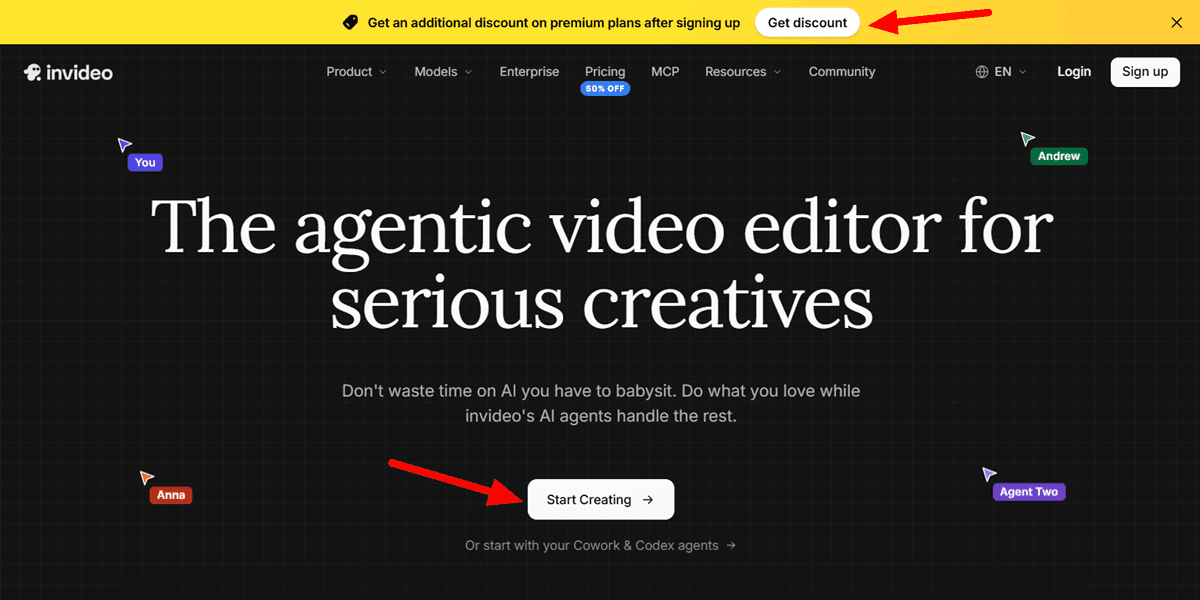
Step 3: After you sign up, switch the pricing toggle from Monthly to Annual. Prices drop by 60%, and you can use the planner to find the right plan for your needs.
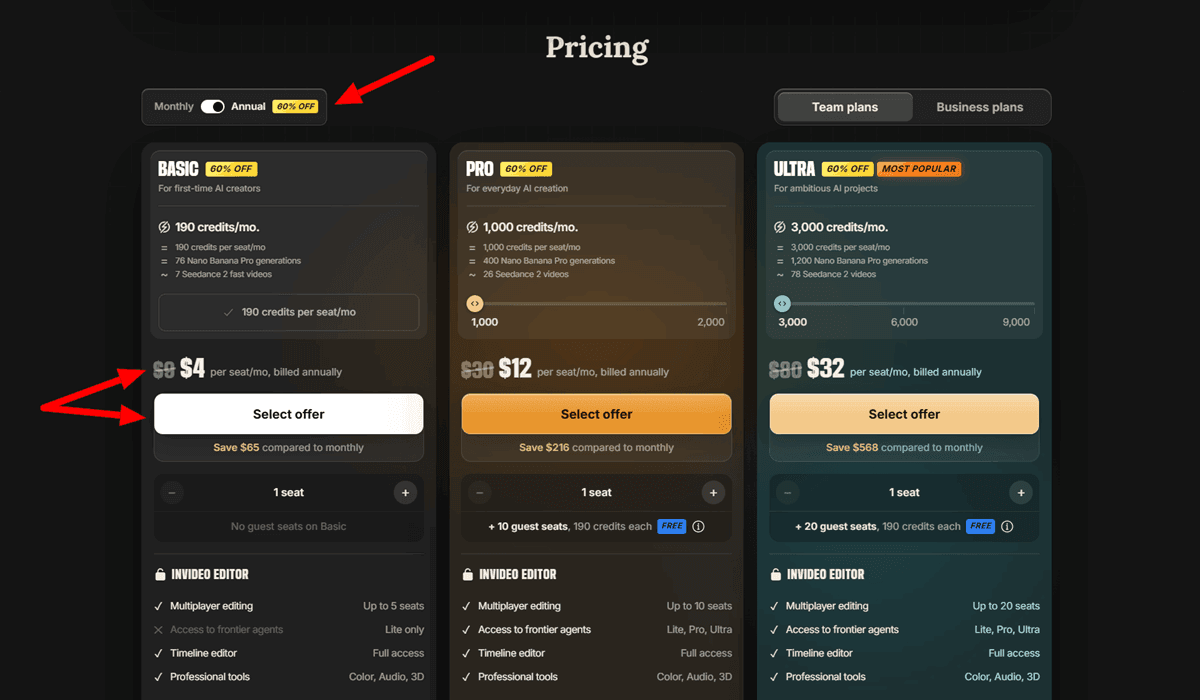
Step 4: Choose your plan and the number of seats you need. With Pro and Ultra, you can adjust the number of credits, and guest seats are included.
Step 5: Click the “Select offer” button to get your 60% discount on your plan and verify the annual price at checkout before paying.
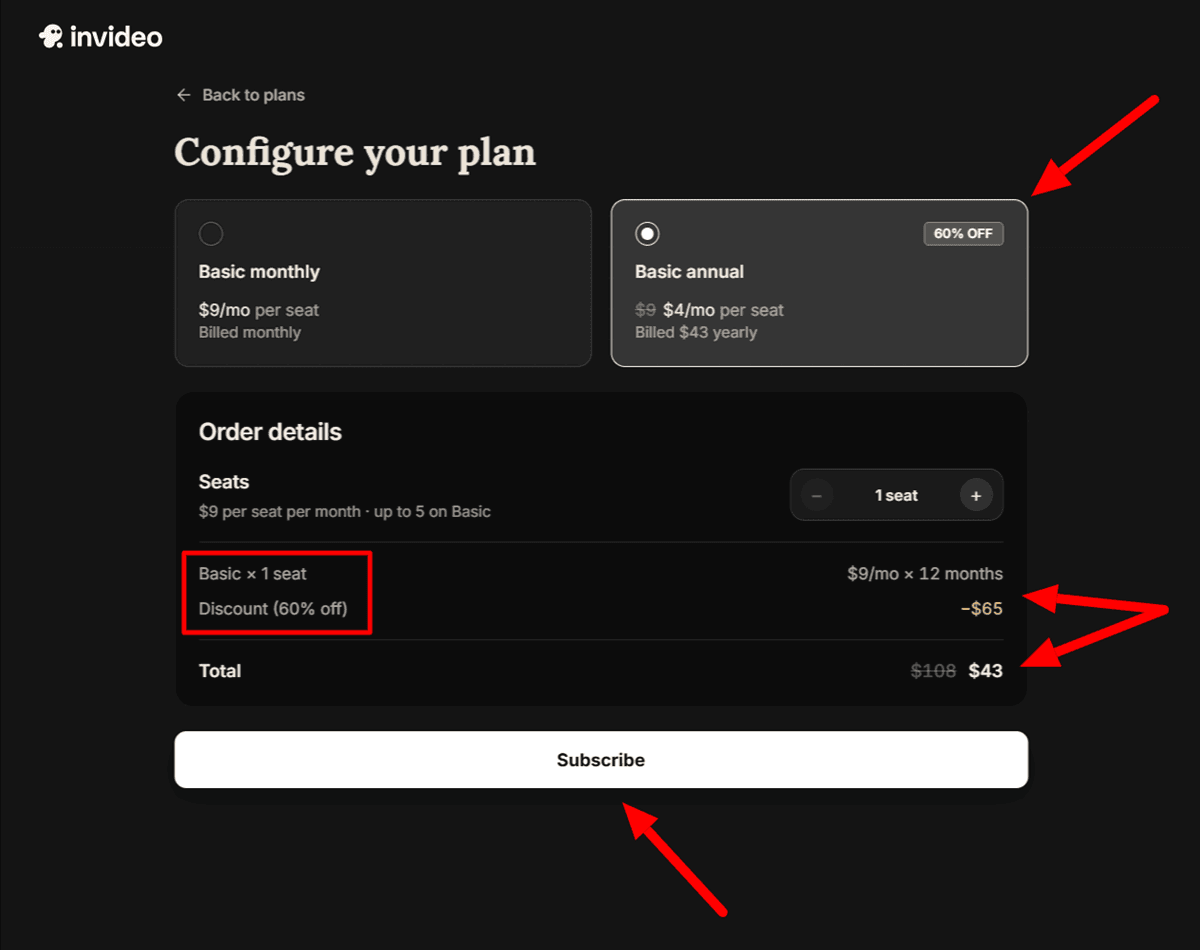
Step 6: Complete your payment, then enjoy 30 days of unlimited image models like Nano Banana 2.1 and Ideogram 4.5.
Step 7: Plan how you’ll use your credits. Since they reset monthly and unused credits don’t carry over, spread your video projects throughout the month.
invideo Prices With 60% Off
| Plan | Monthly Billing | Annual Billing | Credits Per Month | Annual Savings Per Seat | Best For |
| Basic | $9/month | $4/month ($43/year billed annually) | 190 | $65 | First-time AI creators |
| Pro | $30/month | $12/month ($144/year billed annually) | 1,000 to 2,000 | $216 | Everyday creation |
| Ultra | $80/month | $32/month ($384/year billed annually) | 3,000 to 9,000 | $576 | Ambitious projects |
Annual billing saves 60% on every plan. Basic costs $43 per seat per year vs. $108 per seat per month; Pro costs $144 per seat per year vs. $360 per seat per month, and Ultra costs $384 per seat per year and saves $576 per seat.
How Credits Work and What They Buy
Credits cover video creation, generative models, and other platform features. Downloading doesn’t use credits. Each model costs a different amount: for example, a Seedance 2.0 Fast video costs 30 credits, and a Nano Banana Pro image costs 2.5 credits.
With Basic, you get 190 credits monthly, enough for about 7 Seedance 2 Fast videos or 76 Nano Banana Pro images. Pro gives 1,000 credits for about 26 videos or 400 images, and Ultra gives 3,000 credits for about 78 videos or 1,200 images. Since credits reset monthly, choose a plan that matches your usual monthly needs, not just your busiest week.
invideo Features and Benefits
Here’s what each plan offers for the price. Every plan comes with the invideo editor, but they differ in credits, available models, seats, and storage.
invideo Editor and Timeline
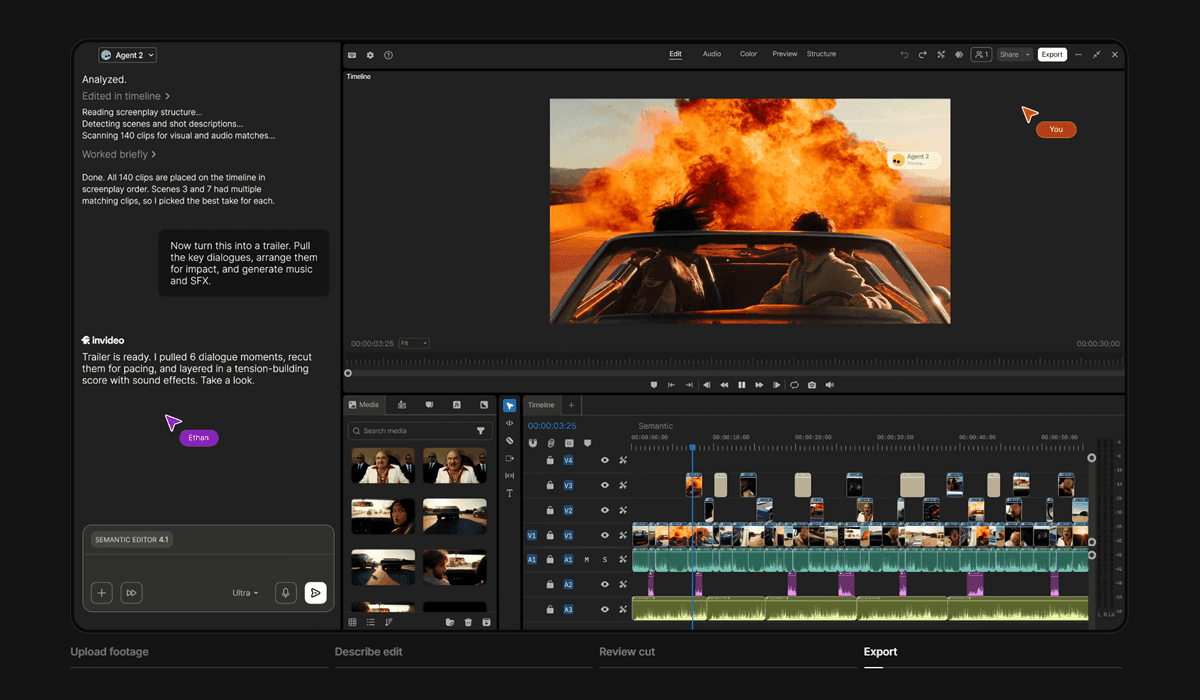
You get a full timeline editor with multiplayer editing, color, audio, and 3D tools. This is great for creators who want to fine-tune their AI footage instead of using the first version. Basic supports up to 5 seats, Pro supports 10, and Ultra supports up to 20 guest seats.
Seedance Video Models
Pro and Ultra plans give you full access to Seedance 2.5 and 2.0, including 4K on Seedance 2.0. Basic only includes Seedance 2.0 Fast and 2.0 Mini. These options are best for creators who want higher-quality AI video.
Image Models
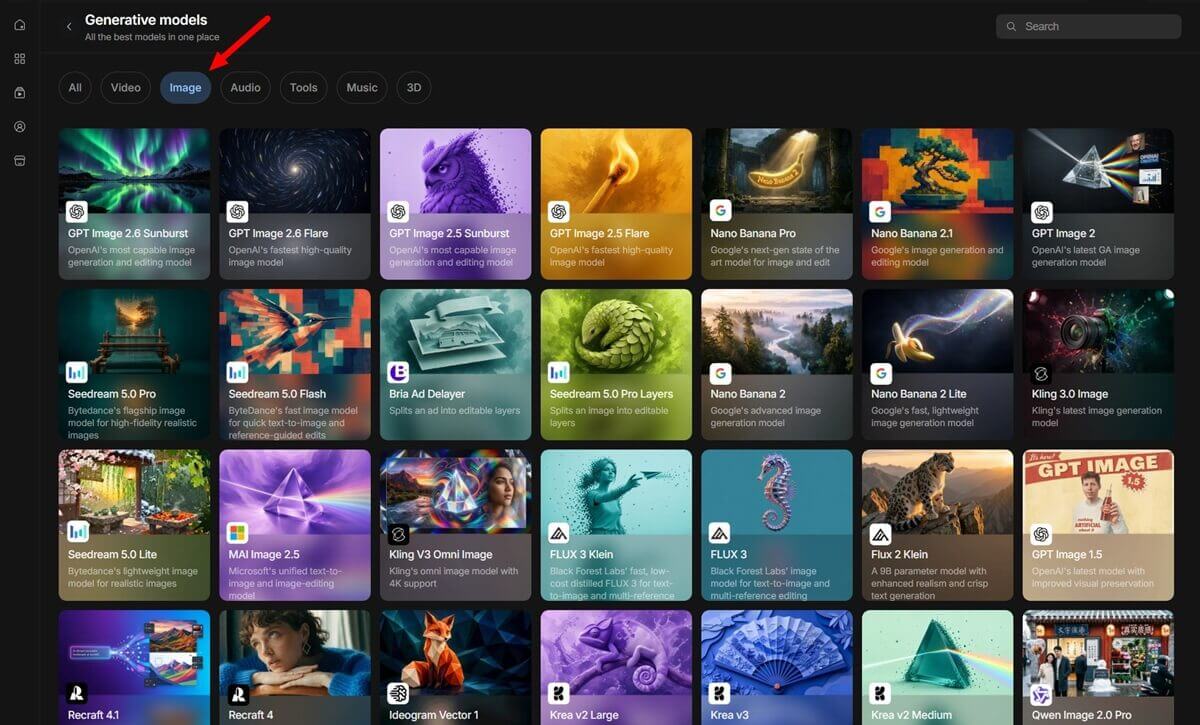
You can generate images with Nano Banana Pro, GPT Image, and other models. Annual plans include 30 days of unlimited access to Nano Banana 2.1, Ideogram 4.5, and more. This is useful for making thumbnails, ads, and storyboards.
Frontier Agents
Agents can help you plan and build your projects. Basic includes only the Lite agent, Pro adds Pro and Ultra agents, and Ultra includes all three. These are helpful if you want more support than just single prompts.
Seats and Collaboration
Pro includes 10 guest seats, and Ultra includes 20, each with 190 credits, so your teammates can work together. Basic doesn’t include guest seats.
Storage and Stock Footage
Basic includes 100 GB of storage and 45 premium stock clips, Pro has 300 GB and 150 clips, and Ultra offers 800 GB and 180 clips. This helps teams keep large projects organized in one place.
invideo Pros and Cons
Pros
- 60% off annual plans, with unlimited image models for 30 days.
- Video, images, and a full timeline editor in one platform.
- Seedance 2.5 and frontier agents on Pro and Ultra.
- Guest seats included on Pro and Ultra.
- A planner on the pricing page helps you pick a plan.
Cons
- Credits reset monthly, and unused credits don’t roll over.
- The 60% off applies only to annual plans, so you pay upfront.
- Basic has no Seedance 2.5, no guest seats, and only Lite agents.
- Credit costs differ by model, so heavy video users use credits quickly.
- The lowest cost per credit is available only with Ultra.
Who Should Choose invideo
- First-time AI creators: Basic.
- Marketers and YouTubers who publish every week: Pro.
- Studios and teams with big monthly output: Ultra.
- Consider other options if you only need captions, simple edits, or avatar-led training videos.
invideo Alternatives
| Tool | Best For | Trade-Off |
| invideo | AI video, images, and a full timeline editor in one place | Credits don’t roll over |
| Runway | Cinematic AI video generation | Less focused on templates and editing workflow |
| Synthesia | Presenter-style avatar videos for training | Narrower than a general video tool |
| Canva | Simple design and quick social clips | Limited AI video depth |
- Runway: choose it if cinematic AI generation is your priority.
- Synthesia: choose it for presenter-style training videos.
- Canva: choose it for simple design and quick social clips.
- Choose invideo if you want AI video, images, and a timeline editor all in one subscription.
Frequently Asked Questions
Q: Is the invideo Black Friday deal live?
A: Yes. The 60% off annual plans deal is live through Monday, November 30, 2026.
Q: Do I need an invideo coupon code?
A: No. Click the “Select offer” button on the pricing page after you create a new InVideo account using our link, and the 60% off annual price applies.
Q: Does the 60% off apply to monthly plans?
A: No. The discount applies to annual plans. Switch the pricing toggle to Annual to see the prices.
Q: What do credits do?
A: Credits pay for video creation, generative models, and other platform features, but not for downloading content. Each model costs a different number of credits; for example, 30 credits per Seedance 2.0 Fast video and 2.5 credits per Nano Banana Pro image.
Q: Do unused credits roll over?
A: No. Credits reset each month, and unused credits don’t carry over.
Q: What are guest seats?
A: Pro includes up to 10 guest seats, and Ultra includes up to 20, each with 190 credits so that teammates can collaborate. Basic has no guest seats.
Q: Which plan should I choose?
A: Choose Basic if you are new to AI video generation, Pro for regular creation with all Seedance models, and Ultra if you make many videos and want the lowest cost per credit.
Q: Can I upgrade later?
A: Yes. You can upgrade, downgrade, or cancel from your account. Check your billing page for how changes affect credits.
How We Verified This Deal
We checked invideo’s pricing page on November 7, 2026. The Annual toggle shows 60% off, with Basic at $43 per seat per year, Pro at $144, and Ultra costing $384 per seat compared to monthly. The page lists credit allowances, Seedance and image-model access, and the 30-day unlimited image-model bonus for annual plans. Check your final price at checkout before paying.
Final Take
invideo’s Black Friday deal is a good choice if you plan to make AI videos year-round. The 60% off annual term brings the Pro plan down to $12 a month, plus 30 days of unlimited image models as a bonus. For most creators, Pro is the best option.
Plan how you’ll use your monthly credits since unused credits don’t roll over. If you’re new, start with Basic. If you only need captions or simple edits, check Canva or other free invideo alternatives first.
Looking for more options? Browse all our Black Friday software and hosting deals.
invideo Black Friday Deal 2026

Name: InVideo
Description: invideo is an AI-powered video creation platform that helps creators turn ideas into videos using AI tools, image models, and editing features. Its annual plans are currently 60% off, with 30 days of unlimited access to Nano Banana 2.1, Ideogram 4.5, and several other image models.
Offer price: 43
Currency: USD
Operating System: Web-based
Application Category: AI Video Creation & Editing
Author: Ankit Main
Overall
4.4-
AI Video Generation
-
Editing Capabilities
-
Ease of Use
-
Pricing
User Review
( votes)