
How to Start a GTA 6 YouTube Channel and Go Viral in 2026

How to Start a GTA 6 YouTube Channel: The Complete Setup Guide
Right now, there aren’t many good YouTube channels about GTA 6. Many people look for GTA 6 videos every week, but only a few channels actually post them. Grand Theft Auto VI releases on PS5 and Xbox Series X/S on November 19, 2026. Once the game launches, this window closes fast. Starting your channel early gives you a real advantage.
The guide outlines practical ways to start a GTA 6 YouTube channel: on camera, off camera, and live. Choose the approach that suits you best. Some creators build an audience by relying on their personality and face-to-face commentary. Others do so through research, writing, and voice without revealing their face, building faceless GTA 6 YouTube channels. Alternatively, many creators attract viewers by streaming live, reacting, and playing in real time while interacting with viewers via an active chat.
Generative AI tools and various other software can help with research, scripting, editing, and production across all three approaches. Use these tools when they truly help, not as a necessity or a replacement for the human judgment behind the content.
When you’ve finished reading this guide, you’ll have identified a specific niche, a production plan suitable for the format you prefer, a clear understanding of the copyright boundary that Rockstar draws around recorded gameplay, and a method for managing your production so that consistency doesn’t break down when things get busy.
The Numbers Behind This Opportunity
The demand is clear. According to vidIQ, a YouTube keyword research and video optimization tool, the term “gta 6” receives about 36 million monthly searches, with a competition score of 56.6 out of 100, as of September 2026. The phrase “gta 6 trailer” attracts around 11.35 million searches monthly, and “gta 6 gameplay” brings about 5.70 million searches.
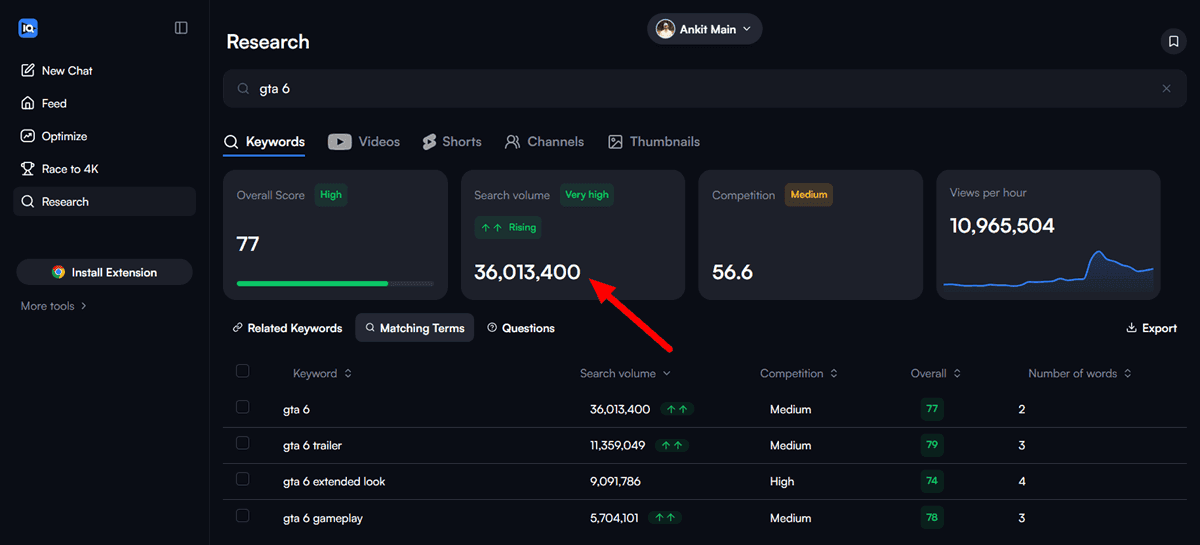
The head terms are brutally competitive, but the long tail offers opportunities where volume drops, and competition falls even faster.
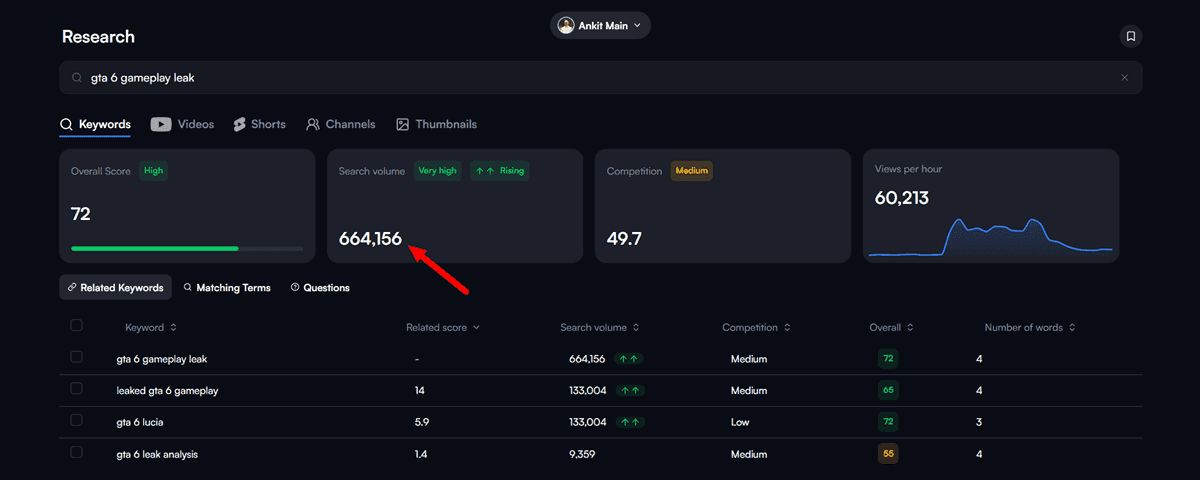
According to the same vidIQ data, “gta 6 gameplay leak” has about 664,156 monthly searches and a competition score of around 49.7.
In comparison, “gta 6 release date” brings in about 66,734 searches per month, with a competition score of about 48.5. The more specific term “gta 6 pc release date” still attracts an estimated 26,278 searches per month, with a competition score of 44.7.
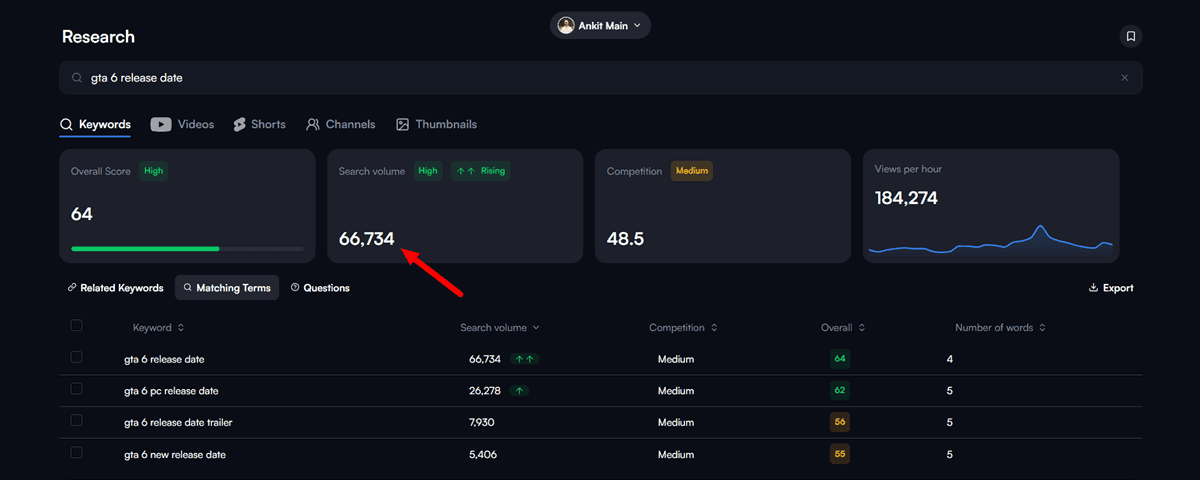
That pattern holds true throughout this niche: specific, narrow terms have good search volume and moderate competition compared to the general head term. A new channel targeting these narrow terms faces a much more level playing field than one aiming to rank for “GTA 6” on day one.
Game history also supports this. When GTA V was released on September 17, 2013, it earned about one billion dollars in its first three days, making it one of the largest entertainment launches ever documented. The channels that grew fastest at the time weren’t the ones with the largest followings initially, and they weren’t all the same type.
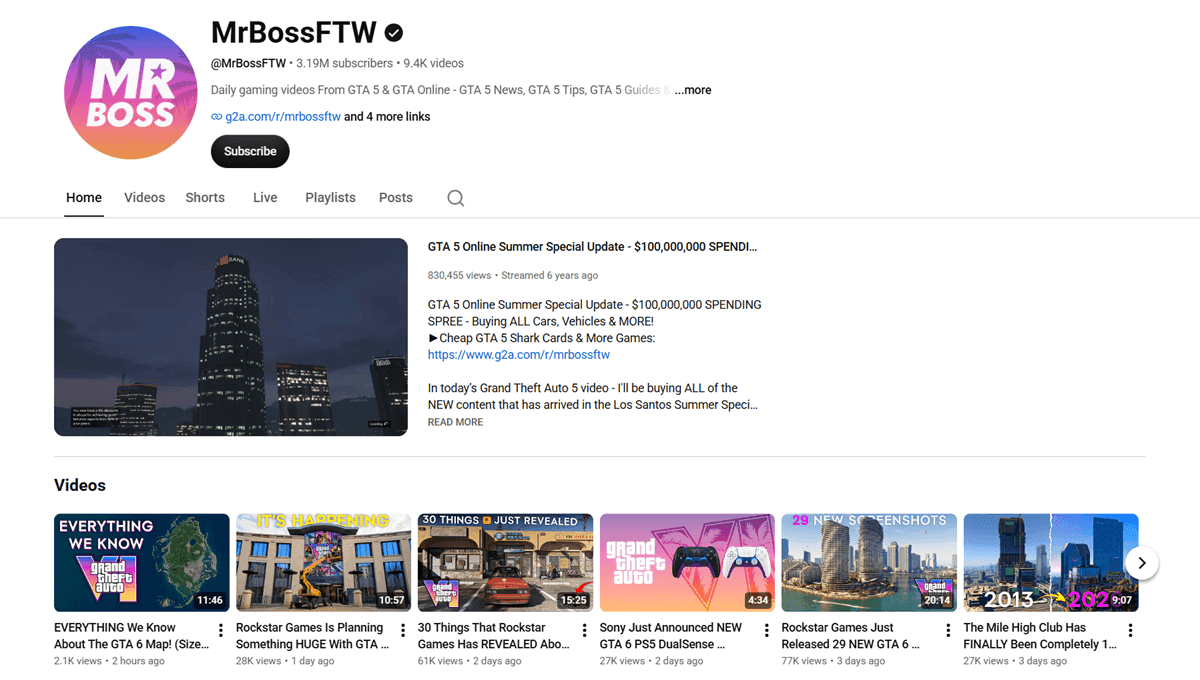
MrBossFTW, who previously ran a Call of Duty channel with around 50,000 subscribers, shifted to daily GTA Online news and eventually reached 3.19 million subscribers through thousands of videos, most of which were on-camera commentary.
Typical Gamer constructed one of the largest gaming channels, with over 16 million subscribers and 5.6 billion views, by uploading daily GTA Online gameplay videos. Some other creators chose to specialize rather than try to cover a wide range of topics:
XpertThief built a following by focusing on glitches and secret locations, and Broughy1322 became the go-to channel for GTA vehicle testing and lap times, both of which relied more on research and data than on personal personality. None of them attempted to cover every aspect of the game. Each established itself as the clear expert on one particular subject, whatever format it used.
The same pattern is already appearing in content about GTA 6, even months before its release. Some small channels are attracting views that far exceed their subscriber counts.
For example, a channel with about 3.68k subscribers did a detailed examination of the gangs in GTA 6 and got more than 504k views.
Another small channel with about 3.39k subscribers adopted one idea: jumping from the highest point in every GTA game from 1997 to 2026, and gained nearly 691k views from a single video.
A channel with fewer than 19.1k subscribers achieved almost 185k views from a focused video on “What GTA 6 Can Improve From RDR2”.
None of these channels were large before the video became a hit. Instead, they chose a very specific, narrow angle rather than offering general coverage.
The main takeaway from this guide is that in a new, rapidly growing field, specificity beats scale, regardless of the format.
Choosing Your Format: On-Camera, Faceless, or Live
Before choosing a niche, consider how comfortable you are appearing on screen and how much time you want to spend on production vs. performance. Each of the three paths below can lead to success in this niche, and many creators combine them once their channel is established.
1. On-camera Commentary
The creator’s face and reactions give the video its character, along with the gameplay or trailer material. This style quickly builds a personal link with viewers, as people see a real person’s reactions and opinions, not just information. It also places the greatest demands on the creator: they need to be comfortable on camera, maintain a consistent appearance, and have enough personality to keep viewers interested throughout.
2. Faceless and Automated Production
You don’t need a camera or to appear on screen for these videos. Instead, focus on research and writing a good script, then use either your own voice or an AI voice to narrate. This method emphasizes research and scriptwriting over being on camera. As your channel grows, you can produce more videos by batching or delegating scripting and voiceover work.
3. Live Streaming
Of the three methods, live streaming creates the strongest audience connection because viewers interact directly rather than just watch. During gameplay, reactions, or discussions, viewers can respond in the chat as events unfold. It requires the most planning and your active presence, either on camera or with your voice.
You don’t have to choose between AI and human judgment. Even if a creator doesn’t show their face, they’re still the ones writing the ideas or jokes in a script. Someone on camera can use AI research tools to find source material faster. Streamers can use AI to quickly spot their best clips. AI tools assist with specific tasks, but the content itself, including the ideas, messages, and meaning, remains the product of human creativity.
Choosing a GTA 6 Niche That Search Actually Supports
GTA 6 gameplay is a huge topic with massive potential and a constant stream of content. When the game releases, many channels will share similar videos for the same viewers. To stand out, a channel should pick a unique angle and cover it in depth rather than just being first with general footage.
1. News and leaks explainer
This content includes official trailers, Rockstar updates, and credible community discoveries. Instead of just reporting, explain what these updates mean. During the pre-launch window, this area sees the most content and the toughest competition. To get noticed, aim for deeper insights and quick delivery instead of trying to cover everything. This approach works whether you appear on camera or use a faceless style.
2. Game Mechanics and Lore Deep Dives
Comparing the physics and systems of GTA V with what we know about GTA 6, drawing connections between Leonida and earlier Rockstar worlds, and building backstories for Jason Duval and Lucia Caminos are all valuable topics. Deep dives like these are worth the effort because they stay relevant over time. As shown in the examples above, this kind of detailed content keeps bringing in search traffic long after the initial news fades.
3. Lists and Speculation
Lists of features we want, wish lists for weapons and vehicles, and predictions about game mechanics are likely to get clicks and don’t take much research. However, this type of content is more disposable, so it works best as a supplement instead of making it the main focus of your channel.
4. Gameplay Walkthroughs and Let’s Plays
Once the game is out, most content will be creators playing through missions, exploring the map, or testing mechanics, with live or recorded narration. This format works well for on-camera videos or live streams because viewers enjoy seeing real reactions. Adding genuine commentary to your footage sets it apart from the common mistake of uploading unedited gameplay with no added value.
5. GTA VI Tips, Tricks, and Guides
You can create guides on how to earn money quickly, the best initial options, some hidden secrets, and shortcuts. This type of content is search-driven and evergreen, meaning it continues to attract traffic long after the news cycle ends, and it works in any format since the value is in the information, not the presenter’s personality.
6. Setup and Configuration Guides
When the port is available, we’ll provide the best graphics settings, control schemes, key-binding advice, and required PC specifications. This is a narrow but highly practical niche, made up of users who buy to solve problems. The content is also flexible in format, though a little on-screen demonstration (even without a person’s face) helps viewers keep up.
7. Gear and Hardware Reviews
It’s surprising how rarely GTA 6 guides touch on the gear and hardware side of things. For many players, the right controller or a good headset makes all the difference. Covering these products not only fills a genuine gap but also opens the door to affiliate partnerships. By sharing honest opinions about what works, what doesn’t, and who might benefit from each item, creators can help viewers make smarter choices and build trust over time.
8. Live Streaming
Live streaming brings a different kind of energy to a channel. Sharing real-time gameplay, unfiltered first impressions, and genuine reactions with an audience feels uniquely engaging. A few moments of surprise or frustration become opportunities for connection, and a stream’s unpredictability can turn even routine gameplay into memorable moments. For viewers, it feels like joining a friend for a play session, complete with all the quirks and excitement of being there in the moment.
9. The Trapped-Creator Pitfall
The biggest error here, regardless of format, is uploading long gameplay sections without editing or adding comments and then calling it content. It is not, for two distinct reasons. First, YouTube’s own monetization policies regard such uploads as low effort. Second, they don’t establish anything that can be claimed as the channel’s own; they don’t create a distinct channel identity a viewer can recognize. The channel’s true value lies in the thought added to the footage, such as commentary, structure, editing, or presentation, not the footage itself.
Choose one or two areas to focus on, using the format that works best for you. Use the rest to supplement them once a regular publishing schedule is set. A channel that tries to cover all topics from the start usually ends up with a fragmented identity, making it hard for viewers or YouTube’s recommendation system to classify.
Planning the First 30 Videos
Having a written plan for your channel’s first month helps you stay consistent, unlike making each video on the fly. Consistency helps you build momentum early on.
Rather than brainstorming 30 separate ideas right away, try planning your content using ratios. Aim for about half your videos to be news and lore explainers, a quarter to be speculation and list articles, and save the last quarter for any official announcements that might come out that week.
You’ll probably need to reserve more time than you think. Rockstar’s announcement schedule is unpredictable. If your channel doesn’t have flexible slots, you might end up posting news videos days late instead of right when the news breaks.
Try to plan all your content at once. It’s easier to write down 30 titles and quick ideas in one afternoon and add them to your workflow than to figure out what to make each upload day.
Now is a great time to plan content around official footage. Rockstar just released its full 26-minute “GTA 6 Extended Look” gameplay presentation, which was originally meant for Netflix but is now free on their YouTube channel.

The video shows character-swapping between Jason and Lucia, the Leonida map, robberies, vehicles, police chases, and open-world activities like racing, kayaking, and scuba diving. This gives your channel a solid, official source you can use for weeks of breakdowns and analysis, without worrying about leaks.
The Rockstar Games Copyright Policy
Most channel setup guides skip this step, and it doesn’t matter whether your content is on-camera, faceless, or live.
Rockstar’s Copyright Policy and Monetization
Rockstar’s copyright policy, last updated on January 10, 2025, lets fans use their material for non-commercial purposes. This means you can’t earn money from the footage or use it to promote products or services. If you follow this rule precisely, ad-supported GTA content wouldn’t be allowed. But in practice, GTA gameplay with ads has been common on YouTube and Twitch for many years, and Take-Two Interactive hasn’t enforced the policy that strictly. The policy still doesn’t officially allow monetization. So, if you rely on this policy, you’re following what’s common on these platforms, not based on an explicit license.
What Rockstar Prohibits Explicitly
The policy sets clear, specific boundaries. It prohibits releasing any footage before the official launch date or publishing story spoilers or cutscenes with their surrounding context removed. It also bans promoting cheats, mod menus, or the trading of accounts and in-game currency, and forbids distributing unauthorized ports or modifications.
Reporting on Leaks: The Safe and the Risky
News and speculation sites need to be careful with leaks, since this is a big part of their content. It’s safe to cover trailers and official announcements. The real risk comes from sharing leaked, unreleased footage before Rockstar confirms it, no matter how popular the video is or what format it uses.
AI Voiceovers and Disclosure Requirements
Besides Rockstar’s rules, if you use an AI voiceover that makes a real person’s face or voice appear to say or do something they didn’t, you must add an AI disclosure label on the platform. YouTube’s March 2024 policy says you need a disclosure if your content replaces a real person’s face or copies their voice for narration. But you don’t need a disclosure for using AI to write scripts, brainstorm ideas, or make captions since these are tools any creator might use. Generic narration that doesn’t copy a real person’s voice also doesn’t need a disclosure. The main issue is using AI to impersonate a real, identifiable person.
Monetization: Originality vs. Non-Infringement
Before you upload any video, remember that to be eligible for monetization, your content must be original, not just free of copyright issues. YouTube’s guidelines say that unedited, raw gameplay without commentary can be considered low-effort or repetitive. So, even if your footage is entirely allowed, you might still lose monetization. This is another reason why the ‘trapped-creator’ mistake can hurt your channel.
Content ID Claims Are Not Copyright Strikes
It’s important to know that a Content ID claim is not the same as a copyright strike. YouTube’s help pages explain this clearly. A Content ID claim happens automatically when your audio or video matches something in YouTube’s copyright database, usually background music. This can affect monetization or visibility, but it doesn’t give your channel a strike on its own.
If you think a claim is wrong because you have a proper license for a music track but the system doesn’t recognize it, you can challenge it in YouTube Studio. After you submit a dispute, the claimant has 30 days to respond by dropping or reactivating the claim. If they reactivate it, you can appeal, and then they have 7 days to reply.
The main risk is disputing a claim when you don’t actually have the rights. In that case, the claimant can file a copyright removal request, which can lead to a real strike if it’s valid. So, only dispute a claim if you’re sure you have the rights.
Branding a Channel Before There’s Footage to Show
Unlike post-launch channels, branding your channel before launch gives you time to get things right before anyone starts watching GTA 6 videos. This applies whether you plan to show your face, stream live, or stay off camera altogether.
YouTube Channel Name and Username
Pick a YT channel username that is simple to spell, easy to pronounce, and clearly relates to GTA 6 or Vice City. Avoid overly general names, since they can get lost in search results. Check that your handle is available on YouTube, TikTok, X, and Instagram before finalizing it.
Visual Identity
Rockstar’s GTA 6 cover art and trailers use a pink-and-purple neon look that clearly references the original 2002 Vice City visual style. Fans have noticed that Jason is linked with blue and Lucia with pink in the official artwork. Using these colors for your banner and avatar helps people instantly recognize the genre and setting, even without any text.
Personal Identity, for On-camera and Live Creators
Building a consistent on-screen style, a catchphrase, or a unique point of view (for example, skeptical, enthusiastic, technical, or comic) helps viewers connect with you, not just the game. Channels without a host can also build this kind of identity through consistent branding and a steady AI or recorded voice.
Channel Bio
The About section serves a genuine purpose for on-page SEO, not just description. It is indexed and one of the areas YouTube’s system checks for topical signals. When writing it, start with the needs of a human reader and let terms a real search query would use, such as GTA 6, Vice City, Leonida, and Rockstar Games, appear naturally rather than forcing keywords that make the text sound unnatural.
Affiliate Marketing Through Honest Gear and Tech Reviews
Most GTA 6 setup guides omit this category, even though it is a reliable income source for any channel and doesn’t depend on ad rates or subscriber thresholds.
Reviewing Gear for GTA 6 Gamers
The concept is straightforward: GTA 6 players buy items like capture cards, controllers, headsets, and especially high-end gaming TVs and monitors that display the game’s graphics effectively. A channel reviewing these products from the GTA 6 perspective, for example, ‘best gaming TV for GTA 6’, ‘best capture card for streaming GTA 6’, or ‘GTA 6 PC specs’ once the port launches, reaches people already ready to buy. Whether the review is on camera, in a live unboxing and testing stream, or a faceless comparison video, this approach works equally well.
The Importance of Trust and Experience
This works in 2026 because of trust, not just traffic. Some advanced AI tools can now produce a decent “top 5 gaming TVs” article in seconds, and much of that content fills search results without any real hands-on testing. People have begun to notice this.
A reviewer who actually owns the product, has played GTA 6 or its predecessor on it, and offers a specific, honest opinion, including the product’s shortcomings, stands out since much competing content no longer does. This is not just about trust; it matches the “experience” element in Google’s E-E-A-T quality guidelines, where content by someone who genuinely used a product for enough time ranks differently from content based on secondhand information.
Transparency and Honest Recommendations
In practice, this means testing whenever possible before publishing, specifying exactly what you tested (for example, which TV model, which capture card, and under what conditions), and being ready to say a popular product isn’t the best choice when it isn’t. A review that always gives positive recommendations feels like an advertisement rather than a review, and both audiences and Google’s own guidelines treat this lack of skepticism the same way.
Regional Language Channels: Less Competition, Same Rules
The competitive analysis above is mostly based on English searches. A genuine gap remains for other languages, since GTA already has a large non-English-speaking audience, as proven by the success of GTA V.
Successful Regional GTA Channels
India alone has many GTA content creators with large followings. The largest GTA streamer in India, Techno Gamerz, has about 53 million subscribers by producing GTA content in Hindi.
CarryisLive, a second channel by creator Ajey Nagar, has surpassed 12.6 million subscribers with its mix of GTA content. This audience is real, as shown in live streaming and on-camera commentary.
Most search-volume and competition data mentioned earlier in this guide relates to the US market and English. A channel in Hindi, Spanish, Portuguese, or Indonesian covering the same GTA 6 niches faces only a small portion of the competition English channels do, while drawing from an audience already willing to support GTA content at scale.
Regional Channels and Copyright Enforcement
Rockstar’s copyright policy is language-agnostic. The rules on leaks, spoilers, and cheat promotion apply the same way to all videos, regardless of narration language or audience size. Some creators assume smaller, lower-visibility regional channels attract less enforcement because of limited reach and fewer complaints. While this may sometimes be true in practice, it is not Rockstar’s stated policy and does not constitute a safe harbor. The guidelines presented here apply equally to regional and English-language channels.
Building Your Content Production Pipeline
Before getting into the details of production, remember that every creator has their own style and preferences. You might prefer live streaming, on-camera recording, or faceless automation, but the main challenge is always the same: making content that feels planned and put together, not random or rushed. Successful channels stand out because they follow a plan. Even small, thoughtful choices have a bigger impact on the viewer’s experience than fancy gear or making things up as you go.
On-Camera Production
The most important things are a webcam or basic camera, a good microphone, and decent lighting. You don’t need expensive gear. Viewers will accept average video quality, but poor audio is a dealbreaker. It’s easier to edit if you record in short sections instead of one long take, and you can fix mistakes without starting over. For reaction or commentary videos, watch the material first and then record your reactions in a clear, organized way. This works better than recording your first, unedited impressions, which can be too long and unfocused.
Faceless and Automated Production
Scriptwriting
Begin with a strong hook within the first five seconds. This could be a statement, a question, or a clip that quickly shows viewers what they’ll see. Keep the pace quick, since faceless videos depend on the script to keep people interested. AI writing tools can help you draft scripts faster, and according to the policy above, you don’t need to disclose that you used AI for scriptwriting. It’s considered production help, not creating fake content.
Voiceover Automation
If you’re making faceless videos, choosing your voiceover approach matters. Text-to-speech and AI voice tools like ElevenLabs, Murf, and Speechify are now good enough that short AI voiceovers can sound almost human. You can also use your own recorded voice to avoid any AI disclosure issues. The same compliance rule applies: you don’t need to disclose if you use your own or an original AI voice, but you must disclose if you clone someone else’s real voice, including famous YouTubers.
Screen Capture Workflow
Before GTA 6 launch, focus on capturing and editing official trailer and gameplay reveal footage with clear framing and no compression issues. After launch, record your own gameplay for commentary and analysis.
Audio-Visual Sync
A common failure point is the voiceover falling out of sync with the on-screen footage as the video gets longer. If you edit the video in short sections and match the audio to the video before assembling the full timeline, you can catch this problem early instead of needing a complete re-edit later.
Visual Pacing
Because faces usually keep viewers interested, faceless commentary needs visual movement to hold attention. Try using b-roll cutaways, trailer breakdowns, close-ups on a particular frame, and on-screen text annotations. The cutting and timing techniques that keep long-form commentary engaging are worth a deeper look at specialized long-form editing tools and workflows, though this guide doesn’t have space to cover those in detail.
Live Streaming GTA 6
Live streaming is its own type of production. Like the other formats, it still requires good preparation, even though everything happens in real time.
Platform and Technical Setup
Both YouTube Live and Twitch allow GTA streaming and have similar technical requirements: you need streaming software such as OBS Studio, a stable internet connection, and a capture setup for playing on either a console or a PC. The advantage of using YouTube Live is that it keeps the stream visible through the same search and recommendation system as regular uploads, which helps a channel already building search authority in the areas mentioned above.
Going Live Around Key Moments
The trailer release, official announcements, and most significantly the November 19 launch are the most valuable opportunities for live content. A stream that begins as soon as the embargo lifts or news breaks can capture search and social interest in a way a pre-recorded video published hours later simply can’t match.
Chat and Community
The key difference between live broadcasts and the other two content types is how you connect with your audience. Reading and replying to chat in real time, acknowledging regular viewers by name, and adding simple interactive features like polls, viewer challenges, and Q&A sessions help build a connection that neither on-camera uploads nor faceless videos can match. This connection encourages people to join your channel and use Super Chat, which pays better than regular ads.
Turning Streams Into More Content
The stream can also serve as a source for other formats discussed in this guide. You can turn the best moments into on-camera highlight uploads, and a faceless channel can take the same footage and later turn it into a scripted, researched breakdown. Making short clips for platforms like TikTok or Instagram is its own skill, but tools like Vizard AI make it easy by quickly finding the moments worth sharing. This saves time and helps you focus on what matters: connecting with your audience.
Managing Production So Consistency Doesn’t Collapse
Consistency is the strongest predictor of growth in this field, and it is the first thing to give way when a content creator gets busy or runs out of ideas. A simple content management system deals with both issues and needn’t be complicated.
An achievable setup, created in a spreadsheet or with a tool such as Notion or Airtable, tracks each video as it moves through five stages.
- Idea: a one-line concept, tagged by niche category and format (on-camera, faceless, live).
- Scripted or planned: draft or talking-point outline complete.
- Recorded: voiceover, on-camera footage, or stream VOD captured.
- Edited: rough cut done, ready for review.
- Scheduled: publish date set, thumbnail and title locked. Each video or stream moves through those five stages in order, in one place, instead of scattered across a notes app and memory.
Two additional fields should be included. Firstly, a niche tag (for example, news, lore, speculation, gear, gameplay, tips, setup) so that a content creator can immediately see whether one of the categories is being overlooked. Second, add a target keyword field completed at the Idea stage so scripting and title-writing can focus on the same search term rather than going in different directions.
When you’re coming up with content ideas, make sure to keep a dedicated list of GTA 6 ideas right inside your production tracker. That way, you can brainstorm freely without mixing up your idea generation with the actual work of making videos.
This system also addresses a common pre-launch problem: batching. It is much more efficient to record several videos or scripts in a single session and then edit them over the following week than to produce one video at a time; a well-defined pipeline enables batching without losing sight of which stage each video is actually at.
Cracking the Algorithm Without Gaming It
The tactics listed below aren’t shortcuts that bypass YouTube’s system; instead, they involve sending the system accurate signals, which differs from trying to trick it. This applies to a stream’s post-broadcast VOD, not just the uploaded video.
Thumbnail Design
Thumbnails should use high-contrast colors and have a clear focal point, such as the creator’s face for on-camera and live content or a vivid character, vehicle, or location image for faceless content. Always include four words or fewer of text. Thumbnails with more than four words become illegible at the small sizes most viewers actually see, losing clicks instead of gaining them.
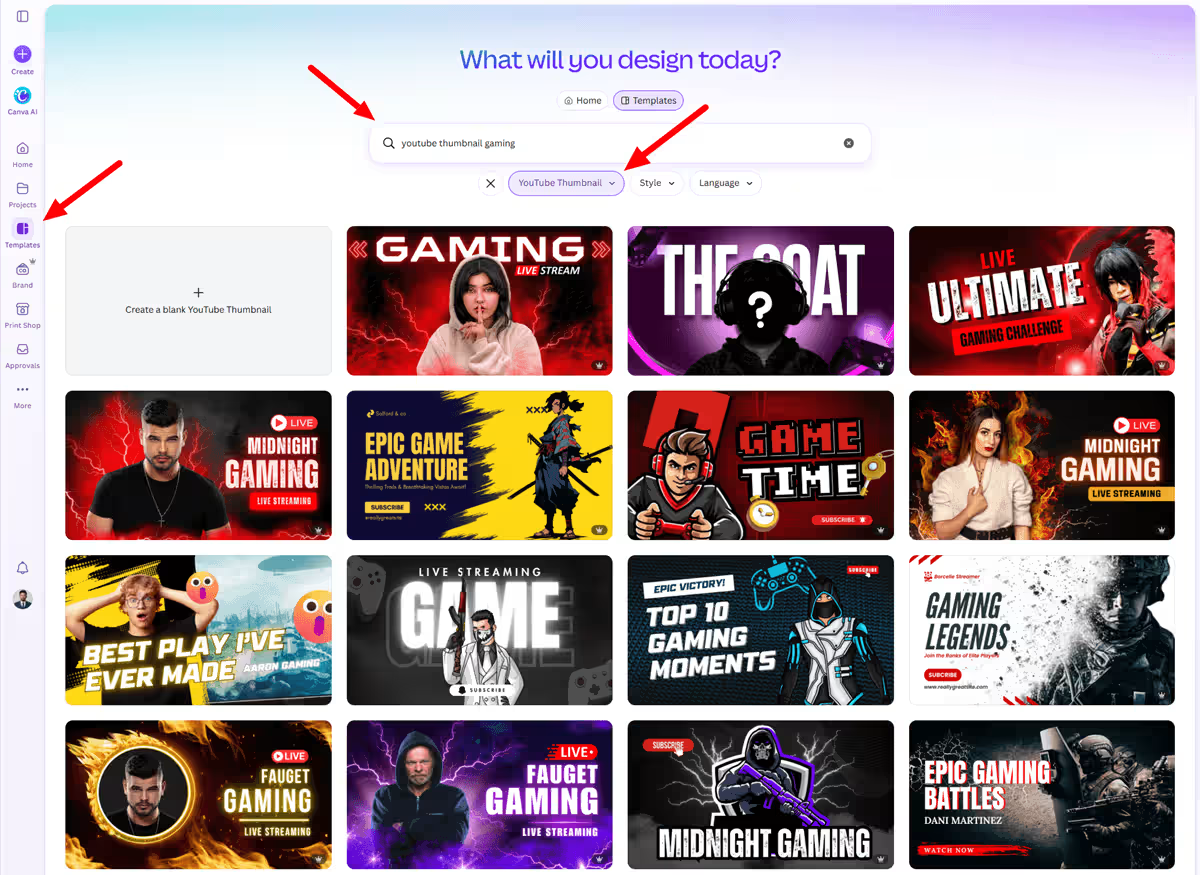
Using a design tool like Canva makes it easy to try several thumbnail arrangements without hiring an editor. By A/B testing two versions of early videos with YouTube Studio’s built-in function, thumbnail design changes from a guess to a data-based decision.
Title Strategy
To attract clicks, combine a specific, search-friendly term with a reason to click. Although “GTA 6 Vehicle List” is on topic, it is forgettable. “Every Confirmed GTA 6 Vehicle, and What We Know About Each One” gives search engines a clear focus and gives human readers a clear reason to click. Promising more in the title than you deliver leads to short viewing times and hurts a channel’s position in the recommendation system. The title’s promise must match the video’s content.
Metadata That Actually Helps
The description begins with two or three simple sentences and includes relevant tags. For longer videos, it also includes chapter markers that divide the content into named sections. These chapters let viewers jump directly to the part they want and give YouTube’s search system a structured overview of the video’s contents.
This improves topical relevance beyond what the title and description alone can achieve. To find which tags and titles are worth targeting, the vidIQ keyword data mentioned earlier is available through a browser extension.
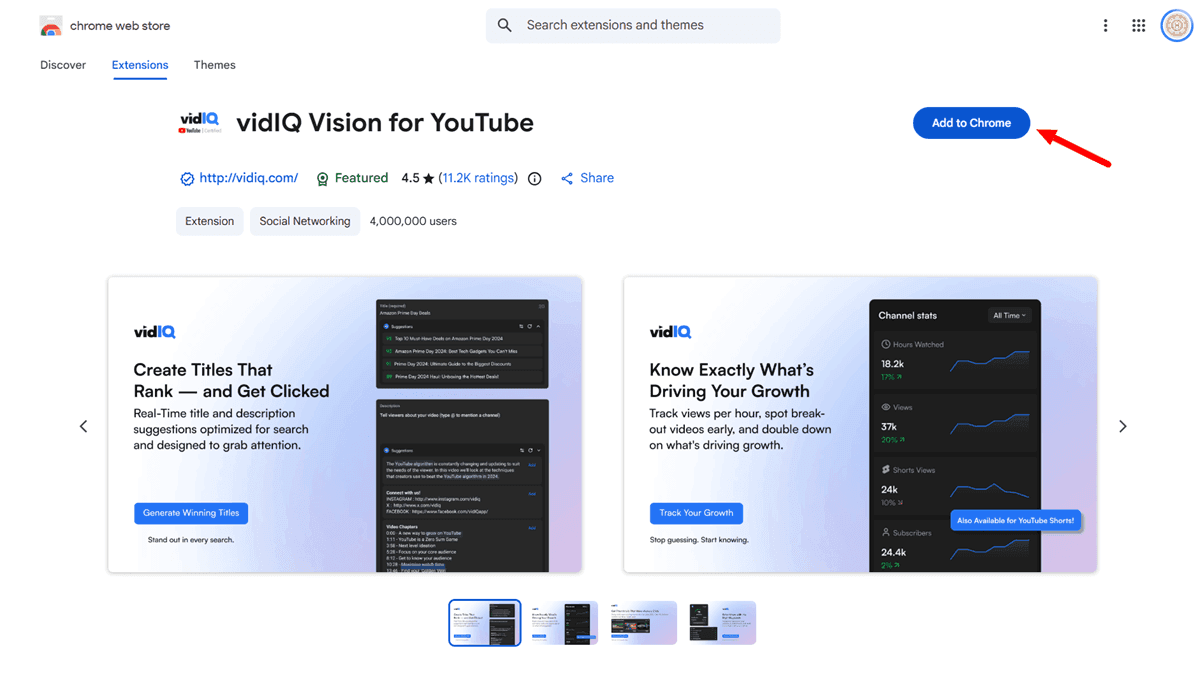
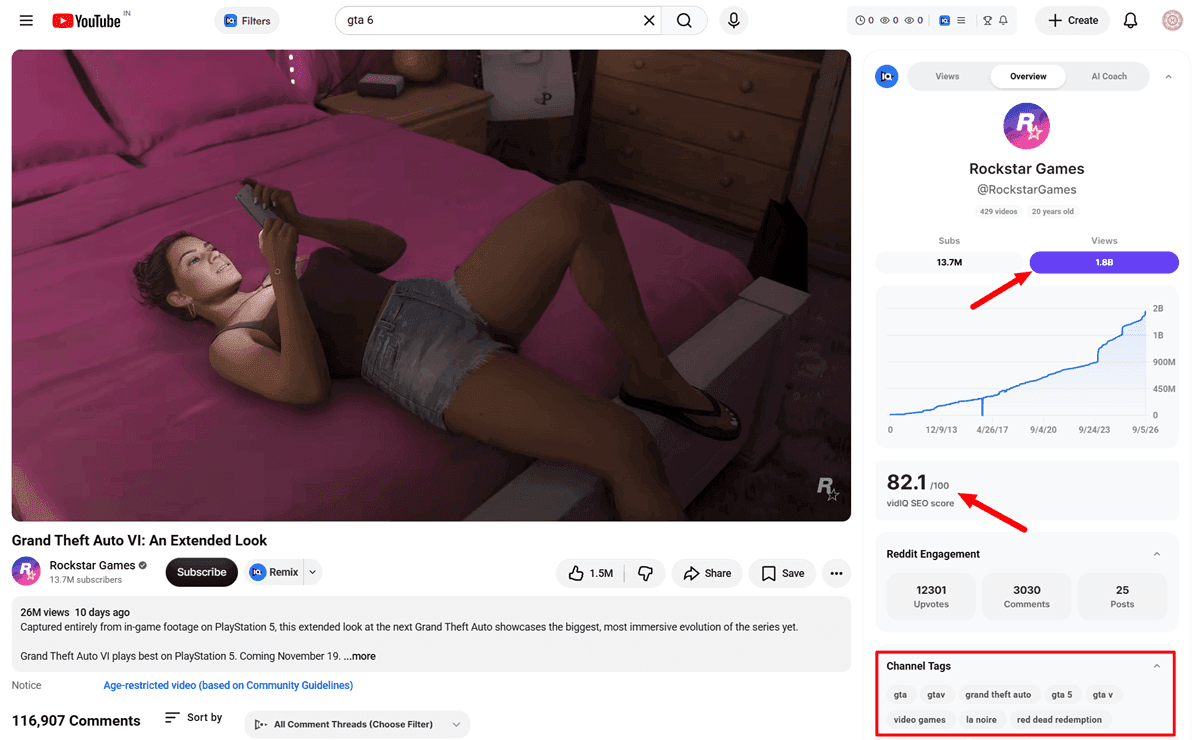
TubeBuddy offers similar tools to select and score tags for SEO. Both replace guesswork with actual search data.
Structural Elements
Key elements to set up:
- A short channel trailer designed for new visitors
- The playlists arranged by niche category, not by upload date
- The end screens that direct viewers to the next relevant video rather than showing a standard ‘subscribe’ message
Although none of these measures affect a single video’s performance, together they turn the channel into something a viewer can explore rather than just a collection of individual uploads.
Watching the Key Metrics
The analytics dashboard on YouTube Studio provides information on click-through rate, average view duration, and audience retention for each video, and those videos that perform well on all three counts are worth developing into a series. Early channel growth mainly comes from identifying the format and topic its specific audience responds to. The data reveals this, not the creator’s judgment about what will work.
The Road to Monetization, and What Comes After It
To join YouTube’s Partner Program, a channel must have 1,000 subscribers and either 4,000 valid public watch hours over the previous 12 months or 10 million valid Shorts views in the last 90 days. You can reach a lower level with 500 subscribers and 3,000 watch hours or 3 million Shorts views. This gives access to fan-funding features such as Super Chat and channel memberships even without any ad revenue, making these tools useful for a live streaming channel.
On August 10, 2026, YouTube announced that the thresholds would increase to 8,000 watch hours or 20 million Shorts views for new creators who apply starting February 1, 2027. Creators accepted by that date will continue to meet the existing lower requirement. Applying before the deadline is a real advantage, not merely a formality.
Ad revenue shouldn’t be the only option. Contextual affiliate links can start bringing in earnings before a channel even becomes eligible for the YouTube Partner Program, since affiliate programs do not have a subscriber requirement. Place links naturally where a video, stream description, or companion blog post discusses a relevant tool or product, such as a voiceover tool comparison, a gaming TV review, or a channel management setup.
A channel that ultimately offers its own digital product catalog, such as templates, presets, or guides, can list them on a platform such as Payhip without building a custom checkout system from scratch. Sponsorships come later, when the channel has a well-defined, specific audience a brand can target with confidence.
The Post-Launch Pivot
The system described above applies to the pre-launch and early-growth stages, but on release day, no matter the format, channels must shift their content mix. Once the news cycle has settled and a real, playable game is available, a channel that initially focuses solely on news and speculation will have a natural end date.
The transition should be planned, not put together last week during launch. It should shift toward gameplay commentary, live streams, guides, and let’s-play material, using the production pipeline developed during the pre-launch phase.
A channel that had been publishing regularly and had developed a distinct identity over many months before its launch has real advantages when it comes to making the transition: it already has a subscriber base, a format that has been proven to work, and search rankings for pre-launch terms that translate into authority for post-launch ones.
This is a far stronger position than starting from scratch on launch day, which is precisely what most competing channels will be doing. For a clear explanation of how a channel makes money from ads, affiliate links, and its own products, see the full creator monetization roadmap.
Getting More Out of Every Video
This section explores practical strategies for maximizing your content’s reach and impact by repurposing, cross-posting, and leveraging multiple formats. Whether you’re working with long-form videos, short clips, or blog posts, these approaches help you get more value from every idea.
Repurposing Long-Form Content
A single, well-researched long-form video or stream contains more content than you think. For example, the research and script for a “Confirmed GTA 6 Vehicles” video can also become a blog post targeting the same keyword, a discussion thread in appropriate GTA communities on Reddit and X, and a talking point for a follow-up video when new information becomes available. You can turn the best moments from a stream into highlight uploads and reuse the footage in a faceless breakdown. Treating research and footage as reusable across formats rather than using them only once per video lets you multiply output without increasing the workload.
Short-Form and Cross-Platform Strategy
The guide focuses on long-form and live production. Turning that footage into short-form clips is a separate editing discipline with its own techniques covered elsewhere. Tools like Buffer or Later schedule posts across multiple platforms simultaneously instead of logging into each platform individually.
Leveraging Blog Posts for Growth
The blog-post version deserves special consideration because it offers something videos and streaming content lack: it captures Google search traffic on a timeline independent of YouTube’s recommendation algorithm. When a creator maintains both a channel and a companion website, they use two different search engines based on the same research. A comprehensive SEO tool like Semrush can verify that the blog post targets terms with actual search volume before writing begins, just as keyword checking on the video side was described above.
Scaling the Pipeline as the Channel Grows
As your channel evolves and ambitions grow, so will the demands on your time and workflow. Let’s discuss how to scale your production pipeline without losing the personal touch that makes your content resonate.
When to Outsource Tasks
The production systems described above suit an individual who does each stage themselves but are also designed to let tasks be passed to others. For a channel without the creator’s face, scriptwriting is usually the first task worth outsourcing once you have revenue to reinvest. If a clear brief is provided, including the target keyword, required hook style, and a few example scripts to match the tone against, a freelance writer can produce a suitable first draft needing only a light edit.
Voiceover work follows the same principle. Once a channel has established a consistent voice, whether provided by a human or AI, you can group recording sessions and assign them to others. For on-camera and live channels, editing is usually the first task to outsource since on-screen performance must remain the creator’s responsibility. However, cutting, pacing, and thumbnail work do not have to.
Tracking Performance
None of this is effective unless you track whether it works. YouTube Studio answers which videos or streams are performing. It is also useful for a channel to compare its numbers with other channels of similar size in the same niche, using publicly available subscriber and view figures as a rough benchmark.
A channel that outperforms its size in watch time but fails to grow subscribers usually points to a specific issue: good content but weak calls to subscribe, not a basic content problem.
Building a Channel That Outlasts the Algorithm
Online platforms constantly change their rules, so it’s important to build a channel that can handle anything. Here’s how to keep your channel going strong no matter what changes come.
Creating Resilient Channels
The algorithms have changed; in the last two years alone, YouTube’s recommendation system, Partner Program thresholds, and AI content policies have all changed significantly. A channel built on today’s exact rules is fragile, a fact easy to overlook while everything works.
The sensible approach isn’t to predict the next change since that is almost impossible from the outside. Instead, build a channel that doesn’t depend on any one mechanism or format and keep it stable. A specific, clearly defined niche is more likely to survive an algorithm update than a general one because niche authority has long been a signal YouTube’s system rewards, even though ranking details have changed over time.
Building multiple income sources, such as ad revenue, affiliate links, and later sponsorships or owned products, means a single policy change affects one stream rather than the entire channel.
The same reasoning applies to the audience. By using a simple email signup tool like Beehiiv or Kit and referring to it in the video description or channel bio, a content creator gains a way to contact viewers directly, a method no algorithm change can hinder.
Community Guidelines vs. Copyright Strikes
It is also important to distinguish between a community guidelines strike and a copyright issue, since these are two separate systems, each with its own causes and consequences. As mentioned above, a copyright-related strike results from a valid takedown request connected to the unauthorized use of someone else’s content.
A strike under community guidelines results from directly breaking YouTube’s content policies, such as harassment, spreading misinformation, or violating rules on violence and age restrictions for realistic gaming footage, whether live or recorded. It affects the whole channel, not just a single video’s monetization. A channel focused on GTA 6 is more likely to face copyright issues than one focused on community guidelines, as long as it stays within the boundaries discussed. It’s important to know the difference if either appears in a channel’s dashboard since the responses and consequences differ.
A channel that focuses on a clear niche, has multiple income sources, uses different formats, and understands the risks will survive future policy changes, not just the current ones.
Frequently Asked Questions
Q: Do I need to show my face to build a successful GTA 6 channel?
A: No, faceless channels are already common and successful on YouTube in the gaming sector, especially in areas such as news, lore, and analysis, where the work involved in research and writing is what produces the video. While on-camera and live-style programs establish a personal connection more quickly, many of the most prominent GTA channels in history, such as research-focused channels and faceless news channels, have never used a face.
Q: Does using an AI voice for narration require a disclosure label on YouTube?
A: Not by itself. According to YouTube’s policy, you must disclose when content copies the voice or face of a specific, identifiable real person, but not when AI originally generates the narration. You don’t need to disclose if a channel uses a consistent, original AI voice in its own scripts. However, you would need to disclose it if you copied the actual voice of a YouTuber or public figure.
Q: How much GTA 6 footage can I legally use before it becomes a copyright problem?
A: Rockstar hasn’t published any word-count limit. The warning lines are clear in that they are categorical rather than based on quantity: this includes leaked or pre-release footage, isolated spoilers or cutscenes without any context, and anything that promotes cheats or unauthorized mods, no matter how much or how little footage is used or whether the video is live or recorded. Officially released trailers and, afterward, a creator’s own gameplay with real commentary are the safest basis.
Q: Will a Content ID claim on my video hurt my channel’s standing?
A: A single claim has no such effect. Content ID claims are automated and distinct from copyright strikes. Although a claim may affect a video’s monetization, it does not penalize the channel as a whole. Copyright strikes, by contrast, result from actual copyright removal requests and involve a more serious process, posing a huge risk of channel disablement.
Q: How soon can a new GTA 6 channel realistically start earning?
A: To earn ad revenue, one must first meet the criteria set by YouTube’s Partner Program: this means attaining 1,000 subscribers and either 4,000 watch hours or 10 million Shorts views, a requirement that usually takes new channels several months of regular content publishing at least. With affiliate income, one can begin earlier because there is no subscriber threshold, as long as the channel already produces content that has genuine commercial-intent value, for example, content comparing gear or software.
Q: Should I wait for GTA 6 to launch before starting the channel?
A: No, the whole benefit of this guide is obtained by developing an audience, establishing a content schedule, and improving search rankings during the pre-launch period, since at that time the level of competition is lowest and search traffic is already increasing; if you wait until launch day, you’ll have to start from scratch at the very moment when competition is at its highest.
Q: Is a non-English GTA 6 channel a realistic strategy?
A: Yes, in fact, it’s often easier. GTA V has shown a large non-English audience, including tens of millions of subscribers among GTA creators who use Hindi. Since most publicly available competition data is in English and focuses on the US market, a channel offering content in a regional language within the same niche faces considerably less competition when it comes to a proven audience.
Q: Is live streaming or uploading video a better starting point?
A: It all comes down to how much time you have and how comfortable you are performing in real time; live streaming builds a stronger connection with your audience faster and lets you use fan-funding features earlier because live viewers are generally the most engaged. By contrast, uploaded video, whether it’s with someone on camera or faceless, offers more schedule flexibility and lets the creator research and edit before the content goes public. Many successful channels end up doing both.
Conclusion
The difference between channels that have a real audience when they go live and those that begin with no audience when competition is greatest is consistency during the pre-launch period. This consistency is possible through the system described in this guide: a specific niche within the right format, a copyright-conscious pipeline, a real content management workflow, and metadata that gives YouTube’s system clear signals about whether content is being filmed, produced off camera, or broadcast live.
Tell us whether you’re starting with a pre-recorded video, a voice-only format, or live broadcasting, and leave your channel name or the most exciting feature you have in store for GTA 6 in the comments.
➡️ Also Read: How to Make Money With GTA 6 Online: Complete Creator Roadmap
