
Vizard Black Friday Deals 2026: 50% Off Yearly Plans

Vizard Black Friday Deal
- Half price on yearly plans: Creator costs $174/year instead of $348 on monthly billing, with no code to enter.
- About half OpusClip’s cost per minute: 7,200 credits/year for $174 works out to $0.024 per minute of video.
- Clipping plus Vizard Agent: Your credits cover AI clipping, Vizard Agent, and AI Studio models like Seedance.
| Deal Detail | What You Get |
|---|---|
| Discount | 50% off Creator and Business on yearly billing |
| Coupon Code | None needed |
| Yearly Prices | Creator $174, Business $234 |
| Credits | 7,200/year, shared between clipping and Agent |
| Renewal | Auto-renews at the end of each billing cycle |
- Virality scores, auto reframing, and animated captions on every clip.
- 4K exports with no watermark on Creator and Business.
- Schedules posts to YouTube, TikTok, Instagram, Facebook, X, and LinkedIn.
- Clip picks rely mainly on speech, so silent gameplay needs manual picks.
- Agent projects use the same credits as clipping.
- No AI dubbing or eye-contact correction.
Quick Deal Summary

- The Vizard Black Friday deal is live: 50% off Creator and Business on yearly billing, with no code needed. Claim the Vizard Black Friday deal.
- Creator costs $174/year ($14.50/month) instead of $29/month, and Business costs $234/year ($19.50/month) instead of $39/month.
- Both plans include 7,200 credits a year, shared between AI clipping and Vizard Agent, with no watermark and 4K exports.
- At $0.024 per minute of video, Vizard Creator costs about half as much per minute as OpusClip Pro on yearly billing.
We recommend Creator for most podcasters and gaming streamers, because it covers 600 minutes of video/month with 4K exports for $174/year. If you work with a team or manage up to 20 brand accounts, Business is a better fit.
Vizard Black Friday Deal 2026 Details
| Deal Component | What You Get |
| Vizard Black Friday deal | 50% off Creator and Business on yearly billing |
| Creator | $14.50/month ($174/year) instead of $29/month |
| Business | $19.50/month ($234/year) instead of $39/month |
| Coupon code | None needed |
| Credits | 7,200/year (600/month), shared between clipping and Vizard Agent; higher credit tiers available |
| Credit rollover | Unused credits roll over for 2 months on paid plans |
| Validity | Live now for Black Friday and Cyber Monday 2026 |
| Renewal | Auto-renews at the end of each billing cycle until you cancel |
| Free plan | 60 credits/month, 720p exports with a watermark, 3-day storage |
| Purchase link | Get the Vizard Black Friday deal |
How to Claim the Vizard Black Friday Deal
Here’s how we picked a yearly plan. The discount shows as soon as you flip the billing switch, so there’s nothing to paste in.
Step 1: Open Vizard’s pricing page through our Vizard link.
Step 2: Set the billing toggle to “Yearly 50% OFF.” Creator changes from $29 to $14.5/month, and Business from $39 to $19.5/month.
Step 3: Pick your credit amount from the dropdown under the price. The default is 7,200 credits/year, which is 600 minutes of video a month.
Step 4: Click “Get Creator” or “Get Business.” Creator shows “$174 billed yearly” and Business “$234 billed yearly.”
Step 5: Pay and confirm. Your plan renews automatically at the end of each billing cycle unless you cancel.
Step 6: Upload a long video to clip, or switch to Vizard Agent and describe the video you want built.
Vizard Pricing: Black Friday Yearly vs Monthly
| Plan | Monthly Billing | Yearly With 50% Off | You Save per Year | Credits | Social Accounts |
| Free | $0 | $0 | None | 60/month | None |
| Creator | $29/month ($348/year) | $174/year ($14.50/month) | $174 | 7,200/year | 6 |
| Business | $39/month ($468/year) | $234/year ($19.50/month) | $234 | 7,200/year | 20 |
One credit equals one minute of uploaded video for clipping. Vizard Agent and AI Studio models such as Seedance draw from the same credit pool, so heavy Agent use leaves fewer minutes for clipping. If you upload more than 10 hours of video a month, choose a higher credit tier from the dropdown instead of switching plans.
Vizard vs OpusClip: The Best OpusClip Alternative?
Vizard is the strongest OpusClip alternative on price. The core AI clipping is the same idea, but Vizard’s yearly Creator plan gives you twice the minutes for the same $174.
| Feature | Vizard Creator (Yearly) | OpusClip Pro (Yearly) |
| Price | $174/year | $174/year |
| Minutes of video | 7,200/year (600/month) | 3,600/year (300/month) |
| Cost per minute | $0.024 | $0.048 |
| Export quality | Up to 4K | No 4K on Pro |
| Free plan editor | Full editor | No editing |
| Scheduling | YouTube, TikTok, Instagram, Facebook, X, LinkedIn | YouTube, TikTok, Instagram, LinkedIn, plus Pinterest, Threads, and Bluesky |
| Subtitle translation | 100+ languages | Video dubbing on Pro instead |
| API | Self-serve on all paid plans | Limited on Pro |
| Direct imports | File upload (up to 10 hours or 30GB) | Twitch, Riverside, Loom, Frame.io |
Choose Vizard if you clip long videos every week and want the lowest cost per minute, 4K exports, or Facebook and X scheduling. Choose OpusClip if you need AI dubbing, eye-contact correction, direct Twitch imports, or posting to Pinterest, Threads, or Bluesky.
Vizard AI for GTA 6 Clips
GTA 6 launched on 19 November 2026 on PS5 and Xbox Series X|S, and it set Twitch viewership records on day one. That makes it the biggest clipping opportunity of the year for gaming creators, and Vizard is one of the best tools for turning long GTA 6 streams into vertical clips.
Vizard accepts uploads of up to 10 hours or 30GB, so a full stream VOD fits in one go. It transcribes the video, scores likely highlights, reframes to 9:16, and adds animated captions; you can also type a prompt such as “find the funniest police chase” to steer the picks. Vizard finds moments mainly from speech, so it works best when you commentate over your gameplay with a facecam. For silent gameplay, scrub the timeline in the editor and pick moments yourself.
At 600 minutes/month on Creator, you can clip about ten hours of GTA 6 footage every month for $14.50/month on yearly billing.
Vizard Agent and Seedance Video Generation
Vizard Agent
Vizard Agent, at agent.vizard.ai, is a video agent that works like a small production team, with its own writer, researcher, editor, and designer. You type an idea or upload footage, describe the style you want in plain words, and it builds the video. It’s Vizard’s answer to Agent Opus. The free plan runs Agent on the Flash model, while Creator and Business add all models for complex tasks.
Vizard Agent has 22 templates, including movie recaps, AI films, mini-docs, and documentaries. It’s useful for product ads built from a description and for tutorials. Agent projects use the same credits as clipping.
Seedance Video Generator
Vizard’s AI Studio includes ByteDance’s Seedance model for text-to-video and image-to-video. Start from a prompt or a still image, and it produces clips up to 1080p in several aspect ratios and durations. It’s best for storytelling clips, product demos, and brand content, and it uses Vizard credits.
Vizard Use Cases
Vizard fits anyone who records long videos and needs short clips from them. Here’s who gets the most from it.

- Podcasters and interview shows: turn each episode into a batch of captioned clips with speaker tracking.
- Gaming streamers: clip GTA 6 and other stream VODs into vertical highlights with commentary.
- Coaches and course creators: cut webinars and lessons into short teaching clips.
- Marketing teams: repurpose events, customer interviews, and product demos, and schedule them from one calendar.
- Agencies: manage up to 20 client social accounts on Business with brand kits and custom fonts.
- Brands without footage: build ads and explainers from a text idea in Vizard Agent or Seedance.
Which Vizard Plan Should You Buy?
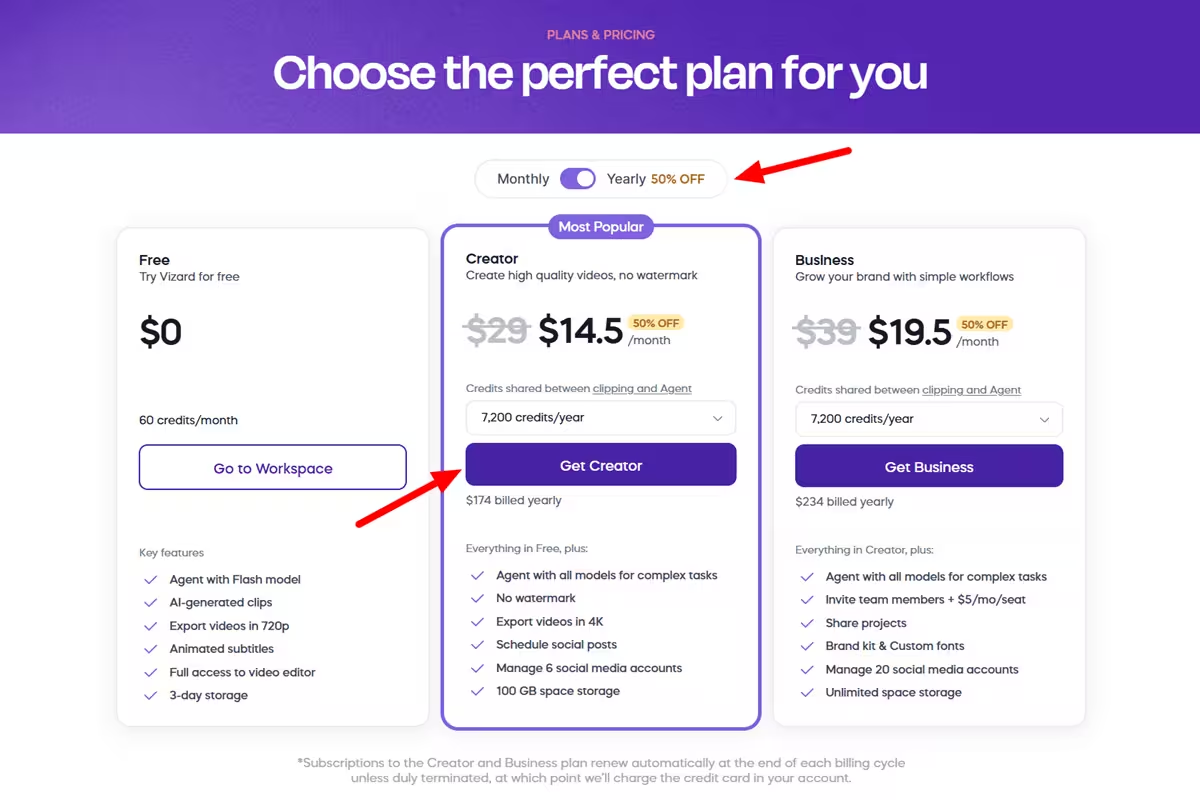
Free: For Testing the Clipping Quality
The free plan gives you 60 credits/month, AI-generated clips, animated subtitles, the full video editor, and Agent with the Flash model. Exports are 720p with a watermark, and storage lasts 3 days. It’s enough to see whether Vizard picks good moments from your videos.
Creator: Best Value for Most Creators
Creator removes the watermark, exports in 4K, schedules posts to 6 social accounts, gives you 100GB of storage, and adds all Agent models. At $174/year for 7,200 credits, it’s the plan we recommend for solo creators and streamers.
Business: For Teams and Agencies
Business adds shared projects, team members at $5/month per seat, a brand kit with custom fonts, 20 social accounts, and unlimited storage. At $234/year, it’s worth the extra $60 if you work with others or post for several brands.
Vizard Features and Benefits
AI Clipping With Virality Scores
Vizard reads your long video, finds moments that stand on their own, and gives each clip a virality score so you know which to post first. You can let the AI choose or steer it with a prompt. It saves hours of scrubbing through recordings, though you’ll still want to review the picks.
Auto Reframe, Captions, and B-Roll
Clips reframe to 9:16, 1:1, or 16:9, with active speaker tracking that keeps the person talking in frame. Animated captions, AI B-roll, emojis, and keyword highlights come built in. Subtitles translate into 100+ languages, and you can download transcripts as TXT or SRT.
Full Video Editor
Every plan, including Free, gets the full editor to trim clips and fix captions. That matters when the AI cuts a sentence short, or you want a different hook. OpusClip’s free plan doesn’t include editing.
Social Scheduling and Calendar
You can schedule posts to YouTube, TikTok, Instagram, Facebook, X, and LinkedIn, with AI-written titles, descriptions, and hashtags. Feed, weekly, and monthly calendar views show what’s going out. Creator connects 6 accounts and Business 20.
API Access
Every paid plan includes self-serve API access, so developers can send videos for clipping without a sales call. It’s useful for agencies and apps that process video at volume.
How We Use Vizard
We use Vizard to turn long recordings into short vertical clips: we upload the video, review the AI picks by virality score, fix captions in the editor, and schedule the best clips to our social accounts. We checked Vizard’s pricing page on 24 November 2026 to record each plan’s prices and credits. The screenshots below show our Vizard workspace and the yearly pricing.
Vizard Pros and Cons
Pros
- 50% off yearly billing brings Creator to $174/year.
- About half the cost per minute of OpusClip Pro on yearly plans.
- 4K exports with no watermark on paid plans.
- The full editor is available even on the free plan.
- Schedules to 6 platforms, including Facebook and X.
- Vizard Agent and Seedance add video creation from an idea.
Cons
- Clip picks rely mainly on speech, so silent gameplay needs manual selection.
- No direct Twitch import; upload your VOD file instead.
- Agent and AI Studio use the same credits as clipping.
- Unused credits roll over for only 2 months.
- No AI dubbing, eye-contact correction, or transition effects.
- Team seats on Business cost $5/month each.
Vizard Alternatives
Vizard is our top pick for low-cost clipping. These tools fit better in specific situations.
| Tool | Starting Price | Credits or Clips | Best For |
| Vizard | $14.50/month (Creator, yearly) | 600 minutes/month | Low cost per minute and 4K exports |
| OpusClip | $15/month (Starter, monthly only) | 150 minutes/month | AI dubbing and direct Twitch imports |
| Klap | $14/month billed yearly (Basic) | 100 clips/month | Twitch links with a facecam-over-gameplay layout |
| Submagic | $12/month billed yearly (Starter) | Clipping via add-on | Caption styling first, clipping second |
OpusClip
OpusClip Starter costs $15/month for 150 minutes and is sold monthly only, while Pro costs $29/month or $174/year for 300 minutes/month. It adds AI dubbing, eye-contact correction, and direct imports from Twitch, Riverside, Loom, and Frame.io. Choose OpusClip if you need those; choose Vizard for twice the minutes at the same yearly price.
Klap
Klap Basic costs $14/month billed yearly for 100 clips/month. It takes Twitch links directly and has a layout that stacks your facecam over gameplay. Choose Klap if you clip mostly from Twitch and want that layout without uploading files.
Submagic
Submagic starts at $12/month billed yearly and is built around animated captions, with AI clipping sold as a Magic Clips add-on. Choose Submagic if caption style is your priority; choose Vizard if clipping long videos is the main job.
Frequently Asked Questions
Q: Does Vizard have a Black Friday deal in 2026?
A: Yes. The Vizard Black Friday deal is live: 50% off Creator and Business on yearly billing. Creator costs $174/year ($14.50/month).
Q: Do I need a Vizard coupon code?
A: No. The 50% discount applies when you switch the pricing toggle to Yearly.
Q: Is there a Vizard Cyber Monday deal?
A: Yes. The same 50% off yearly plans is live for Cyber Monday 2026.
Q: How much does Vizard cost?
A: Vizard is free with 60 credits/month. Creator costs $29/month or $174/year, and Business costs $39/month or $234/year.
Q: What is a Vizard credit?
A: One credit equals one minute of uploaded video for clipping. Credits are shared between clipping, Vizard Agent, and AI Studio models.
Q: Is Vizard better than OpusClip?
A: For most creators, yes, on price: Vizard Creator gives 7,200 minutes a year for $174, while OpusClip Pro gives 3,600 minutes for the same price. OpusClip is better if you need AI dubbing or Twitch imports.
Q: Can Vizard clip GTA 6 streams?
A: Yes. Upload VODs of up to 10 hours or 30GB, and Vizard finds highlights, reframes to vertical, and adds captions. It works best when you commentate over gameplay.
Q: What is Vizard Agent?
A: Vizard Agent is an AI video agent at agent.vizard.ai that builds or edits a video from a plain-language description, with 22 templates such as movie recaps and mini-docs.
Q: Does Vizard remove the watermark?
A: Yes. The Creator and Business plans allow you to export videos in up to 4K quality without a watermark.
How We Verified This Deal
On 24 November 2026, we opened Vizard’s pricing page on yearly billing and recorded the regular and sale price, credits, and features for Free, Creator, and Business.
Feature limits and the OpusClip comparison come from Vizard’s comparison and tool pages, Vizard Agent details from agent.vizard.ai, and OpusClip, Klap, and Submagic prices from their 2026 pricing pages. We calculated cost per minute from the yearly prices and credits.
Final Take
The Vizard Black Friday deal is worth it if you turn long videos or streams into short clips every week. Half-price on yearly billing gets you 600 minutes/month and 4K exports for $174/year, about half OpusClip Pro’s cost per minute. We recommend Creator for most creators and GTA 6 streamers. If you work with a team or manage client brands, Business at $234/year is a better fit.
Want more choices? Check out all our Black Friday software deals.
Vizard Black Friday Deal 2026

Name: Vizard
Description: Get 50% off Vizard yearly plans: Creator costs $174/year ($14.50/month) instead of $29/month. Business costs $234/year ($19.50/month) instead of $39/month. Both include 7,200 credits/year shared between AI clipping and Vizard Agent. Vizard turns long videos into captioned vertical clips with virality scores. It exports in 4K without a watermark, schedules posts to 6 social platforms, and adds Vizard Agent and Seedance video generation.
Offer price: 14.50
Currency: USD
Operating System: Web
Application Category: AI Video Clipping
Author: Ankit Main
Overall
4.8-
AI Clipping Accuracy
-
Captions and Editing
-
Vizard Agent
-
Social Scheduling
-
Ease of Use
-
Pricing & Value for Money
User Review
( votes)