
Restream Black Friday 2026: Save 20% with Promo Code

Restream Black Friday Deal
- Two discounts that stack: Annual billing gives you 2 months free, and RESTREAM20 takes another 20% off, so Professional costs $376 instead of $470.
- Studio 2.0 included on every plan: Scenes, show notes, custom music, and your own images and GIFs in a browser studio, with nothing to install.
- 7-day money-back guarantee: Go live on all your channels, and get your money back within 7 days if Restream isn’t for you.
| Deal Detail | What You Get |
|---|---|
| Discount | 20% off your plan with code RESTREAM20 |
| Stacks With | Annual billing, which already gives you 2 months free |
| Annual Prices | Standard $152/year, Professional $376/year, Business $1,912/year |
| Add-Ons | AI Clips and Streaming to Slack are billed separately, without the discount |
| Guarantee | 7-day money-back guarantee |
- One stream goes out to YouTube, Twitch, LinkedIn, and more at once, with one combined chat.
- Studio 2.0 runs in the browser with scenes, guests, show notes, and custom music.
- Upload & Stream, Clips, and analytics help you reuse every stream.
- Studio streams in 720p on Standard; 1080p needs Professional.
- The free plan adds a Restream watermark and caps you at 2 channels.
- OBS and hardware switchers still give deeper control over your output.
Quick Deal Summary

- The Restream Black Friday deal is live: an extra 20% off with code RESTREAM20, on top of the 2 free months you get with annual billing. Claim the Restream Black Friday deal.
- Professional drops to $376/year ($31.33/month), Standard to $152/year, and Business to $1,912/year.
- Against monthly billing, that’s 33% to 36% off, and Professional saves you $212/year.
- Every plan includes Restream Studio 2.0 and a 7-day money-back guarantee.
We recommend Professional on annual billing for most creators, because it adds 1080p in Studio, 5 channels, and co-producers. If you stream to 3 channels or fewer and 720p is fine, Standard is a better fit.
Restream Black Friday Deal 2026 Details
| Deal Component | What You Get |
| Restream Black Friday deal | Extra 20% off with RESTREAM20, plus 2 months free on annual billing |
| Discount | 20% off the annual plan price, or 33% to 36% off compared with monthly billing |
| Prices with the code | Standard $152/year, Professional $376/year, and Business $1,912/year |
| Coupon code | RESTREAM20 |
| Validity | Live now for Black Friday and Cyber Monday 2026 |
| Free plan | Yes: 2 channels, 720p in Studio, and a Restream watermark |
| Add-ons | AI Powered Clips $16/month (50 clips) and Streaming to Slack $99/month (100 attendees); the code doesn’t discount them |
| Money-back guarantee | 7 days |
| Renewal | Annual plans renew automatically; the regular annual price is $470 for Professional |
| Purchase link | Get the Restream Black Friday deal |
How to Claim the Restream Black Friday Deal
Here’s how we upgraded our Restream account with the code. It takes about two minutes.
Step 1: Open Restream through our Restream link and sign up for free with Google or email. You land in your dashboard on the free plan.
Step 2: Click Upgrade and switch the billing toggle to Annually, the option marked “2 months free.” The plan cards update to $16, $39, and $199/month billed yearly.
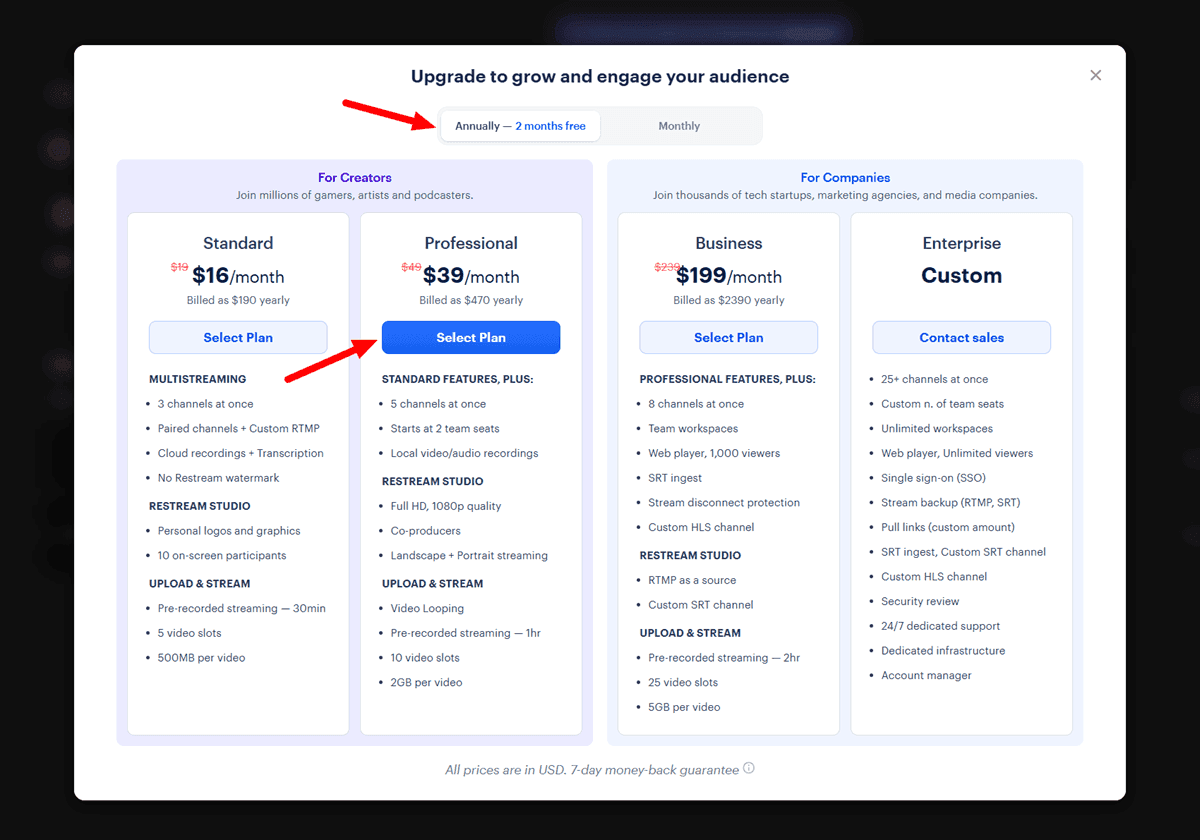
Step 3: Pick your plan and click Select Plan. On our account, Professional showed $470 for the year.
Step 4: Enter RESTREAM20 in the promo code field. The payment screen shows “Applied promo code RESTREAM20 (20% OFF)” and takes $94 off Professional, bringing it to $376.
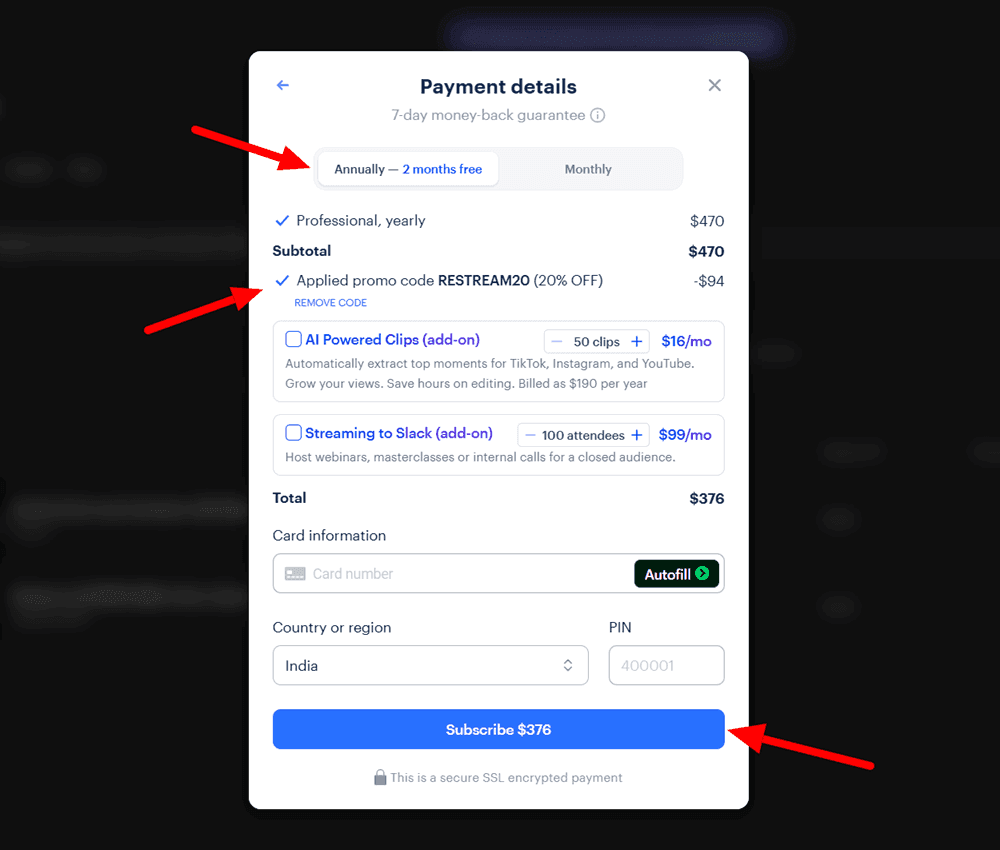
Step 5: Check the add-ons. AI Powered Clips and Streaming to Slack are optional, so leave them unticked unless you need them; with both added, our total rose from $376 to $665.
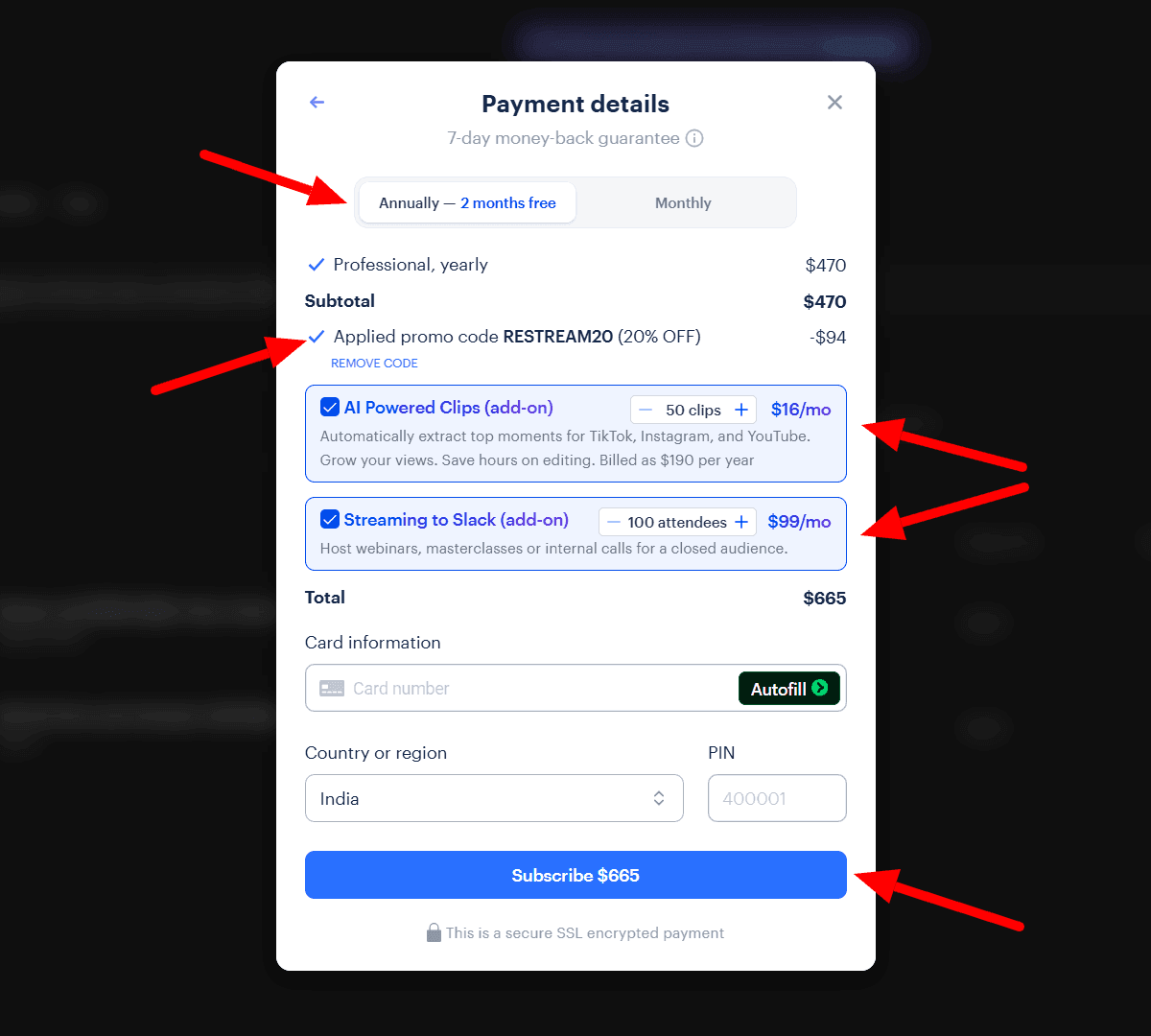
Step 6: Enter your card and click Subscribe. Your 7-day money-back guarantee starts now.
Step 7: Open Restream Studio, connect your channels, and build your first scene. You can be live on YouTube, Twitch, and LinkedIn in the same session.
How Much Does Restream Cost?
Restream has a free plan and four paid plans: Standard, Professional, Business, and Enterprise. Here’s what each costs on monthly billing, annual billing, and annual billing with RESTREAM20.
| Plan | Monthly | Annual | Annual With RESTREAM20 | Per Month With Code | You Save vs Monthly |
| Free | $0 | $0 | $0 | $0 | None |
| Standard | $19/month | $190/year | $152/year | $12.67 | $76 (33%) |
| Professional | $49/month | $470/year | $376/year | $31.33 | $212 (36%) |
| Business | $239/month | $2,390/year | $1,912/year | $159.33 | $956 (33%) |
| Enterprise | Custom | Custom | Custom | Custom | Contact sales |
Annual billing already takes off 2 months, and the code stacks on top. Professional gets the biggest cut because its annual price was already the deepest discount off monthly. Add-ons are billed separately: AI Powered Clips costs $16/month for 50 clips, billed as $190/year, and Streaming to Slack costs $99/month for 100 attendees.
Which Restream Plan Should You Buy?
Free: For Testing Multistreaming
The free plan streams to 2 channels with cross-platform chat and analytics, and Studio runs at 720p with 6 on-screen participants. Your streams carry a Restream watermark, and uploaded videos cap at 15 minutes. It’s fine for testing, but most creators outgrow it fast.
Standard: For Solo Creators
Standard streams to 3 channels, removes the watermark, and adds paired channels, custom RTMP, cloud recordings with transcription, personal logos and graphics, and 10 on-screen participants. Upload & Stream handles 30-minute videos with 5 video slots. At $152/year with the code, it suits solo streamers who don’t need 1080p.
Professional: Best Value for Most Creators
Professional adds 5 channels, Full HD 1080p in Studio, co-producers, horizontal and vertical streaming, local video and audio recordings, and 2 team seats. Upload & Stream covers 1-hour videos, 10 video slots, and video looping. At $376/year with RESTREAM20, it’s the plan we recommend for most creators and small brands.
Business: For Companies and Teams
Business adds 8 channels, team workspaces, a website player for 1,000 viewers, SRT ingest, stream disconnect protection, and a custom HLS channel. Studio can take RTMP as a source, and Upload & Stream covers 2-hour videos with 25 slots. It’s built for agencies and media teams that stream for clients.
Restream Studio 2.0 Features and Benefits
Studio 2.0 is where Restream earns its price. It solves the usual live streaming headaches, like fumbling layouts, forgetting talking points, and dead air, from a browser tab.
Scenes
Scenes let you build each part of your show in advance, with its own layout, graphics, and sources, then switch between them live. It works like clicking through presentation slides instead of rebuilding one slide on air. Your transitions look smoother, and you see what’s coming next before viewers do.
On-Screen Controls
Controls for guests, layouts, videos, images, presentations, and screen sharing sit right on the screen. You can make changes mid-stream without digging through menus. It matters most when you’re hosting solo and can’t afford a pause.
Custom Images and GIFs
Drag and drop your own images and GIFs into Studio, or paste a GIF link to import it automatically. GIFs and videos with transparent backgrounds work as scene overlays or in place of a logo. It’s an easy way to keep a long stream visually fresh.
Custom Music
Upload your own songs and sound effects in all major audio formats for background music, stingers, or call-ins. Your tracks stay saved in Studio until you remove them, and brand folders can hold different tracks for different shows. Copyright-free library music is also built in.
Show Notes
Save notes directly to each scene so your talking points sit right where you need them. Notes are internal, so your audience and guests don’t see them. They work on desktop and tablet, and they’re exclusive to Studio 2.0.
Graphics, Countdowns, and Live Sales
Add logos, overlays, countdown timers, scrolling text, QR codes, and captions to any scene. Live Sales lets viewers buy products directly from your stream. Together they make a browser stream look like a produced show.
Multistreaming and Unified Chat
Restream sends one stream to every connected platform at once, so you don’t run separate encoders for YouTube, Twitch, and LinkedIn. Chat from every platform lands in one view, and you can reply without switching tabs. Restream also works with OBS if you prefer your own encoder.
Upload & Stream, Clips, and Webinars
Upload & Stream broadcasts pre-recorded videos as if they were live, and paid plans add longer videos and looping. The AI-Powered Clips add-on cuts your best moments into short videos for TikTok, Instagram, and YouTube. Streaming to Slack runs private webinars and internal calls for up to 100 attendees.
How We Use Restream
We run our live sessions from Restream Studio 2.0 in the browser. We build scenes for the intro, main segment, and Q&A, keep our talking points in show notes, and multistream to our channels while replying to chat in one place.
Restream Pros and Cons
Pros
- One stream goes out to multiple platforms at once, without separate encoders.
- Restream Chat pulls messages from every connected platform into one view.
- Studio 2.0 adds scenes, show notes, custom music, and GIFs in the browser.
- Upload & Stream, Clips, and cross-platform analytics help you reuse each stream.
- Handy workflow controls, like ending on one platform while staying live on others.
- RESTREAM20 stacks with annual billing for up to 36% off.
Cons
- The free plan adds a watermark and limits channels and resolution.
- Studio tops out at 720p on Standard; 1080p starts on Professional.
- OBS and hardware switchers offer deeper customization, and Studio can strain weaker computers.
- Scheduling has quirks, such as a 10-minute window before going live and extra steps for external platforms.
- Add-ons like AI Clips and Slack streaming cost extra and aren’t covered by the code.
- Hard to justify for occasional streamers.
Restream Alternatives
If Restream isn’t the right fit, these three tools cover similar ground in different ways.
| Tool | Starting Price | Multistream Channels | Best For |
| Restream | $12.67/month (Standard, annual with RESTREAM20) | 3 to 8, or 25+ on Enterprise | Multistreaming with a browser studio |
| Streamlabs Ultra | $15.75/month ($189/year) | Multiple platforms, plus dual horizontal and vertical output | Gamers who stream from Streamlabs Desktop |
| StreamYard | $35.99/month (Core, billed annually) | 3 on Core, 8 on Advanced | Interview shows and webinars |
| OBS Studio | Free | 1 without plugins | Full control over your stream on your own computer |
Streamlabs Ultra
Streamlabs Ultra adds multistreaming to Streamlabs Desktop, plus dual output that sends one horizontal and one vertical stream at the same time, and disconnect protection. It also includes the full overlay and widget theme library, the App Store, Talk Studio for browser streams with guests, and premium editing tools. It costs $27/month or $189/year ($15.75/month); choose it if you stream games from your PC and want built-in overlays and alerts, and choose Restream for a browser-first studio and unified chat.
StreamYard
StreamYard is a browser studio known for easy guest joining. Core costs $35.99/month billed annually ($44.99 monthly) and streams to 3 destinations in 1080p, while Advanced at $68.99/month billed annually reaches 8. Choose StreamYard if your show is mostly interviews; choose Restream for more channels per dollar and unified chat.
OBS Studio
OBS Studio is free, open-source software that gives you full control over scenes, sources, and output quality. It doesn’t multistream to many platforms on its own, which is why many creators pair it with Restream. Choose OBS if you want maximum control and don’t mind setup work.
Frequently Asked Questions
Q: Does Restream have a Black Friday deal in 2026?
A: Yes. The Restream Black Friday deal is live: code RESTREAM20 takes an extra 20% off on top of annual billing, which already gives you 2 months free.
Q: How much does Restream cost?
A: Restream is free for 2 channels. Paid plans cost $19, $49, or $239/month, or $190, $470, or $2,390/year billed annually. With RESTREAM20, the annual prices drop to $152, $376, and $1,912.
Q: What is the Restream promo code?
A: RESTREAM20. Enter it at checkout to take 20% off your plan price. It doesn’t discount add-ons.
Q: Is there a Restream Cyber Monday deal?
A: Yes. RESTREAM20 is live for Cyber Monday too, on top of the 2 free months from annual billing.
Q: Is Restream free?
A: Yes. The free plan streams to 2 channels with Restream Studio at 720p, but it adds a Restream watermark.
Q: Does Restream have a money-back guarantee?
A: Yes. Every paid plan comes with a 7-day money-back guarantee.
Q: Which Restream plan is best?
A: Professional suits most creators: 5 channels, 1080p in Studio, co-producers, and 2 team seats for $376/year with RESTREAM20. Pick Standard if 3 channels and 720p are enough.
Q: What’s new in Restream Studio 2.0?
A: Scenes, on-screen controls, custom images and GIFs, custom music uploads, and show notes saved to each scene.
How We Verified This Deal
On 23 November 2026, we opened Restream’s upgrade screen on annual billing and recorded every plan’s price and features. We applied RESTREAM20 to the Professional annual plan and confirmed the $94 discount, the $376 total, and how add-ons change the total, then calculated the Standard and Business prices using the same 20% discount. Studio 2.0 features come from Restream’s help center, and StreamYard and Streamlabs prices come from their own pages.
Final Take
The Restream Black Friday deal is worth it if you stream to more than one platform. RESTREAM20 stacks with the 2 free months from annual billing, so Professional costs $376/year, $212 less than paying monthly. We recommend Professional for most creators for 1080p, 5 channels, and co-producers. If you stream occasionally to 3 channels or fewer, Standard at $152/year is a better fit, and the 7-day guarantee lets you try Studio 2.0 risk-free.
Want more choices? Check out all our Black Friday software deals.
Restream Black Friday Deal

Name: Restream
Description: Get an extra 20% off Restream with code RESTREAM20 on annual billing (2 months free). With the promo code, Professional costs $376/year ($31.33/month) annually, instead of $588/year ($49/month) when billed monthly. It includes a 7-day money-back guarantee. Every plan includes Restream Studio 2.0 with scenes, show notes, custom music, and unified chat. You can go live on YouTube, Twitch, LinkedIn, and more simultaneously from your browser.
Offer price: 376
Currency: USD
Operating System: Web
Application Category: Live Streaming, Webinars, AI Clipping
Author: Ankit Main
Overall
4.8-
Multistreaming
-
Live Streaming Studio
-
Stream Quality
-
Ease of Use
-
Pricing
-
Customer Support
User Review
( votes)